
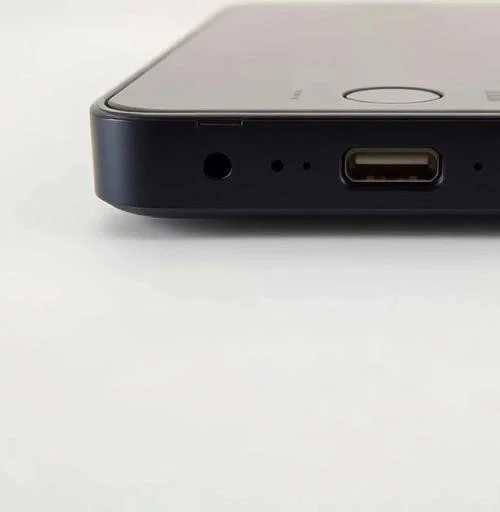
On the Redmi 4X, the main microphone is tucked into the bottom edge of the phone․ Hold the screen facing you and look along the edge with the micro-USB charging socket: the microphone is the tiny pinhole beside the socket, on its left․ The speaker grille is on the other side․ In other words, the little hole is the listener; the larger row of openings is the loudspeaker․
A tiny doorway for your voice
The microphone opening is deliberately small, so it can be easy to mistake for a screw hole or a speck of dust․ It is not a button, and it should not be pressed․ During calls, voice recordings, and voice messages, sound travels through this opening to the phone’s internal microphone․ Keeping the bottom edge clear helps your voice reach it properly․
Check before you clean
If callers say you sound distant or muffled, first remove the case․ Some cases have a cutout that is slightly misplaced, or collect lint around the opening․ Then inspect the pinhole under a bright light․ Wipe the exterior gently with a soft, dry brush or cloth․ Do not push a needle, pin, or toothpick into it: the opening leads to delicate components, and poking inside can cause damage․ Avoid liquid and high-pressure air, too․
A quick microphone test
- Open the voice recorder and make a short recording while speaking normally․
- Play it back with the phone’s volume turned up․
- Repeat without the case, then try a call or a voice message․
If the recording is clear but calls are not, the issue may be related to the call app, network, or settings rather than a blocked microphone․ Restarting the phone and checking app microphone permissions are sensible next steps․ If every recording remains quiet after the opening is clean and unobstructed, the microphone or its connection may need inspection by a repair technician․
Don’t confuse the openings
The Redmi 4X’s bottom edge puts several features close together: the charging port, microphone pinhole, and speaker openings․ Their jobs differ․ The microphone takes in sound; the speaker puts out sound․ Covering the microphone with a finger while talking can make your voice fade, even if the speaker still plays music perfectly․ When troubleshooting, keep the bottom edge uncovered and speak toward the phone’s lower end․
In one glance
Main mic: bottom edge, tiny pinhole beside the micro-USB port; with the display facing you, look to the port’s left․ Treat it like a miniature acoustic doorway—not a cleaning hole․ A clear case cutout and a gentle exterior clean are usually all it needs․
4 Comments. Оставить новый
A pinhole becomes the hero of this practical guide. The clear distinction between microphone and speaker is especially helpful—tiny openings, very different jobs.
I like how this turns a small repair mystery into a careful bit of detective work. The warning against poking inside the microphone is important, and the recording test gives readers a simple way to check their theory.
The “tiny doorway for your voice” image makes the explanation memorable without losing its practical focus. A bright light, a gentle brush, and no improvised surgery: a sensible little toolkit.
Useful, calm, and pleasantly specific. The article doesn’t leap straight to a hardware fault; it first considers the case, lint, permissions, and network—exactly the sort of troubleshooting order that saves needless worry.