
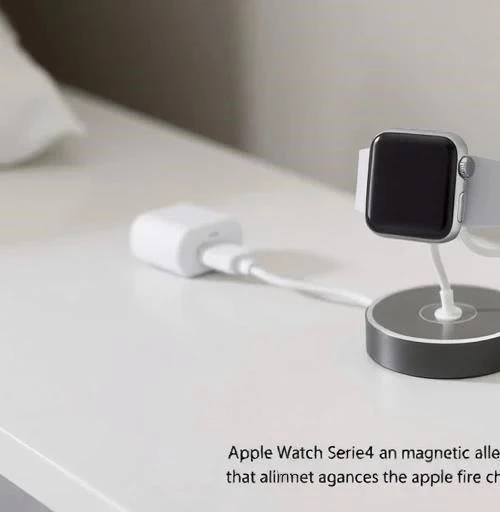
Charging an Apple Watch Series 4 is straightforward, but using the right equipment and keeping the watch and charger clean helps ensure a reliable connection. The watch charges through a magnetic cable or charging dock; it does not charge on an ordinary Qi phone pad. Follow these steps whenever its battery is low.
What you need
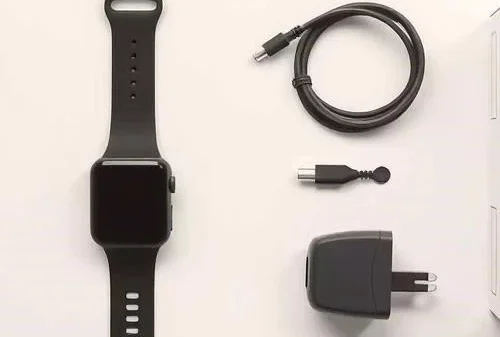
- An Apple Watch magnetic charging cable or a compatible, certified charging dock.
- A suitable USB power adapter and a working wall outlet. The adapter may not be included with a replacement cable.
Use undamaged accessories from Apple or a reputable compatible manufacturer. Avoid loose, frayed, unusually hot, or unverified chargers: a poor connection can interrupt charging or create a safety risk.
Step-by-step instructions
- Remove the watch from your wrist. If it has been in water, dry it thoroughly first. Do not connect a wet watch to power.
- Connect the charging cable to its USB power adapter, then plug the adapter into an outlet. You can also connect a compatible cable to a powered USB port.
- Place the round magnetic charger against the back of the watch. The magnets should pull it into position; do not force or twist the watch to make it fit.
- Check the display for the charging symbol. A green lightning bolt indicates that the watch is charging. If the battery is critically low, a red bolt may appear first; leave the watch connected for a while and check again.
Set the watch and cable on a stable, ventilated surface. Make sure the back of the watch sits flat against the charger, with no case, dirt, or debris preventing contact. A case that interferes with the magnetic connection should be removed.
How long does charging take?
Apple’s estimate for Series 4 is about 1.5 hours to reach 80% and about 2.5 hours to reach 100%, although actual times vary with the adapter, cable, battery condition, temperature, and use during charging. A watch that has been fully drained may need several minutes before its screen responds. Charging overnight is generally convenient; Nightstand mode can show the time while the watch rests on its side.
If it will not charge
- Reposition the magnetic puck and confirm that the cable and adapter are firmly connected.
- Try another outlet or compatible power adapter. Inspect the cable for damage and stop using it if it is frayed or excessively hot.
- Wipe the charger and watch back with a soft, dry, lint-free cloth. Do not use liquids or insert objects into openings.
- If the screen remains blank, leave the watch on the charger for 30 minutes. If it still shows no charging symbol, restart it if possible and contact Apple Support or a qualified service provider.
Protect the battery
Keep the watch and charger away from extreme heat and direct sunlight while charging. Some warmth is normal, but disconnect the charger if the watch becomes unusually hot. Avoid charging a damaged device. For routine care, keep watchOS updated and check Settings > Battery > Battery Health for battery condition and available optimized-charging options. These features can change charging behavior, so a pause near a chosen level is not necessarily a fault.
In short: dry the watch, connect a sound magnetic charger, confirm the lightning bolt, and allow time for the battery to recover. If careful repositioning and a known-good power source do not help, seek service rather than forcing the connection.

5 Comments. Оставить новый
I appreciate the distinction between an Apple Watch magnetic charger and an ordinary Qi phone pad. That detail prevents a common misunderstanding, while the advice to check the cable and adapter gives readers sensible first steps if charging does not begin.
The advice is concise and reassuring, particularly for a watch that has drained completely and may take a while to respond. The text appears to end mid-word, though, so checking that the final section is complete would improve the article.
The charging-time estimates are useful because they set realistic expectations, and the article appropriately notes that actual results vary. The safety guidance about damaged or unverified accessories is also relevant rather than merely focusing on speed.
The instructions are clear and practical, especially the reminder to dry the watch before charging it. Explaining what the charging symbols mean should also help readers avoid mistaking a critically low battery for a faulty charger.
This is an easy-to-follow guide, with a logical sequence from preparing the watch to checking for the charging indicator. Mentioning cases, dirt, and debris is helpful because small obstructions can interfere with the magnetic connection.