Your Xiaomi earbuds are tiny sound studios with one important opening act: Bluetooth pairing. Once the phone and earbuds have met‚ music‚ calls‚ podcasts‚ and navigation can travel without a cable in sight. The first connection is usually quick‚ but the exact steps can vary slightly between Xiaomi‚ Redmi‚ and other models. This guide walks you through the usual setup‚ then helps if the two devices refuse to shake hands.
Before you begin: prepare the little sound crew
- Charge the earbuds and case. Put both earbuds in the case and make sure they sit correctly on the charging contacts. If the case or buds are completely empty‚ pairing indicators may not appear. Give them a short charge before troubleshooting.
- Bring the phone nearby. Keep it within about a metre of the case‚ and move away from other devices you are trying to pair at the same time.
- Check Bluetooth on your phone. Make sure Bluetooth is switched on. You usually do not need Wi-Fi or mobile data to pair earbuds.
- Pause old connections. If the earbuds have previously connected to a tablet‚ laptop‚ or another phone‚ disconnect them there or switch Bluetooth off on that device temporarily. Earbuds may reconnect to their last partner instead of appearing to your new phone.
The usual pairing method
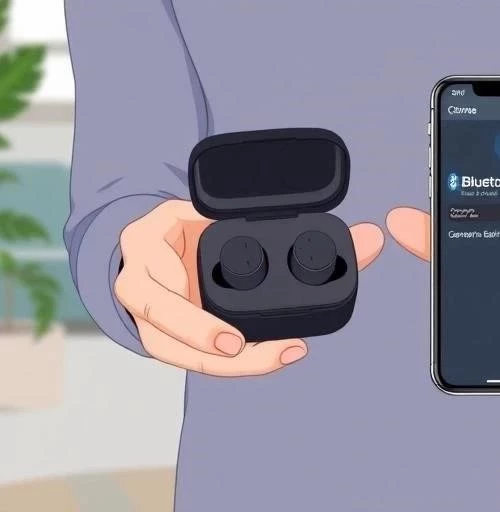
For many Xiaomi and Redmi models‚ the charging case is the launchpad. Leave the earbuds inside‚ open the lid‚ and look for a blinking indicator. Some models enter pairing automatically the first time they are opened. Others have a pairing button on the case: press and hold it until the light flashes. The indicator’s colour and rhythm differ by model‚ so treat the quick-start sheet for your exact earbuds as the final authority.
- On an Android phone‚ open Settings‚ then Bluetooth or Connected devices. Choose Pair new device if that option appears. The labels may differ between Xiaomi‚ Samsung‚ Google‚ and other Android phones.
- On an iPhone‚ open Settings and tap Bluetooth. Turn Bluetooth on and stay on that screen while the phone searches.
- Wait for the list of available devices. Tap the entry that matches the name printed on the box‚ case‚ or manual. It may say “Xiaomi‚” “Redmi Buds‚” or a model-specific name.
- If a confirmation or pairing request appears‚ approve it. When the name moves to the connected list‚ play a short audio clip to check that sound is coming through the earbuds.
That is the essential route: open the case‚ make the buds discoverable‚ choose their name on the phone. On some Android phones‚ a nearby-device pop-up may offer a one-tap setup. If it appears‚ follow the on-screen instructions; if it does not‚ the regular Bluetooth menu works just fine.
First connection versus everyday reconnection
Pairing is the introduction; reconnecting is the familiar wave across a room. After the first successful setup‚ the earbuds will usually reconnect to the phone when you take them out of the case‚ provided Bluetooth is on and the buds are not busy connected to another device. If they do not reconnect automatically‚ open Bluetooth settings and tap their name.
To use a different phone‚ put the earbuds into pairing mode again and select them on the new phone. Some models can remember several devices‚ while others may switch between them or connect to only one at a time. If the old phone keeps claiming the connection‚ disconnect or “forget” the earbuds on that phone‚ then pair them with the new one.
Optional: install an app for extra controls
Basic listening and calls normally work through the phone’s Bluetooth settings‚ without a special app. Depending on the model and region‚ Xiaomi Earbuds or Xiaomi’s system settings may offer extras such as battery information‚ touch-control adjustments‚ firmware updates‚ or noise-control options. Check the model’s documentation and use an official app source. App features are not identical across every Xiaomi or Redmi product‚ and some earbuds offer fewer options on iPhone than on Android;
Keep Bluetooth permissions and notification prompts practical rather than automatic: approve only what you need. An app can be useful‚ but it is not a magic prerequisite for ordinary pairing.
When the earbuds do not appear
A missing name in the Bluetooth list is usually a clue‚ not a catastrophe. Try these checks in order:
- Confirm pairing mode. The earbuds must be discoverable‚ not merely powered on. Reopen the case and use the model’s pairing-button or touch-control procedure. Watch for the indicator to flash.
- Check the old partner. A previously paired phone may have connected first. Turn Bluetooth off on that device for a moment‚ then search again on the phone you want to use.
- Refresh the search. Turn Bluetooth off and on‚ leave the settings screen‚ return to it‚ and wait. Restarting the phone can also clear a temporary Bluetooth hiccup.
- Charge and reseat the buds. Make sure both earbuds are seated in the case and that charging contacts are not blocked by dust or protective film;
- Move closer and reduce clutter. Keep the case beside the phone. Temporarily pause nearby Bluetooth accessories if the list is crowded or pairing keeps failing.
Paired‚ but silent? Try this sound check
First‚ raise the phone’s media volume while audio is playing; call volume and media volume may be controlled separately; Then open the phone’s Bluetooth device details and confirm that audio output is enabled‚ if that option is shown. Check the app’s selected output too. Disconnect and reconnect the earbuds‚ then test another audio app. If only one earbud plays‚ return both buds to the case‚ check their seating and charge‚ and reconnect them as a pair.
Remove a stubborn pairing and start fresh
If the phone says “connected” but the earbuds will not behave‚ remove the saved connection. On Android‚ open the earbuds’ Bluetooth details and choose Forget or Unpair. On iPhone‚ tap the information button beside the device name and choose Forget This Device. Put the earbuds back into pairing mode and pair them again.
A factory reset is the next step only if ordinary reconnecting fails. Reset procedures vary by model: they may involve holding a case button or touching the earbuds for a set time. Follow the instructions for your exact model rather than guessing; a reset can erase remembered devices and custom settings. After the reset‚ repeat the pairing steps from the beginning.
A final note for clear‚ dependable sound
Keep the phone and earbuds within range‚ avoid covering the phone with a thick barrier‚ and keep the charging contacts clean and dry. If the connection drops repeatedly‚ test the earbuds near the phone and disconnect other paired devices to identify the source. For model-specific light patterns‚ controls‚ and reset instructions‚ check the guide that came with your Xiaomi or Redmi earbuds.
Once the Bluetooth list says Connected and your test track plays in both ears‚ you are ready. Close the case‚ pocket the phone‚ and let the soundtrack follow you.