
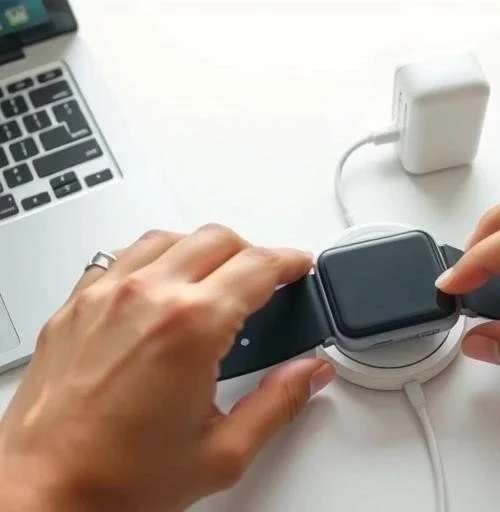
Charging a Xiaomi smartwatch is usually straightforward, but the exact method depends on the model. Xiaomi Watch and Redmi Watch devices, as well as Xiaomi Smart Bands, may use different cables, docks, or connector arrangements. Before connecting anything, check the instructions supplied with the watch or look up the guide for its exact model. Do not assume that a charger made for one Xiaomi wearable will fit another.
Identify the correct charger
Most Xiaomi wearables charge through a dedicated magnetic cable or a model-specific charging dock. One end attaches to the watch or band, while the other connects to a compatible USB power source. Some chargers use exposed contact pins; others have a shaped cradle that holds the device in place. Use the cable or dock intended for the exact model whenever possible. A connector that appears to fit may still make poor contact or fail to charge correctly.
If the original charger is missing, choose a replacement explicitly listed as compatible with the precise model name and version. Check that its contacts match the device and that the seller identifies the intended watch. Avoid forcing a connector, using an improvised cable, or placing loose metal objects across the charging contacts; These actions can damage the watch, charger, or battery.
Prepare the watch and charging area
- Remove the watch from your wrist. Place it on a stable, dry surface away from water, direct sunlight, and strong heat.
- Inspect the charging contacts on both the watch and cable. If they are dusty or marked, wipe them gently with a clean, soft, dry cloth. Do not scrape the contacts or apply household cleaners.
- Make sure the watch and charger are completely dry. Water resistance is not permission to charge a wet device: moisture around electrical contacts can cause charging problems or corrosion.
- Position the watch according to the shape of its charger. For a magnetic cable, let the magnets align the contacts; do not pull the cable into place if it resists. For a dock, seat the watch fully without pressing hard.
- Connect the USB end to a suitable power source, then check the watch display for a charging symbol, battery animation, or other charging indication.
Choose a suitable power source
A computer USB port or a reputable USB wall adapter can generally power a compatible charging cable. Follow the model’s user guide and any rating printed on the charger. The watch’s charging electronics regulate the power it accepts, but that is not a reason to use damaged, counterfeit, or poorly regulated equipment. Prefer a certified adapter from a reliable manufacturer, and do not connect bare charging contacts directly to a power supply.
Some Xiaomi models may charge slowly from a low-power port, and the time required varies with the battery capacity, remaining charge, temperature, and power source. A phone’s fast-charging adapter is not automatically unsafe simply because it has a high maximum rating, but compatibility and quality matter; When uncertain, use the supplied adapter or a standard, reputable USB source that meets the manual’s requirements. Do not use an adapter or cable that becomes unusually hot, smells burnt, or shows visible damage.
While the watch is charging
Keep the watch on a firm surface with space around it. Avoid covering it with fabric or leaving it on a hot dashboard, near a heater, or in direct sunlight. Charging in very hot or cold conditions may be restricted by the device and can affect battery performance. If the watch or charger feels unusually hot, disconnect the power source if it is safe to do so, let the equipment cool, and inspect it before trying again.
You can usually leave the watch connected until it reaches the desired charge level. Many models display the battery percentage or a charging animation; some may take a short time to show an indication after connection. There is generally no need to charge a new watch for a fixed number of hours, or to fully discharge the battery before charging. Lithium-ion batteries do not require a “first charge” ritual. For everyday use, recharge when convenient and follow any battery-care advice in the model’s manual.
Whether to wear or use the watch while it charges depends on its design and the manufacturer’s guidance. A watch attached to a short magnetic cable is easier to knock off a desk, so leaving it undisturbed is practical. Avoid using the device in ways that bend the cable, pull on the connector, or expose the charging setup to liquid.
If the watch does not charge
- Check alignment. Detach the cable or remove the watch from the dock, then reconnect it carefully. Magnetic connectors can look attached while the contacts are slightly out of position.
- Clean and dry the contacts. Disconnect the charger first. Wipe both contact surfaces with a soft, dry cloth and wait until everything is fully dry before reconnecting.
- Check the power source. Try another reliable USB port or compatible adapter. If possible, test the cable with a suitable power source, but do not substitute a charger that is not designed for the watch.
- Allow for a low battery. If the battery is completely depleted, leave the watch connected for several minutes before deciding that it has failed. Do not repeatedly plug and unplug it every few seconds;
- Restart the watch if appropriate. If it has power but the display does not show charging, use the restart procedure in the model’s manual. Button combinations vary, so avoid guessing at a factory reset.
- Look for damage or heat. Stop using a frayed cable, cracked dock, damaged contacts, swelling, unusual odor, or repeated overheating. Do not open the watch or attempt to replace its internal battery yourself.
If these checks do not help, consult Xiaomi support or an authorized service provider. Include the exact model, the charger being used, and what appears on the screen. This helps distinguish a cable or power-source issue from a fault in the watch or its battery.
Practical battery-care habits
Use the correct charger, keep contacts clean and dry, and avoid unnecessary exposure to extreme temperatures. Disconnect the cable by holding its connector rather than pulling the wire. When storing the watch for an extended period, follow the manufacturer’s storage recommendations and check the battery periodically. Battery capacity naturally changes with age and use; a gradual reduction in time between charges is different from sudden failure, swelling, or excessive heat, which calls for service.
In brief: identify the exact Xiaomi model, use its compatible charging cable or dock, align clean and dry contacts, and connect it to a reliable USB power source. Confirm that the watch indicates charging, keep it away from heat and moisture, and stop if the device or accessories show signs of damage.
1 Comment. Оставить новый
The article clearly explains why using the charger designed for the exact Xiaomi model matters. Its practical advice about keeping the device and contacts dry is useful, though the final charging instructions appear to be cut off.