
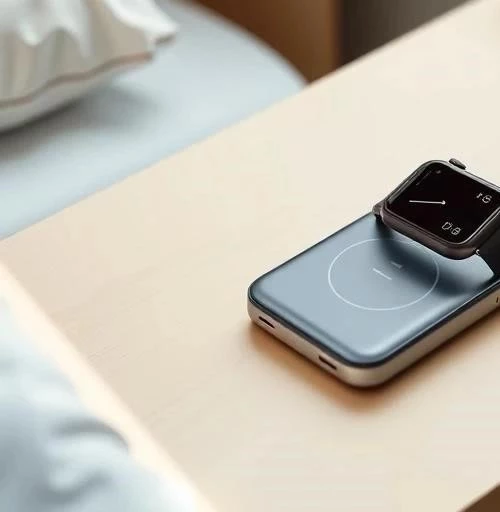
The short answer: an Apple Watch cannot be charged by placing it on an ordinary wireless phone charger. It needs a compatible magnetic Apple Watch charging puck or a charger specifically designed for Apple Watch. You can‚ however‚ avoid carrying a separate charging cable by using a cable-free charging stand‚ a power bank with a built-in Watch charger‚ or a puck plugged directly into a USB power source.
Why an ordinary wireless charger usually will not work
Apple Watch charging is wireless at the point where the watch meets its charger‚ but that does not mean every wireless charging pad will work. The watch uses a dedicated magnetic charging system. Standard Qi pads made for phones generally do not provide the right charging arrangement‚ so the watch may not charge even if it sits neatly on the pad. A magnet sticking to the back is not proof of compatibility.
This distinction matters because improvised methods can waste time or risk damaging a device. Do not try to charge the watch on an ordinary phone pad‚ with exposed wires‚ or by connecting it to a phone’s back. iPhones do not provide a supported way to reverse-charge an Apple Watch. The dependable solution is always a compatible Watch charger.
Practical ways to charge without carrying a cable
Use a cable-free charging stand
A charging stand or dock designed for Apple Watch can keep the charging puck and its power connection set up in one place. Some models include a built-in plug; others use a removable puck or a USB connector. Check the product details carefully: “wireless charger” alone does not guarantee Apple Watch compatibility. Look for explicit support for your Watch model and a clear description of how the stand receives power.
Choose a power bank with a built-in Watch charger
Some portable power banks include a small magnetic charging surface for Apple Watch. This is useful when travelling because it can reduce the number of separate accessories you carry. Before buying‚ confirm that the power bank is intended for Apple Watch‚ has enough capacity for your trip‚ and can charge the Watch while the bank itself is unplugged. A model that merely has a USB port still needs a compatible Watch charging puck.
Use a compact charging puck with a USB power source
If “without a cable” means without a long‚ dedicated charging lead‚ a compact USB-C Apple Watch charging puck may be the simplest option. Plug it into a suitable wall adapter‚ power bank‚ or powered USB port‚ then place the watch on the magnetic end. The puck still needs a power source‚ but you can avoid packing a separate long cable. Check the connector type and adapter requirements before you leave.
Borrow a compatible charger
If you are away from home‚ borrowing an Apple Watch charger is generally safer and more reliable than experimenting with a phone charger. Ask whether it is designed for Apple Watch and inspect the cable and connector for damage. Place the watch on the puck until the magnets align and the charging symbol appears.
How to charge it correctly
- Connect the compatible charger or charging stand to a working power source‚ unless it has its own charged battery.
- Hold the back of the watch near the magnetic charging surface. The magnets should pull it into position.
- Look for the charging symbol on the display. If it does not appear‚ reposition the watch and check the power connection.
- Keep the watch and charger dry‚ clean‚ and on a stable surface. If the watch is hot‚ let it cool before charging.
What to do if it will not charge
First‚ confirm that the accessory specifically supports Apple Watch. Remove any protective case that prevents the watch from sitting flat‚ then clean and dry the back of the watch and the charging surface. Try another power adapter or outlet; If the battery is completely depleted‚ allow several minutes for the charging screen to appear. Restart the watch if it still fails to respond‚ and consult Apple Support if a known-compatible charger does not work.
Common myths and unsafe shortcuts
- “Any Qi pad will work.” Usually it will not; use a charger made for Apple Watch.
- “An iPhone can charge the Watch from its back.” This is not a supported charging method.
- “A magnet or metal plate can replace the puck.” It cannot provide a safe‚ reliable charging connection.
- “A hidden port or DIY adapter is an easy fix.” Older or unusual accessories are not a dependable substitute for an approved charger‚ and modifications can damage the watch or void service coverage.
Bottom line
You can avoid carrying a conventional charging cable‚ but you cannot safely skip the Apple Watch charging hardware. Choose a compatible cable-free stand‚ a power bank with an integrated Watch charger‚ or a compact charging puck connected to USB power. Verify compatibility before purchasing‚ and rely on the charging symbol—not appearance alone—to confirm that power is reaching the watch.

5 Comments. Оставить новый
The safety guidance is sensible and well explained. In particular, clarifying that an iPhone does not provide a supported way to reverse-charge an Apple Watch helps prevent readers from relying on an improvised solution.
I appreciate the practical alternatives for people who want to travel with fewer cables. The advice to verify how a stand or power bank receives power adds useful detail and helps readers avoid buying an accessory that does not meet their needs.
The article balances a direct answer with practical options, making it useful both for everyday charging and travel. I would also check that any portable charger supports the specific Watch model, but the advice already points readers toward careful compatibility checks.
This is a helpful overview because it distinguishes magnetic attachment from actual charging compatibility. That point is easy to overlook, and the article gives readers a straightforward rule: use a charger specifically designed for Apple Watch.
The article clearly explains why an ordinary Qi phone charger is not a reliable way to charge an Apple Watch. Its emphasis on checking for explicit compatibility is especially useful, since product descriptions can use “wireless” without meaning they support Apple Watch charging.