
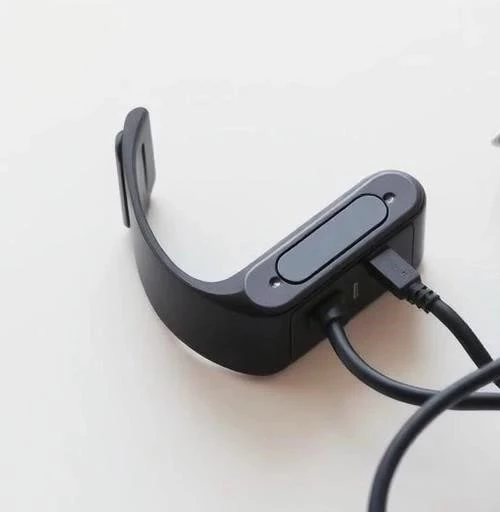
The HUAWEI Band 7 charges through a small magnetic charging cable that connects to the two metal contacts on the back of the band. It does not charge wirelessly on a Qi pad, and it does not have a USB socket built into the tracker. For reliable charging, use the cable supplied with the device or a compatible replacement made specifically for the HUAWEI Band 7.
What you need
- Your HUAWEI Band 7.
- The Band 7 magnetic charging cable.
- A suitable USB power source, such as a computer USB port or a reputable USB wall adapter.
The cable’s magnetic end attaches to the charging contacts on the rear of the tracker. Its USB plug connects to the power source. A standard USB adapter is convenient, but choose a sound, undamaged one and follow the voltage and charging guidance in the product documentation. Do not use a cable that is visibly worn, frayed, or intended for a different device if its connector does not fit correctly.
Step-by-step charging instructions
- Remove the band from your wrist. Charging while wearing it is inconvenient and may prevent the magnetic connector from sitting flat.
- Check the tracker and cable. Look at the two metal contacts on the back of the Band 7 and the matching pins on the charging head. They should be clean and dry, with no lint, dust, lotion, or moisture.
- Connect the USB plug to power. Insert it into a computer USB port or a suitable USB power adapter. If possible, start with a known-good power source and cable.
- Attach the magnetic end. Bring the charger close to the back of the band. The magnets should pull it into place, with the charging pins aligned to the two contacts. Check that the head sits securely and is not tilted or held on by only one pin.
- Confirm that charging has started. The screen should wake or show a charging symbol or battery level. If there is no indication, detach the cable, check the alignment and contacts, and attach it again.
- Leave it connected until you have enough charge. Charging time varies with the remaining battery level, the power source, temperature, and the condition of the cable. Check the displayed battery level rather than relying on a fixed time.
How to tell when it is charging
When the connection is correct and the power source is working, the Band 7 normally displays a battery or charging indicator. The screen may take a moment to respond if the battery is very low. If it stays blank, do not assume that the band is charging: check that the USB plug is fully inserted, the magnetic head is aligned, and the power source is switched on. Try a different USB port or adapter if necessary.
You can check the battery percentage on the band’s screen. Depending on the software version and settings, battery information may also be available through the HUAWEI Health app after the band reconnects to your phone. The app is useful for monitoring battery level, but the band itself must still be connected to its charging cable to recharge.
Important safety and care tips
- Keep the contacts dry. The Band 7 is designed for water resistance in normal use, but charging contacts and the cable should be dry before you connect them. After swimming, washing, or exercising, dry the device carefully first.
- Use gentle pressure. The magnetic head should attach naturally. Do not force it, scrape the pins, or bend the cable to make it fit.
- Charge in a cool, dry place. Avoid direct sunlight, heaters, very hot surfaces, and extreme cold. If the band or charger becomes unusually hot, disconnect it and let it cool before checking the setup;
- Keep metal objects away from the connector. Small metal pieces can interfere with the magnetic connection or bridge the contacts.
- Disconnect by holding the connector, not pulling the wire. This helps prevent damage where the cable meets the magnetic head or USB plug.
- Do not dismantle the cable or improvise a connection. Never strip wires, touch loose conductors to the charging contacts, or use a homemade charger. Incorrect polarity or voltage can damage the tracker, cause overheating, or create a safety risk.
What if the HUAWEI Band 7 will not charge?
Work through these checks in order:
- Reseat the magnetic connector. Lift it off and place it back so both pins line up with the contacts. A connector that looks attached may still be slightly offset.
- Clean and dry the contact area. Wipe it gently with a soft, dry, lint-free cloth. Do not use sharp tools, abrasive materials, or liquid cleaners on the contacts. If the band has been wet, allow it to dry completely before trying again.
- Test another power source. Try a different USB port or a reliable adapter. If you use a computer, check that the port is active; some ports may provide no power when the computer is asleep.
- Inspect the cable. Look for damaged insulation, bent pins, loose parts, or a cable that only works when held at an angle. Stop using a damaged charger and replace it with a compatible one.
- Allow time for a deeply discharged battery. If the screen is completely blank, leave the correctly connected band on a working charger for a short period, then check again. Avoid repeatedly disconnecting it every few seconds.
- Restart the band if it has power but the display seems stuck. Use the on-screen power or restart controls when available. If it still will not charge, consult HUAWEI support or an authorized service provider rather than opening the device.
Can you charge it without the original cable?
You can use a replacement only if it is specifically compatible with the HUAWEI Band 7 and correctly matches its magnetic contact arrangement. Many fitness bands look similar but use different pin spacing or connector designs. Check the product description and compatibility list before buying. A generic wireless charging pad, phone charging coil, or USB-C cable alone cannot charge the Band 7. Do not try to transfer power from a phone by placing the tracker against its back; the band is not designed to charge that way.
If you have misplaced the original cable, a compatible replacement is safer than a DIY workaround. Make sure the replacement attaches neatly and charges consistently; stop using it if it becomes hot, disconnects repeatedly, or shows signs of damage.
Quick summary
Connect the Band 7’s magnetic cable to a suitable USB power source, align the magnetic head with the two contacts on the back, and confirm that the charging indicator appears. Keep the contacts clean and dry, use an undamaged compatible cable, and never force, modify, or improvise the connection. If normal checks do not solve the problem, contact HUAWEI support or a qualified service center.
4 Comments. Оставить новый
A useful guide for new Band 7 owners. The safety tips about clean contacts and using an undamaged cable are particularly valuable.
Clear and practical instructions, especially the reminder to check that the magnetic connector is aligned properly.
The troubleshooting advice is helpful and easy to follow. It’s good to know the band does not charge on a Qi pad.
Well organized and straightforward. Including the signs that charging has started makes the process less confusing.