
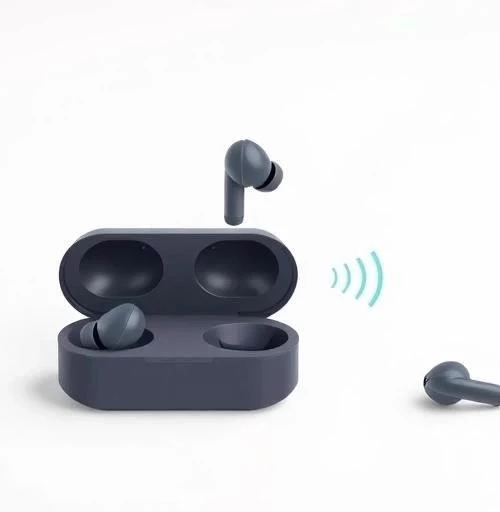
When two Xiaomi earbuds stop acting like a team, it can feel as if the left one has moved to another planet. One may connect to your phone while its partner stays silent, or your Bluetooth menu may show two identical device names. The usual fix is to make the earbuds forget their old connection and perform a fresh internal pairing. The exact reset gesture varies by model, but this careful routine works for many Xiaomi and Redmi true-wireless sets.
First, know which connection you are fixing
Your earbuds have two little conversations: one between the left and right buds, and another between the set and your phone. If only one bud plays, the first conversation may have broken. If both work separately but the phone cannot find them, the phone connection is the likely problem. A reset can clear both, so be ready to pair the set with your phone again afterward.
The reunion routine
- Give them a clean start. Charge the case and both earbuds for a while. Check that each bud sits correctly in its charging slot and that the case or earbud indicator responds. Wipe the metal charging contacts gently with a dry, soft cloth. A bud that never charged may not be able to join its partner.
- Remove old phone pairings. On your phone, open Bluetooth settings, select the Xiaomi or Redmi earbuds, and choose Forget, Unpair, or the equivalent. If two entries appear, remove both. Then turn Bluetooth off temporarily. This stops the phone from grabbing one earbud halfway through its reunion.
- Put both buds in the case. Make sure they are seated and the lid is open or closed as your model’s instructions require. Wait about ten seconds. This gives them a moment to reset their tiny internal conversation before you try anything more dramatic.
- Reset the pair using the model’s method. Many Xiaomi/Redmi models use a case button held for roughly 10–15 seconds, often until an indicator flashes. Other models use touch areas or physical buttons on both earbuds, held together for several seconds. Follow the manual or model-specific support instructions: the gesture and light pattern are not universal. Do not keep pressing randomly; some controls may trigger a different function.
- Let them find one another. Leave both buds in the case for a few seconds, then remove them together, or follow the manual’s stated pairing sequence. Wait for the indicators to settle. Depending on the model, one light may stop flashing, or a voice prompt may announce pairing. The buds should now behave as one set.
- Reconnect to the phone. Turn Bluetooth back on, open the available-device list, and tap the single Xiaomi/Redmi entry. If the list briefly shows separate entries, wait before tapping; do not pair each bud individually unless the model’s guide specifically says to.
If one earbud is still silent
Repeat the process once, slowly, and verify that both earbuds actually charge. A stubborn contact, very low battery, or a bud left outside the case can make a reset appear successful when it was not. Keep the phone’s Bluetooth turned off until both buds have completed their internal pairing, then enable it and connect to the set.
Also check that no nearby phone, tablet, or laptop is automatically reconnecting to one bud. Temporarily switch Bluetooth off on those devices. If you use Xiaomi Earbuds or another companion app, open it after the basic pairing is restored and check for model-specific prompts or firmware updates. An update is not a substitute for charging or resetting, but it may help with persistent connection faults.
When the steps do not match your earbuds
Xiaomi sells many generations and regional versions, and their buttons, touch controls, reset timing, and indicator lights differ. Look up the exact model name printed on the case, packaging, or Bluetooth listing, then use that model’s official manual. A case button is not present on every set, and a long press is not the right reset method for every pair. Avoid poking contacts or using liquids; delicate charging pins are not reset switches.
A quick reality check
- Only one bud plays: charge both, forget old Bluetooth entries, and reset the earbuds together.
- Two device names appear: remove saved entries and pair through the single combined listing after the buds sync.
- No lights or response: charge the case and buds, reseat them, and inspect the contacts.
- The problem returns: confirm the exact model’s instructions; persistent failure may need Xiaomi support or service.
The key is order: charge, forget, reset, reunite, then reconnect. Think of it as clearing the dance floor before the music starts. Once the earbuds recognize each other again, your phone should see one dependable pair—not two tiny soloists competing for the Bluetooth spotlight.


6 Comments. Оставить новый
A refreshingly calm troubleshooting guide: remove the old pairing, give the earbuds a moment, then try again. It reads like a tiny peace treaty for your tech.
The “another planet” image is charming, but the advice stays grounded. A useful reminder that sometimes the real culprit is simply a bud that never charged.
I like how this turns a mysterious Bluetooth breakup into two separate conversations to diagnose. That small distinction could save a lot of frustrated button-pressing.
The model-specific caution is important here. Earbuds may look like twins, but their reset rituals can be surprisingly different.
Clear, patient, and pleasantly human. This makes troubleshooting feel less like arguing with a phone menu and more like helping two tiny companions find each other again.
I appreciated the practical details about charging contacts and Bluetooth entries. Those are the unglamorous little clues that often solve the whole puzzle.