
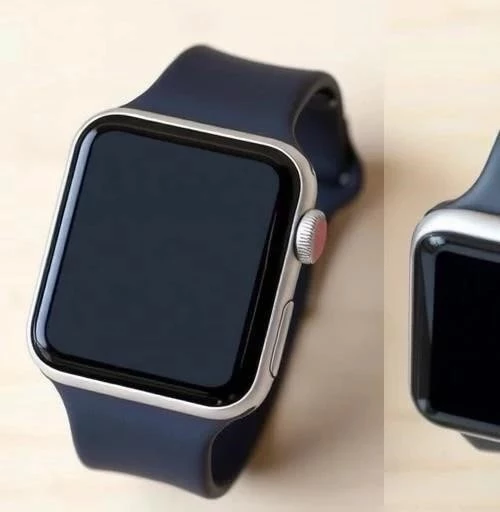
Buying a used Apple Watch Series 4 can feel like meeting a tiny time-travelling detective: it is an older model‚ still convincing at a glance‚ and often sold without the clues that once came in its box. A convincing counterfeit may copy the shape and even imitate the watch face. The safest test is not one dramatic giveaway‚ but a trail of small checks—hardware‚ software‚ serial numbers‚ and a real connection to an iPhone.
Start with the shape‚ not the sales pitch
Series 4 came in two case sizes: 40 mm and 44 mm. Its display reaches much closer to the rounded edges than the displays on earlier Apple Watch generations. The screen should look crisp and evenly lit‚ with smooth curves at the corners; a thick black border‚ rough edge‚ or visibly uneven gap between glass and case deserves a closer look. These details are clues‚ not proof: a counterfeit can imitate the silhouette.
Turn the watch over. The back should have a neatly finished sensor assembly and small‚ precise lettering. Depending on the version‚ the rear materials include ceramic and sapphire crystal. Look for crooked printing‚ spelling mistakes‚ glue‚ rough seams‚ or sensors that look like decorative plastic. The Digital Crown on Series 4 has an electrical heart sensor built into it for ECG readings. On cellular models‚ the crown has a red ring. A red ring alone does not prove authenticity‚ and a GPS-only model should not be rejected for lacking one.
Ask the watch to introduce itself
A fake can borrow Apple’s silhouette‚ but it may struggle to behave like an Apple Watch. On the watch‚ open Settings → General → About. Check the model name‚ software version‚ serial number‚ and model number. You can also find the serial number in the Watch app on a paired iPhone. Compare those details with the markings on the case and with Apple’s official identification or coverage tools. The Series 4 model numbers include A1977 and A1978 for GPS versions‚ and A1975 and A1976 for cellular versions; regional variants exist‚ so treat this list as a cross-check‚ not a complete catalogue.
Be sensible about what a serial-number search can prove. A copied serial number may belong to a genuine watch‚ and an old device may not show the same coverage information as a new one. A matching number is a useful clue‚ not a certificate of authenticity. If the number appears on the box but not in the watch’s own settings‚ walk away.
The pairing test: the strongest clue in the room
Ask the seller to erase the watch properly and pair it with an iPhone using Apple’s Watch app. A real Apple Watch should enter Apple’s pairing process‚ communicate with the app‚ and display a swirling animation that the iPhone camera can scan. A counterfeit may show a familiar-looking screen but rely on a separate app‚ Bluetooth settings‚ or an Android-style companion program instead.
Do not complete a purchase while Activation Lock is still attached to someone else’s Apple Account. The owner should unpair the watch and remove it from their account in front of you. If setup asks for a previous owner’s password‚ the watch is not ready for a new owner; This may indicate a legitimate forgotten step rather than a fake‚ but it is still a reason not to hand over money until the seller resolves it.
Try the features that are harder to counterfeit
- Digital Crown: Turn it and press it. Menus should respond smoothly‚ with clear haptic feedback rather than a loose‚ scratchy‚ or oddly delayed reaction.
- Touchscreen: Swipe around the display and open several built-in apps. Watch for lag‚ dead areas‚ blurry icons‚ or screens that behave like a basic phone interface.
- Health sensors: Check whether the Heart Rate app opens and whether the sensor reads your pulse. ECG availability depends on region‚ software‚ and setup‚ so a missing ECG option alone does not prove the watch is fake.
- Sound and microphone: Test a call or a voice recording if possible. Tinny audio or a silent microphone is a warning about condition‚ though not necessarily authenticity.
Series 4 does not have an always-on display. If a seller claims that this feature proves it is genuine‚ they may be confusing it with a later model—or hoping you will not check. Likewise‚ a shiny box‚ charger‚ or receipt can be swapped or copied. Judge the watch itself‚ not its costume.
Buy like a careful detective
Meet somewhere with time and a reliable internet connection. Inspect the case‚ check the About screen‚ test the controls‚ and pair the watch before paying. Compare the price with similar used listings; an unbelievable bargain often comes with an unmentioned lock‚ defect‚ or counterfeit. Ask about battery health and return terms‚ too. A genuine Series 4 can still have a tired battery or damaged screen.
The short version: match the physical details‚ confirm the information inside Settings‚ verify the serial as a supporting clue‚ and insist on a successful Apple Watch app pairing with Activation Lock removed. No single trick is foolproof. Together‚ these checks turn a hopeful glance into a much safer purchase—and help ensure the little rectangle on your wrist is an Apple Watch‚ not an imitation wearing its face.
4 Comments. Оставить новый
A strong, level-headed guide that treats serial numbers as one thread in a larger investigation rather than a magic authenticity stamp. That balanced advice is exactly what a nervous marketplace shopper needs.
I like the article’s detective-work approach: no single clue gets to wear the crown as “proof.” That’s a much safer mindset for buying second-hand tech, where a polished shell can be a very convincing disguise.
The practical checks make this feel less like a spec sheet and more like a pocket-sized field guide. I’d still want buyers to test pairing and core functions in person; a watch should do more than look the part.
The reminder that a red ring is only a clue—not a verdict—is especially useful. It turns a tiny design detail into a lesson in careful buying: inspect the whole story, not just its loudest punctuation mark.