
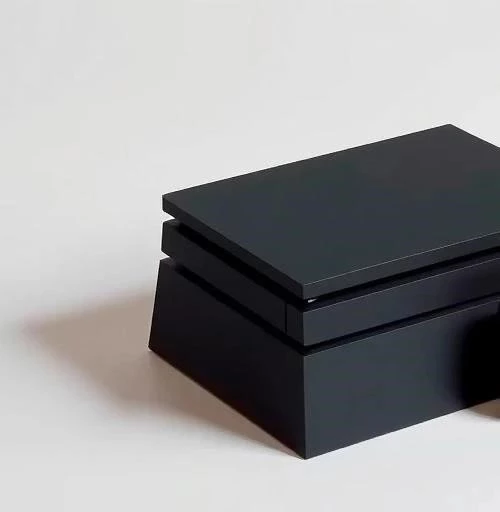
At first glance, the PlayStation 4 Pro looks less like a gadget that wants attention and more like a small, dark monument to it. It is a broad, low rectangle in black, built from three distinct horizontal layers. Set one slab on another and then add a third, and you have the console’s signature silhouette: a stack of smooth, squared-off plates, softened at the corners, with a narrow shadow-line running around each tier. It is unmistakably a PlayStation 4, yet its extra layer makes it look like the original design has put on a discreet, architectural crown.
The Pro is a home games console released as a more powerful member of the PS4 family. Its appearance is not all dramatic fins or glowing science-fiction machinery. Sony chose a restrained shape: matte surfaces, clean edges and a familiar PlayStation logo. The result is a machine that can sit beside a television without demanding to become the room’s main character. Look more closely, though, and the proportions, stepped body and carefully arranged controls give it a personality of its own.
The three-tier silhouette
The easiest way to recognize the PS4 Pro is to count its layers. The original PS4 has a split, two-part body; the Pro adds another horizontal tier, making its profile look like three flat black books stacked with deliberate precision. The layers are not separate boxes, but parts of one sculpted casing. Their edges create slim bands of shade, so even when the console is switched off, its outline has a little depth and movement.
Seen from above, the console is a broad rectangle with softened corners. From the side, the stepped layers are much more obvious: the upper and lower sections project around the middle, producing a sandwich-like profile. It is a simple visual trick, but an effective one. A single plain block might appear bulky; the repeated ledges break up its mass and make the machine seem composed, as if each layer has a job in the design.
The casing is mostly matte black on the standard version. It absorbs light rather than shining like a mirror, which helps the console blend into a media cabinet. Depending on the room and the angle, the finish can read as charcoal, ink or near-black. The logo on the top surface offers a small point of recognition, while the broad, uncluttered panels keep the overall look calm. There is no giant display, decorative grille or riot of colored lights across the front. The design speaks in quiet lines.
How big is it?
The PS4 Pro is noticeably larger than the original, slimmer PS4. Its approximate dimensions are 295 mm wide, 55 mm high and 327 mm deep, and it weighs about 3.3 kg. The exact feel depends on what it is being compared with, but it is a substantial console: wide enough to occupy a clear patch of shelf, and deep enough that it should not be squeezed into a cramped nook. Its flat, horizontal shape is the first thing a visitor may notice; its extra tier is the detail they spot after leaning in.
Those numbers describe a low, wide machine, not a tall tower. On a shelf, the Pro spreads itself out like a compact piece of black furniture. Make sure there is room around it for ventilation, and do not treat the spaces between its layers as handles or decorative slots. The stepped outline is part of the casing, not an invitation to pile objects on top. Leave air around the console, particularly if it is going to sit inside an entertainment unit during long play sessions.
The front: buttons, ports and a narrow slit
Turn the console toward you and the front panel reveals its practical side. The most visible opening is the narrow disc slot, a precise line in the dark face rather than a large, obvious tray. Two USB ports sit near the front, ready for compatible accessories and charging. Their position makes everyday connections convenient: a controller cable can reach without needing to circle around the back of the cabinet.
The power and eject controls are small and discreet. On many PS4 Pro models, they are touch-sensitive controls rather than big mechanical buttons; later revisions have physical buttons, so the exact feel varies by model. Look closely around the front edge to find them. This understated treatment suits the rest of the design, although it can take a little getting used to if you expect a large, clicky switch. A tiny status light gives the console a restrained signal when it is operating or resting. It is a hint of activity, not a glowing billboard.
Because the front is so clean, a powered-off PS4 Pro can look almost featureless from a distance. Move closer and the disc opening, USB sockets and controls emerge like details on a dark stage. That contrast is part of its appeal: the machine does not advertise every function at once. It keeps the everyday hardware tucked into a narrow band, leaving the broad faces largely uninterrupted.
The back: where the cables gather
From the rear, the console looks more utilitarian. This is where the cables connect: HDMI for a television or display, Ethernet for a wired network, power, an optical digital audio output and an auxiliary connection. There is also a USB port on the rear of the PS4 Pro, useful for compatible devices that can remain connected. The exact arrangement can vary slightly by hardware revision, but the back is generally the place to look when you are identifying sockets or planning how to route cables.
The rear panel is not meant to be the star of a living-room photograph. It is a working wall of ports, shaped to let the console connect to the rest of the entertainment setup. If you are checking whether a console is a Pro, the three-tier body is a much clearer clue than trying to identify it from its cable sockets alone. Still, the back matters in practice: leave enough space to reach the connections and avoid bending cables sharply against a wall.
What does it look like when it is standing?
The PS4 Pro is designed to rest horizontally, and that position shows off the three-layer profile best. A compatible vertical stand can hold it upright, but the stand is an accessory rather than part of the console’s basic silhouette. Upright, the Pro becomes a tall, dark column with its layered edges running across the body like lines in a piece of modern sculpture. It can save shelf width, although it needs a stable, clear place to stand.
Whether it lies down or stands up, the console is still the same broad, tiered shape. Choose a position that leaves ventilation space and keeps the machine secure. The visual effect should not come at the cost of blocking its air openings. A console hidden in a tight cabinet may look tidy, but a little breathing room is more useful than a perfectly sealed display case.
Black, white and special editions
Standard PS4 Pro models are most often seen in black, but the family has also appeared in special finishes and themed editions. A white version replaces the dark, understated look with a brighter, more conspicuous one. Limited editions may use distinctive colors, logos or artwork associated with a game or PlayStation milestone. These variations can make the console feel less like a neutral piece of entertainment equipment and more like a collectible.
Even with a different color, the defining outline remains: a wide body, three stacked sections and softened rectangular corners. A white Pro still reads as a Pro from the side. A special edition may add a graphic flourish, but it does not erase the layered architecture. If you are looking at a listing or photograph, check the model details as well as the color. The casing can be customized, while the familiar three-tier form provides the visual signature.
How it differs from other PS4 consoles
Beside the original PS4, the Pro’s extra layer is the giveaway. The earlier console has a lower, split body with two main sections; the Pro has three. The PS4 Slim, by contrast, has a more compact, rounded two-tier appearance and lacks the Pro’s taller stepped profile. Put all three in a row and their family resemblance is obvious, but the Pro looks like the largest and most deliberately layered sibling.
Photographs can make the differences harder to judge. A close-up may crop away the side edge where the extra tier is easiest to see, and lighting can make black surfaces lose their outlines. For a reliable visual check, look for a full view from a slightly low angle, or a side view showing all three bands. A picture from the front may show the ports, but the profile tells the better story.
Why the design feels the way it does
The PS4 Pro’s appearance balances presence with restraint. It is large enough to look capable, but its simple geometry avoids the aggressive styling often associated with gaming hardware. The stepped casing creates a sense of engineered layers without adding ornamental clutter. In a room full of glossy screens, speakers and cables, its matte finish can seem almost deliberately quiet.
There is also something theatrical about the shape. Each horizontal tier catches light differently, so the console changes subtly as you move around it. From above, it is a clean rectangle; from the side, it becomes a sequence of ledges; in a dim room, the layers can appear as three dark horizons. The design does not move, of course, but it gives the eye a small journey around an otherwise still object.
That visual character makes the PS4 Pro easy to describe even to someone who has never owned one: imagine a large, low black console, then imagine its casing arranged in three stacked plates with rounded corners. Add a discreet PlayStation mark, a slim disc slot and a few small front controls. That is the essential picture. Everything else—special colors, lighting, a vertical stand or the furniture around it—changes the setting, not the central form.
What to look for in a photograph
- Three horizontal tiers: the clearest sign that the console is a PS4 Pro rather than a two-layer PS4 model.
- A broad, low rectangular body: it is wider and deeper than the Slim, with a substantial shelf presence.
- Mostly matte surfaces: the standard black finish is understated and does not look highly reflective.
- A front disc slot and USB ports: these are easiest to spot in a straight-on or angled front view.
- Rounded corners and clean edges: the shape is geometric, but not sharply pointed.
Be cautious with tiny, low-resolution images. Black details can disappear into shadow, and a console photographed from above may hide the middle layer. A glossy reflection can also make a matte surface look shinier than it is. If the model matters, use several views and check the seller’s description or the console’s model number rather than relying on color alone.
A final portrait
So, how does the PlayStation 4 Pro look? Like a compact black building made of three carefully stacked terraces; like a broad, quiet object that keeps its controls and connections close to the edges; like a familiar PS4 silhouette given an extra architectural beat. It is not delicate, but it is tidy. It is not flashy, but it is far from anonymous. Its most memorable feature is also its simplest: three horizontal layers that turn a plain console into a recognizable shape.
Set it on a shelf and the Pro’s design does not shout over the television. Instead, it waits in the corner of your vision, a dark, stepped platform for digital worlds. When the screen comes alive, the console becomes part of the room’s machinery; when it is off, its clean outline remains—a small piece of modern hardware with the presence of a carefully stacked, matte-black sculpture.




6 Comments. Оставить новый
The comparison to stacked books gives the console an unexpectedly tactile quality. You can almost imagine the layers shifting into place, each slim edge adding one more line to its visual rhythm.
The stepped profile is a clever way to make a broad machine feel less like a brick. It brings to mind a tiny modernist building that happens to open a portal to game worlds.
I appreciate the attention paid to the silhouette rather than just the specifications. This description makes a black box feel like a deliberate piece of industrial design, with its own quiet geometry.
The three-tier design sounds like a stack of shadows made solid. I like that the console manages to look distinctive without dressing itself in noisy, futuristic armor.
There is something charming about a console that does not beg to be admired, yet rewards a closer look. The layered edges sound like a design detail you notice once, then keep noticing.
Calling it an architectural crown is a lovely touch. The PS4 Pro seems designed for the quiet drama of a living room: not a centerpiece, exactly, but a dark little skyline beneath the television.