
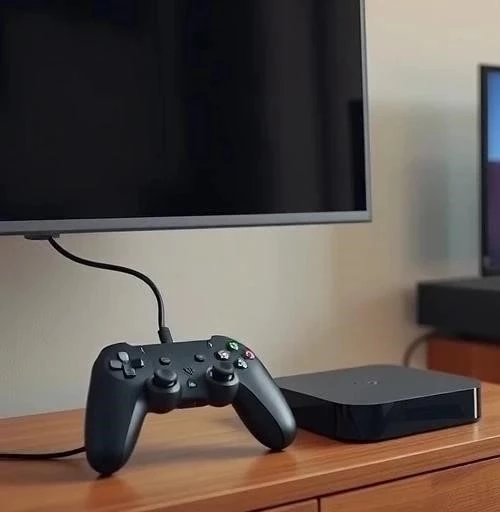
PlayStation TV, often shortened to PS TV and originally introduced in Japan as PlayStation Vita TV, is a small home console made by Sony. It connects to a television and runs selected games and apps from the PlayStation Vita, PSP and original PlayStation. It can also stream gameplay from a PlayStation 4 using Remote Play. In simple terms, it is a compact, television-connected version of some Vita features—not a PlayStation 4, and not a device that can run every Vita game.
The idea was to bring handheld PlayStation games into the living room. Instead of looking at a screen built into a portable console, you play on a TV and use a separate DualShock controller. The system is small enough to sit beside a television, but it relies on compatible games, accessories and, for some functions, a suitable network connection.
How the device works
PS TV is based on the same general hardware platform as the PlayStation Vita. It has no built-in screen, speakers or handheld controls. Connect it to a TV with an HDMI cable, provide power, and pair a compatible DualShock 3 or DualShock 4 controller. The controller is generally sold separately, so it is worth checking what is included when buying a used unit.
Games can be played from compatible Vita game cards or downloaded from the PlayStation Store, where the relevant content remains available for the account and region. The system also supports certain PSP and original PlayStation games in digital form. Compatibility depends on the particular title, the system software, the store region and, sometimes, the controller being used. Owning a game for another PlayStation device does not automatically mean it will work on PS TV.
What can you play on it?
- Selected PS Vita games: Many titles can be played on a television, using a DualShock controller in place of the handheld’s controls.
- PSP games: Supported digital PSP titles can be played, usually with the DualShock controller.
- Original PlayStation games: The system can run compatible PS One Classics available through the PlayStation Store.
- Some apps and smaller games: Certain applications and games designed for the Vita ecosystem are supported, although the selection is not universal.
- PS4 Remote Play: A PS4 can stream its picture and sound to PS TV over a home network, allowing play on another television.
This range made the device interesting to people who already owned games in Sony’s digital ecosystem. However, it should not be thought of as a miniature console with access to the complete libraries of the PS Vita, PSP, PS One and PS4. Each category has its own restrictions, and PS4 titles are streamed from a PS4 rather than run directly on the PS TV.
Why some Vita games do not work
The most important limitation is control compatibility. A regular Vita has a touchscreen, a rear touch pad, motion sensors, cameras and controls built into the handheld. PS TV has none of those physical features. A DualShock controller can replace buttons and sticks, but it cannot naturally reproduce every touch gesture, camera interaction or motion-based action.
Sony therefore restricted the system to a compatibility list rather than promising that every Vita cartridge would work. Games that depend heavily on Vita-specific controls may be unavailable or awkward to play. Tearaway, Uncharted: Golden Abyss and Gravity Rush are commonly mentioned examples of titles whose Vita features make them unsuitable for ordinary PS TV play. Compatibility can vary by game and software version, so check a reliable title list before purchasing a particular cartridge for this device.
Some games offer control options or map touch actions to buttons, but that does not remove every limitation. Even when a title starts, its controls may feel different from the handheld version. A sensible rule is to confirm that a game is officially supported and to look up how its special controls work before assuming it will be a good fit.
Playing PS4 games with Remote Play
Remote Play is one of PS TV’s most useful features for households with more than one television. The PS4 runs the game, while the video and audio are sent across the network to the PS TV. The player uses a DualShock controller connected to the receiving setup. This can let someone play in a bedroom or another room without moving the main console.
Remote Play is streaming, not a second copy of the game running on PS TV. The PS4 must be configured for the feature, and both devices need a suitable network connection. A wired Ethernet connection for the PS4, where practical, and a stable local network can improve reliability. Wi-Fi congestion, weak signal, distance, other network activity and the condition of older equipment can cause delay, reduced image quality or interruptions. Fast internet alone does not guarantee a perfect experience when the devices are communicating over a busy home network;
Remote Play is best for games that tolerate a little extra input delay. Fast competitive games may feel less responsive than when played directly on a television connected to the PS4. The console also needs to be available and configured to wake or connect as required. PS TV does not remove the need to own a PS4 or the games you want to stream.
Media and online features
PS TV was designed as part of a broader PlayStation ecosystem. Depending on the software, region and services available at the time, users could access PlayStation Store content and selected video or entertainment apps. Services such as Hulu or Niconico were associated with the platform in particular markets, but app availability was not the same everywhere and can change as providers discontinue support.
Because this is an older product, buyers should not assume that every online feature still works today; Store access, downloads, account sign-in and individual streaming applications may be affected by current service policies, regional availability or the age of the software. Check Sony’s current support information and the status of the specific service you need rather than relying on old reviews or advertisements.
Memory cards and game cards
The system uses Vita-style game cards and memory-card support, which is one reason it resembles a Vita without a screen. A physical Vita game card can be inserted, provided the title is compatible. Digital games and saved data may require a memory card, depending on the content and the system’s available storage. Vita memory cards are a proprietary format and can be costly or harder to find than ordinary SD cards, particularly when buying used hardware.
A memory card used with a handheld Vita may be usable with PS TV, but switching it between devices can involve account, content or system prompts. Follow the on-screen instructions and back up important saves where possible. Do not assume that moving a card between systems will always be as effortless as moving a standard USB drive; the PlayStation account and data-management rules still apply.
Basic setup
- Connect PS TV to a television with HDMI and attach its power supply.
- Insert a compatible memory card if your games or saved data require one.
- Connect or pair a DualShock 3 or DualShock 4 controller according to the on-screen instructions.
- Complete the initial setup, including language, network and PlayStation Network sign-in if needed.
- Install available system updates and check the compatibility of each game before launching it.
- For Remote Play, configure the PS4 and PS TV using the instructions for the relevant system software, then test the network connection.
If there is no picture, confirm the TV is set to the correct HDMI input and check the cable and power connection. If a controller will not pair, connect it by USB and follow the pairing prompts. If a game fails to launch, check its compatibility, region, software requirements and memory-card needs before assuming the console is defective.
Why Sony made it
At the time, Sony was trying to connect portable and living-room PlayStation experiences. PS TV offered a comparatively inexpensive way to access some Vita, PSP and PS One content on a television, while also serving as a Remote Play receiver for PS4. It was a small, unobtrusive device for people who wanted another screen for PlayStation games or already owned compatible digital titles;
Its concept was appealing, but its value depended on a fairly specific set of circumstances: a user needed games that actually supported the system, a controller, and—if Remote Play mattered—a PS4 and a good home network. The limited compatibility list made the product harder to explain than a conventional console. Many customers expected a simple “Vita games on TV” experience, only to discover that a significant portion of the handheld library could not be played as intended.
Why it did not become a major console
- Limited game compatibility: Touch, rear-touch and motion controls excluded or compromised some well-known Vita titles.
- A confusing identity: It looked like a home console but was built around a handheld library and did not play PS4 games locally.
- Extra purchases: A controller and, in many cases, a memory card added to the cost.
- Remote Play depended on the network: Performance could vary, and buyers still needed a PS4.
- Changing services: Store and media features depended on software, region and third-party support.
These limitations do not mean the device was useless. They explain why it became a niche product rather than a replacement for a PlayStation console. It made most sense to someone who knew exactly which games and features they wanted, rather than to a buyer expecting every Vita title to appear on a television.
Should you buy one today?
A used PS TV may be appealing to collectors, Vita owners, or people who want to play a verified list of compatible games on a television. It can also be a convenient Remote Play receiver for a PS4 if the network and software still meet your needs. Before paying, inspect the console, power supply and HDMI output; confirm that a controller is included or budget for one; and check whether a memory card is needed.
Most importantly, make a list of the exact games and apps you plan to use, then verify each one. Check regional compatibility, account requirements and the present availability of digital purchases. A low price does not make a device a good bargain if the game you want is blocked by its controls or the service you expect is no longer supported.
Is PS TV the same as a PS Vita?
They share a platform and many aspects of the software environment, but they are not interchangeable in how they are played. A Vita is a handheld with its own screen and touch controls. PS TV is a small box connected to a television and controlled with a DualShock. The similarity explains why some Vita games and cards work, while the missing handheld features explain why others do not.
PlayStation TV is a compact Sony microconsole that brings selected PS Vita, PSP and original PlayStation games to a television and can stream PS4 gameplay through Remote Play. Its small size and connection to the Vita library are its main attractions. Its biggest drawback is that it cannot run every Vita game, especially titles that depend on touch or motion controls. It is best understood as a specialized accessory and legacy gaming device—not as a full PS4, a universal Vita dock, or a modern all-purpose streaming box.


3 Comments. Оставить новый
The article explains the device’s purpose in straightforward terms and distinguishes it from a PS4. The overview is helpful for readers who are discovering this compact console for the first time.
I appreciate the emphasis on compatibility limits. It helps set realistic expectations and makes clear that owning a Vita game does not guarantee it will work on PS TV.
This is a clear, practical introduction to the PlayStation TV. The explanation of its hardware and controller requirements is especially useful for anyone considering a used unit.