
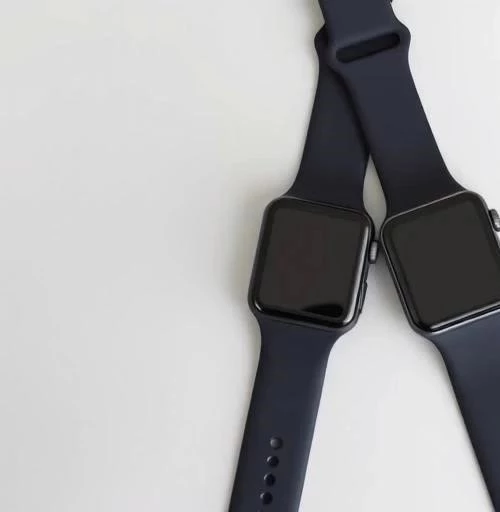
At a glance, both watches speak the same design language: a rounded rectangle, a Digital Crown, and Apple’s familiar fitness rings. But Series 4 is not simply Series 3 wearing a fresh outfit. Its screen reaches farther, its case is reshaped, and several of its sensors and controls have changed. If you’re comparing two watches on a seller’s desk—or trying to identify one on your own wrist—these are the clues worth checking.
Start with the display: the easiest giveaway
Look at the screen while it is lit. Series 4 has a noticeably larger display that curves visually toward the edges, leaving less dark border around the interface. Apple described the display area as up to 35% larger than Series 3, depending on the size being compared. Icons and text seem to have more room to breathe, and Series 4 can show more information on a watch face at once.
The case sizes changed, too. Series 3 came in 38 mm and 42 mm versions; Series 4 came in 40 mm and 44 mm. Those numbers refer to the height of the case, not the screen. A Series 4 may therefore look bigger from the front even though it is slimmer: its case is about 10.7 mm thick, compared with 11.4 mm for Series 3. The newer case also has softer, more rounded corners.
A quick visual test: if the watch face fills much more of the front and the case measures 40 or 44 mm, it points to Series 4. If it measures 38 or 42 mm and has a more obvious border around the display, it points to Series 3. Don’t rely on a photograph alone: perspective, a thick screen protector, or a dark watch face can disguise the difference.
Inspect the Digital Crown and side button
On Series 4, the Digital Crown has a subtle red outline around its edge on cellular models. Series 3 cellular models are generally marked with a red dot instead. It is a useful clue, but not a universal test: GPS-only watches do not have the cellular marking, and cases or lighting can make it hard to see.
Series 4’s Crown also supports haptic feedback. When you turn it, you can feel tiny, deliberate taps rather than just a smooth rotation. The control looks familiar, but the extra feedback and its interaction with the larger screen give the newer watch a different feel. The side button remains beside the Crown on both generations, so its presence alone tells you nothing.
Check the sensors: ECG is the headline difference
Series 4 introduced an electrical heart sensor that can record an electrocardiogram (ECG) using the Digital Crown and the sensors on the back; It also added irregular-heart-rhythm notifications in supported regions. Series 3 has an optical heart-rate sensor, but it does not have the ECG feature. Series 4 also brought fall detection, which can sense a hard fall and offer to contact emergency services if the wearer does not respond.
Important caveat: ECG availability depends on the country, software, age requirements, and setup. The feature may not work in every region, even on a genuine Series 4. A seller’s promise that “ECG is included” is not proof that it will be available where you live. Check Apple’s current regional support information before buying if ECG is a key reason for your choice.
Both generations can track workouts, heart rate, activity, and sleep through compatible software and apps. A Series 3 can still be a capable basic fitness watch; it simply lacks Series 4’s electrical heart sensor and fall-detection hardware. Don’t confuse a heart-rate graph in an app with an ECG: optical pulse tracking and an electrical recording are different measurements.
Listen, feel, and look at the back
Series 4 has a speaker that is louder than Series 3’s, with the microphone repositioned to help reduce echo during calls. If you can test both side by side, try a short call or an alert at the same volume. The improvement is easier to notice in use than in a listing photo, and a damaged speaker can make this comparison misleading.
Turn the watch over and inspect the sensor assembly. Series 4 has a redesigned back and updated heart-rate sensor layout; Series 3’s arrangement looks different. Some materials depend on the exact model: GPS and cellular versions can have different back materials, so don’t identify a generation from one shiny or ceramic-looking detail alone. The case engraving and model information are safer clues.
Compare performance and everyday features
Series 4 uses the S4 chip, while Series 3 uses the S3. Apple said the S4 was up to twice as fast, which helps explain the newer model’s quicker-feeling interface and ability to support its larger, information-rich watch faces. Series 4 also includes Apple’s W3 wireless chip and Bluetooth 5.0; Series 3 uses the earlier W2 chip and Bluetooth 4.2.
Both were designed for roughly 18 hours of battery life under Apple’s testing conditions. Real-world results vary with battery age, GPS workouts, cellular use, screen settings, and software. Since these are older generations, battery health may matter more than the original specification. Ask the owner to show battery condition if available, and check that the watch charges and holds a charge.
Both generations offer water resistance rated to 50 metres, but that is not an invitation to use an old, second-hand watch carelessly in water. Seals can weaken over time or after repairs. Neither generation should be treated as a diving computer, and Apple advises against activities involving high-velocity water.
Confirm the identity in Settings
- On the watch, open Settings.
- Choose General, then About.
- Find Model. Tap the displayed part number if needed to reveal the model identifier beginning with “A”.
Use that identifier to verify the generation with Apple’s official model-identification information. Numbers can differ between GPS and cellular configurations and between regions, so avoid trusting a single number copied from a random listing. If the watch is paired with an iPhone, the Watch app’s General > About screen can also provide identifying details.
At-a-glance comparison
- Series 3: 38 mm or 42 mm case; smaller display; 11.4 mm thick; S3 chip; optical heart-rate sensor; no ECG or fall detection.
- Series 4: 40 mm or 44 mm case; display area up to 35% larger; 10.7 mm thick; S4 chip; electrical heart sensor, ECG support where available, and fall detection.
- Both: familiar Apple Watch shape, Digital Crown and side button, workout tracking, and a stated battery life of about 18 hours.
Which one should you choose?
Choose Series 4 if the larger, more readable screen, faster performance, ECG hardware, or fall detection matters to you—and confirm that the features you want are supported in your region. Series 3 may make sense if it is substantially cheaper and you only need basic notifications, activity tracking, and heart-rate monitoring. But compare the price with newer, supported models: a very low price is less appealing if the battery is worn, activation is locked, or the watch cannot run the apps you need.
The quickest verdict: measure the case, study the screen, then verify the model in Settings. A 40/44 mm case with the edge-to-edge display signals Series 4; a 38/42 mm case with a smaller screen signals Series 3. The Crown’s red ring versus red dot can help on cellular models, but it is only a supporting clue. The most reliable identification combines the physical design with the model information—not a seller’s title, a watch face, or one tiny splash of red.
6 Comments. Оставить новый
I like how the article separates the easy clues from the unreliable ones. The red Crown marking sounds like a tiny detail, but the caveat about GPS models makes the advice much more trustworthy.
The comparison feels like holding both generations under a jeweler’s lamp: screen, case, and Crown each get their own moment. Clear, practical, and just nerdy enough.
A helpful antidote to guessing from a blurry listing photo. I especially appreciated the distinction between case height and screen size—it clears up a surprisingly common mix-up.
This guide turns watch-spotting into a pocket-sized detective story. The display clues are especially useful, and the warning about misleading photos keeps the investigation grounded.
A tidy field guide for second-hand watch hunters. It gives readers concrete things to check without pretending that one color, measurement, or photograph can tell the whole story.
This makes a modest design refresh feel like a set of clues waiting to be noticed. The quick visual test is memorable, while the cautions stop it from becoming a false certainty.