
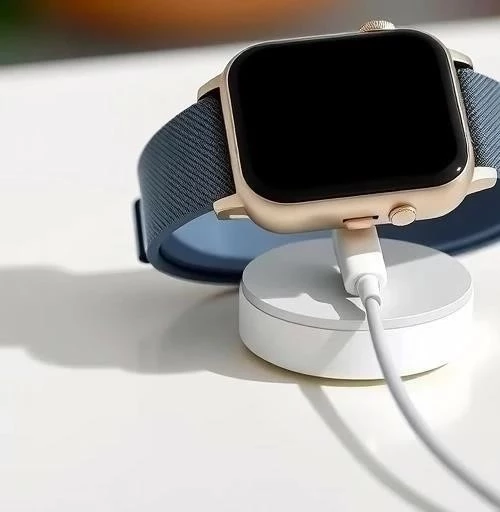
Charging an Apple Watch SE is straightforward: connect its magnetic charging cable to a power source‚ place the watch on the charger‚ and check that charging has started. The exact charging speed and included accessories can vary by model and region‚ so use a compatible charger and refer to the instructions supplied with your watch if anything differs.
What you need
Use the Apple Watch magnetic charging cable or charging puck that is designed for Apple Watch. One side attaches to the back of the watch; the other connects to a power adapter or a suitable USB port‚ depending on the cable. Some cables have a USB-C connector‚ while older accessories may use USB-A. If you need an adapter‚ choose a reputable‚ compatible USB power adapter. The adapter is often sold separately.
Apple Watch SE does not charge by being placed on an ordinary Qi wireless charging pad or a MagSafe iPhone charger. It needs a compatible Apple Watch charging puck or a charger specifically designed to work with Apple Watch. Do not try to charge it using the watch’s side button or by connecting a cable directly to the watch case.
Step-by-step instructions
- Connect the charger. Plug the charging cable into a compatible power adapter or USB port. Connect the adapter to a working outlet‚ if applicable.
- Position the watch. Place the back of the watch against the round‚ concave surface of the charging puck. The puck’s magnets help it settle into place. You can lay the watch flat or position it on its side‚ provided the back remains in contact with the charger.
- Check the display. A charging symbol‚ such as a green or yellow lightning bolt‚ should appear on the screen. If the watch is deeply discharged‚ it may take a short while before the display responds. Leave it connected and check again.
- Allow it to charge. Keep the watch on the charger until it reaches the battery level you need. When finished‚ lift it off the puck; the magnetic connection will release easily.
Before charging‚ make sure the watch and charger are dry and free of dirt. If the watch has been exposed to water‚ follow Apple’s guidance for drying it before placing it on the charger. Remove any case or accessory that prevents the charging puck from sitting flush against the back. Do not insert objects between the watch and charger.
How to check the battery level
While the watch is charging‚ its screen can show the current battery level. You can also check the battery from the watch face by opening Control Center and looking for the battery percentage. On some watchOS versions‚ tapping the percentage opens additional battery information. To see battery details on a paired iPhone‚ open the Watch app or add a battery widget‚ if available.
If the watch is off and the battery is very low‚ it may display a cable or low-battery image instead of turning on immediately. This does not necessarily mean the charger is faulty. Leave the watch connected for a while‚ then check the screen again. Charging time varies according to the watch model‚ battery condition‚ power adapter‚ temperature‚ and how much charge is needed. Avoid relying on a single time estimate as a guarantee.
If the watch does not charge
- Confirm that the power adapter is plugged in and the outlet or USB port works. Try another compatible power source if possible.
- Lift the watch and place it back on the puck‚ checking that the magnets align and the charging surface touches the watch’s back.
- Inspect the cable and puck for damage‚ and check for dust or residue on the contact surfaces. Disconnect the charger before cleaning it; use a soft‚ dry‚ lint-free cloth.
- Remove a protective case or other accessory that may block the connection. Do not use a damaged cable or charger.
- If the display remains unresponsive‚ leave the watch on the charger for at least 30 minutes. If it still will not charge‚ restart it if possible and consult Apple Support or an authorised service provider.
Do not force the cable into a connector‚ pull it by the cord‚ or attempt to open the watch. If the watch or charger becomes unusually hot‚ disconnect the charger and let the equipment cool in a safe place. Keep charging equipment away from liquids and follow the safety information supplied with it.
Good charging habits
It is generally fine to charge the watch when convenient; the battery does not need to be completely empty first. For overnight charging‚ place the charger on a stable‚ ventilated surface and make sure the watch is securely aligned. Avoid covering the watch or charger with bedding‚ and do not charge them near a heat source. Extreme temperatures can affect charging and battery performance.
Battery features and charging behaviour may differ between Apple Watch SE generations and watchOS versions. For model-specific instructions‚ check the model name in the Watch app on the paired iPhone or in the watch’s settings‚ then consult Apple’s current support information. These steps help identify whether an accessory is compatible and what to try if charging does not begin.
3 Comments. Оставить новый
The instructions clearly explain how to connect and position the charger, and they note that the power adapter may be sold separately.
The article is organized into practical sections and includes helpful guidance on what to check if the display does not respond immediately.
The distinction between Apple Watch chargers and ordinary Qi or MagSafe chargers is useful for avoiding compatibility confusion.