
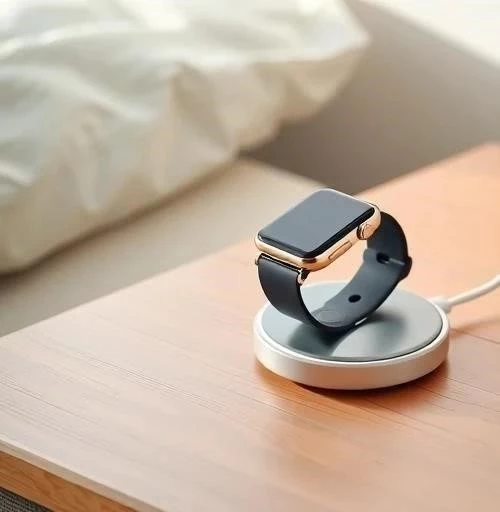
Charging an Apple Watch Series 7 is simple, but using the right cable and adopting a sensible routine can make the process safer and more convenient. The watch charges wirelessly through a magnetic connector; it does not use a standard Lightning or USB-C port on the case. For reliable results, use the supplied Apple Watch charging cable or a compatible, reputable replacement.
What you need
The Series 7 comes with an Apple Watch Magnetic Fast Charger to USB-C Cable. One end has a round magnetic charging puck; the other is a USB-C plug. Connect that plug to a compatible USB-C power adapter, then plug the adapter into a wall outlet. The cable does not include the wall adapter, so you may need to supply one separately.
A standard Apple Watch magnetic charging cable can also charge the Series 7, but it may charge more slowly. To access the watch’s fast-charging capability, use the USB-C Magnetic Fast Charging Cable designed for Apple Watch and a compatible USB-C power adapter that supports USB Power Delivery. Fast charging depends on the cable, adapter, power source, and watch conditions. If you are unsure whether your accessories support it, use Apple’s cable and a suitable USB-C adapter rather than assuming that every USB-C charger will charge at the same speed.
Step-by-step instructions
- Connect the USB-C end of the charging cable to a compatible power adapter.
- Plug the adapter into a working wall outlet. A computer USB port or other power source may work, but charging speed can vary.
- Place the back of the watch against the charging puck. The magnets should pull it into position and hold it flat.
- Check the display for the charging symbol. A green lightning bolt indicates that the watch is charging. If the battery is extremely low, it may take a short while for the screen to respond.
- When you have enough charge, lift the watch from the puck and put it back on your wrist. There is no need to switch the watch off before charging.
The charger’s magnetic alignment is designed to make positioning easy, but the watch will not charge properly if the puck is held at an angle or separated from the back by dirt or an unsuitable covering. If the charging symbol does not appear, remove the watch, reposition it, and check the cable and outlet.
How long does charging take?
Charging time varies with the adapter, cable, starting battery level, temperature, and whether the watch is being used. Apple advertises fast charging for Series 7 under suitable conditions, with approximately 80 percent charge possible in about 45 minutes. Treat this as an estimate rather than a guarantee: a different cable or power adapter, a warm watch, or active use may extend the time.
For a quick top-up, leave the watch on the charger and avoid using demanding features. For a full charge, allow extra time instead of relying on a precise minute-by-minute estimate. The battery icon gives a practical indication of progress; frequent disconnection to check it does not improve charging.
Good charging habits
- Choose a safe surface. Put the charger on a stable, dry, well-ventilated surface. Do not cover the watch or charger with bedding while charging.
- Keep the contact area clean. Wipe the back of the watch and the charging puck with a soft, dry, lint-free cloth if needed. Avoid abrasive materials and do not pour liquid onto the charger.
- Watch the temperature. Charge the watch in a cool, dry place, away from direct sunlight and heat sources. If it becomes unusually warm, remove it from the charger and let it cool before trying again.
- Use trustworthy accessories. A damaged cable, loose adapter, or poorly made third-party charger can cause unreliable charging. Replace frayed or cracked equipment rather than continuing to use it.
- Charge when convenient. You do not need to wait until the battery is completely empty. Short top-ups are a practical way to keep the watch ready for use.
Apple Watch is designed to manage charging automatically, so leaving it connected after it reaches a high charge is not the same as repeatedly forcing power into the battery. Still, sensible placement matters: good airflow and a moderate temperature are better for the device than leaving it under a pillow or in a hot car. If you wear the watch for sleep tracking, charge it beforehand or during another part of your daily routine.
If your Apple Watch will not charge
Start with the simplest checks. Confirm that the adapter is firmly connected to the cable and outlet, and test the outlet with another device if necessary. Remove the watch from the puck and place it back so the magnets align. Check for dust, moisture, or debris on the contact surfaces, then wipe them dry. If the watch is in a thick case or has an accessory between it and the puck, remove it and try again.
If there is still no charging symbol, try a different compatible adapter or cable if one is available. A deeply discharged watch may need several minutes on the charger before anything appears on screen. You can also restart the watch once it has enough power to respond. Do not insert objects into the watch, heat it to speed charging, or attempt to open the case.
If the watch repeatedly stops charging, becomes excessively hot, or fails to charge with known-good accessories, disconnect it and contact Apple Support or an authorized service provider. Persistent problems may point to a faulty cable, adapter, battery, or watch—not a need to press the charger harder against the case.
In brief
Connect a compatible magnetic Apple Watch charger to a suitable power source, align the puck with the back of the Series 7, and confirm the charging symbol appears. The original USB-C fast-charging cable and a compatible USB-C Power Delivery adapter are the best choice when speed matters; a standard magnetic charger remains useful when a slower charge is acceptable. Keep the equipment clean, dry, undamaged, and cool, and troubleshoot the power source and alignment before assuming the watch needs repair.

7 Comments. Оставить новый
A concise and useful explanation of charging the Series 7. The guidance that the watch does not need to be switched off before charging is a small detail, but it makes the process feel less uncertain for beginners.
I appreciate the distinction between regular charging and fast charging. The reminder that a USB-C plug alone does not guarantee fast charging is practical and prevents an easy assumption.
The instructions clearly explain the difference between the magnetic charging puck and a standard charging port. That detail should help Series 7 owners avoid looking for a connector that is not there.
I found the troubleshooting note about a very low battery helpful. Knowing the display may take a little while to respond can stop a new user from assuming the charger is not working.
The advice to use reputable accessories is sensible, and the article avoids promising that every compatible-looking charger will perform the same way. That makes the guidance both practical and appropriately cautious.
This is a useful, straightforward guide. It explains that the wall adapter may need to be supplied separately, an important point that could otherwise surprise someone opening the box.
The numbered steps make the process easy to follow, especially for someone setting up an Apple Watch for the first time. Mentioning the green lightning bolt also gives readers a simple way to confirm that charging has started.