
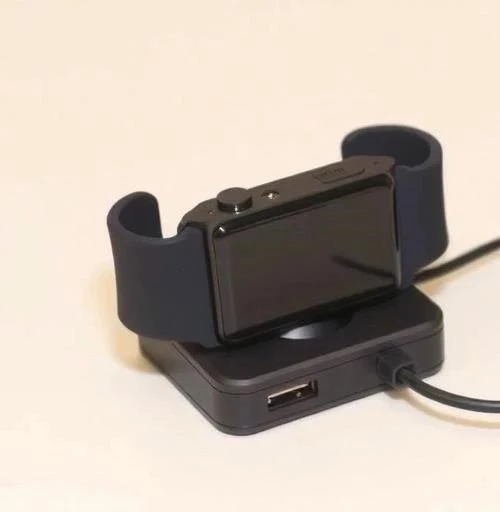
The Mi Watch Lite charges through a small magnetic charging cradle and cable. It does not use wireless charging, and you should not try to charge it with a phone’s wireless pad. For the most reliable connection, use the cable supplied with the watch or a compatible replacement designed specifically for this model.
Charging it step by step
- Take the watch off your wrist and make sure its back and the charger’s metal contacts are clean and completely dry. If the watch has been swimming or exposed to sweat, dry it carefully before connecting the charger.
- Place the cradle against the back of the watch. Line up the metal charging contacts on the watch with the contacts on the cradle. The magnets should pull the parts into the correct position. Check that the cradle sits flat and does not wobble.
- Connect the cable to a USB power source, such as a computer port or a reputable USB adapter. Use a suitable, undamaged adapter and follow the charging guidance in the watch’s manual. Avoid forcing the connector or using a cable that does not fit securely.
- Check the watch screen for a charging symbol or battery indicator. If nothing appears, lift the cradle, realign it, and try a different USB port or adapter.
How long should it charge?
Charging time varies with the battery’s remaining capacity, its age, and the power source, so there is no single time that applies to every watch. Let the battery indicator guide you rather than repeatedly unplugging the device to check it. When it shows a full charge, disconnect the cable. You do not need to wait for the battery to run completely flat before charging again.
If the watch will not charge
First check that the USB source is working and that both sets of charging contacts are aligned. Wipe away dust or residue with a soft, dry cloth; do not scrape the contacts or apply cleaning liquid. Try another suitable USB port and inspect the cable and cradle for visible damage. If the watch is unusually hot, disconnect it and let it cool before trying again. A restart may help if the screen does not respond, but do not attempt to open the watch or replace its battery yourself.
Good charging habits
Keep the watch and charger dry while charging, and place them on a stable, ventilated surface away from heat. Do not charge a wet watch, wear it while it is attached to the cradle, or use a damaged cable. If charging repeatedly fails despite correct alignment and a working power source, stop experimenting with incompatible accessories and contact Xiaomi support or a qualified service centre.

3 Comments. Оставить новый
This is a helpful, easy-to-follow guide for someone charging the Mi Watch Lite for the first time. It would be even more complete if the final troubleshooting section included what to do if these checks do not resolve the problem.
The instructions clearly explain how to align the magnetic cradle and check the charging indicator. The emphasis on keeping the contacts dry is especially useful, since moisture could interfere with a reliable connection.
I appreciate that this advice avoids promising a fixed charging time and instead recommends following the battery indicator. The troubleshooting steps are practical and appropriately cautious about damaged cables and unusually high heat.