
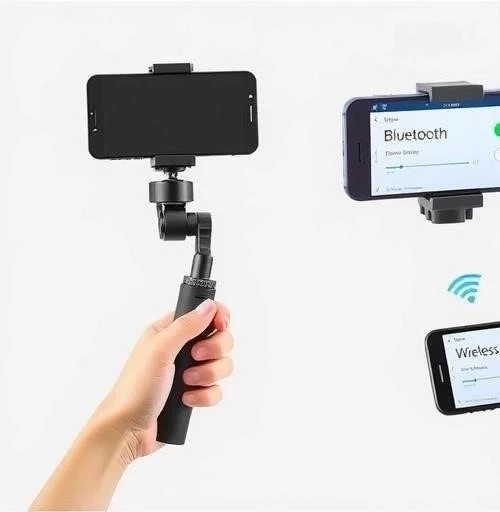
A Xiaomi selfie stick looks like a simple wand, but it can play several roles: phone holder, remote shutter, and—on tripod models—a pocket-sized camera stand. Setup is usually quick once you know which kind you own. Some Xiaomi sticks use a detachable Bluetooth remote; others have a shutter button built into the handle, and a few connect by cable. The exact design varies, so use the instructions below as a practical guide rather than assuming every model behaves identically.
Prepare the stick and phone
- Check the hardware. Look for a Bluetooth button or removable remote, a charging port, and any cable or plug. If the remote has a power switch, leave it off for the moment.
- Charge the remote if needed. A weak battery can make pairing unreliable. If your model uses a replaceable battery, check that it is seated correctly.
- Open the phone holder. Pull the clamp apart gently, place the phone in it, and release the clamp so it grips the phone securely. Keep the holder away from the phone’s volume and power buttons.
- Balance the phone. Position it near the center of the clamp. Turn it to portrait or landscape before tightening or extending the stick, and check that the camera lenses are not covered.
Do not force the telescoping sections. Extend them smoothly, hold the stick over a soft surface while testing, and keep a firm grip. A phone that slips from a fully extended stick can turn a group photo into an expensive action scene.
Pair a Bluetooth Xiaomi stick
- Unlock your phone and open Settings → Bluetooth. Switch Bluetooth on and keep this screen open.
- Turn on the stick or remote. Depending on the model, you may need to press and hold its button for a few seconds until an indicator flashes. Some remotes enter pairing mode automatically when switched on.
- Wait for the accessory to appear in the list of available devices. Its name may include “Xiaomi,” “Mi,” or a model identifier. Tap the matching name to connect. If a pairing request appears, confirm it.
- When the phone shows Connected or Paired, open the Camera app and take a test shot with the remote button.
If the name does not appear, switch the remote off and on, move it close to the phone, and scan again. If it was previously paired with another phone, disconnect it there or remove the old pairing. On Android, you can usually tap the gear beside the device name and choose Forget, then pair again. On an iPhone, open Bluetooth settings, tap the information icon beside the accessory, and choose Forget This Device.
Make the shutter button speak camera
Bluetooth pairing connects the devices, but the button still has to send an action the camera understands. Many selfie remotes imitate a volume-button press. If pressing the stick’s shutter changes the volume instead of taking a picture, open the camera settings and look for an option such as Volume button function, Shutter, or Take pictures. Set it to capture a photo. The label and menu location depend on your Xiaomi phone and its MIUI or HyperOS version.
Try the phone’s built-in Camera app first. If the button works in the photo mode but not in video, that may be a limitation of the app or remote. Test the front and rear cameras, portrait orientation, and video separately. Third-party camera apps can interpret remote clicks differently, so check their button or shutter settings if you prefer using one.
If your model connects by cable
Some selfie sticks use a short cable and a plug rather than Bluetooth. Seat the phone in the holder, connect the plug to the compatible audio or accessory port, and open the Camera app. A wired stick may need no pairing or charging. If the phone has no matching socket, do not force the plug or assume an adapter will work: compatibility depends on the phone, adapter, and stick. Remove a thick case if it prevents a secure connection.
Use the tripod and remote
If your Xiaomi model has folding tripod legs, place it on a flat, stable surface and spread the legs fully. Extend the center pole only as far as the scene requires. Stand close enough to catch the phone if the setup wobbles, then step into frame and use the remote. For group shots, take a test photo to check framing before everyone commits to their best smile.
Quick troubleshooting
- No Bluetooth device found: Charge the remote, activate pairing mode, keep it near the phone, and temporarily disconnect it from other devices.
- Button changes volume: Set the camera’s volume-button action to shutter, then test again.
- Button does nothing: Reconnect Bluetooth, reopen the Camera app, and try the built-in camera before testing another app.
- Phone feels loose: Re-center it, tighten the clamp gently, and shorten the stick until the setup is stable.
- Photos are blurry: Hold the stick steady, use the timer, add light, or rest the tripod on a firm surface.
A final two-second check
Before the real shot, confirm that the phone is clamped, the camera view is clear, the stick is stable, and the shutter works. Then extend the pole, step into the light, and let the tiny remote do its one-button magic. A properly set-up Xiaomi selfie stick is less a piece of gear than a patient photographer who fits in your bag.


1 Comment. Оставить новый
A refreshingly grounded guide—especially the reminder that a fully extended selfie stick can turn a photo into an “expensive action scene.” That little image sticks in the mind, right where the safety advice should.