
If the left earbud in a pair of Xiaomi or Redmi wireless earbuds has stopped playing sound, the cause may be simple: the earbud may be discharged, the charging contacts may be dirty, the phone may be routing audio incorrectly, or the earbuds may have lost their connection with each other. A damaged speaker or battery is also possible. Work through the checks below in order, starting with the least disruptive steps. Menu names and reset procedures vary by model, so use the instructions for your exact earbuds when available.
Check the audio source and balance settings
First, make sure the problem is actually with the earbud. Play audio from another app, then try another song, video, or audio file. Pause and resume playback, and check that the phone or computer is not muted. If possible, connect the earbuds to a different phone, tablet, or computer. If both earbuds work on another device, investigate the original device or app before resetting the headset.
Check the left-right audio balance on the connected device. On many phones this setting is under Settings > Accessibility, often within audio or hearing options. On a computer, look in sound settings or the accessibility controls. Make sure the balance slider is centered and that mono audio or other accessibility settings are not causing unexpected behavior. The exact path depends on the operating system and its version.
Confirm that the left earbud is charged
- Place both earbuds in the charging case and check that the left one sits correctly in its slot. Remove any protective film that may still cover its charging contacts, if the earbuds are new.
- Connect the case to a working power source using a compatible cable. Leave the earbuds charging for at least 20–30 minutes, or longer if the case was fully discharged.
- Look for the normal charging indicator, if your model has one. Some models show charge status in a phone app or Bluetooth pop-up; others provide only limited indicators. Consult the model’s manual rather than assuming that every Xiaomi case displays charging in the same way.
- After charging, remove and reseat the left earbud, then test it again.
If the left earbud does not seem to charge, the case may have little or no power, the earbud may not be seated properly, or the contacts may be obstructed. Try a different suitable cable and power adapter if available. Do not use a damaged cable, force the earbud into its slot, or insert metal objects into the case.
Clean the earbud and charging contacts carefully
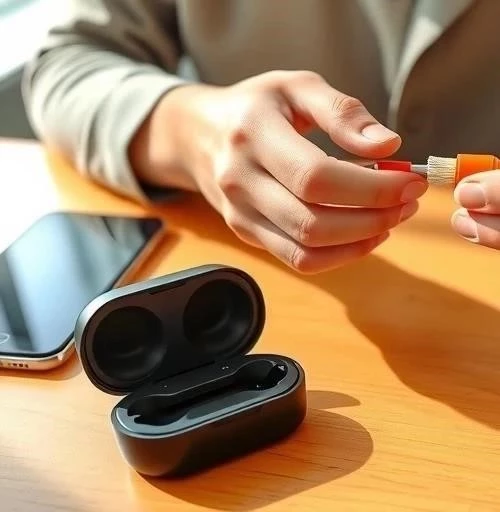
Dust, skin oil, earwax, or debris can interfere with charging and sound. Remove the earbud from the case. Use a clean, dry, soft cloth or a dry cotton swab to wipe the metal charging contacts on the earbud and the corresponding points inside the case. Use gentle pressure and avoid scratching the surfaces. Do not pour liquid into the case or onto the earbud, and do not use sharp tools, abrasive materials, or household cleaners.
If the left earbud plays very quietly rather than producing no sound, inspect its sound outlet for visible wax or dirt. Clean the exterior gently with a dry, soft brush, keeping debris from being pushed into the mesh. Do not remove the mesh or poke through it. If the manufacturer’s instructions permit a specific cleaning method, follow those instructions. Allow the earbud to dry completely before charging or using it if it has been exposed to moisture.
Check the fit and sound outlet
Try the left earbud with the correct ear tip and adjust its position. A poor seal can make bass and overall volume seem much lower on one side. If your model supports in-ear detection, briefly turn the earbud off and on by placing it in the case and taking it out again; a sensor that is obstructed or not detecting the earbud may interrupt playback. Test with the earbud outside the ear at a low volume if necessary, but do not turn the volume up to compensate for a suspected blockage.
Reconnect the earbuds to the device
A Bluetooth connection can become incomplete or unstable. Turn Bluetooth off and back on on the phone, then place both earbuds in the case for a few seconds. Take them out together and wait for them to connect. If that does not help, remove the headset from the device’s saved Bluetooth list and pair it again:
- Open the Bluetooth settings on the phone, tablet, or computer.
- Select the Xiaomi or Redmi earbuds and choose Forget, Unpair, or the equivalent option.
- Put both earbuds in pairing mode using the method specified for the model. This may involve a case button, touch controls, or another procedure.
- Select the earbuds in the device’s Bluetooth list and complete pairing. Keep the two earbuds near each other and the device during setup.
Some true wireless models connect to the phone through one earbud and synchronize the second earbud separately. If one side has been paired or reset on its own, the pair may need to be synchronized again. Follow the manual’s pairing instructions for both earbuds; do not assume that the same button sequence applies to every Xiaomi model.
Restart or reset the earbuds
If charging and reconnecting do not resolve the issue, restart the earbuds and then consider a factory reset. A reset normally clears the saved Bluetooth connection, so you will need to pair the earbuds again. The exact process differs by model: it may require placing both earbuds in the case and holding a case button, or using touch controls for a set period. Check the model number on the case, packaging, or device information and use the official user guide or Xiaomi support instructions for that model.
Before resetting, make sure the case and both earbuds have enough charge. Follow the sequence and timing in the instructions, and wait for the indicator or other stated confirmation before pairing again. Avoid repeatedly trying reset combinations meant for a different model, as these may do nothing or leave the earbuds in an unexpected state. If one earbud cannot power on or respond to the reset procedure, that is useful information to give support.
Check software and device compatibility
Restart the phone and install pending operating-system updates if appropriate. If the earbuds have a supported companion app or firmware update feature, check the manufacturer’s instructions and make sure the earbuds remain charged during an update. Not all Xiaomi or Redmi models use the same app or support firmware updates through one. Do not install unofficial firmware or disconnect the earbuds while an update is in progress.
If the sound problem occurs only in one application, check that app’s audio, accessibility, and output-device settings, and update or reinstall it if necessary. If the issue occurs on only one phone but not on another, review the phone’s Bluetooth and accessibility settings. Resetting network settings can remove saved Wi-Fi and Bluetooth connections, so treat that as a later option and check the device maker’s guidance first.
Identify signs of a hardware problem
Hardware service may be needed if the left earbud remains silent after charging, cleaning, re-pairing, and a model-appropriate reset, especially if it fails on multiple devices. Other warning signs include a cracked shell, a loose internal part, a battery that will not hold charge, unusual heat, swelling, a burning smell, or a history of impact or liquid exposure.
Stop using and charging an earbud that is swollen, unusually hot, visibly damaged, or emitting an unusual smell. Do not open the earbud or case, replace the internal battery yourself, or attempt a repair involving soldering. Small lithium batteries and compact electronic components can be damaged by improvised repairs. Contact Xiaomi support or an authorized service provider and explain the tests you have already completed.
When to contact support
Before contacting support, note the exact model name, purchase date, whether the left earbud charges, any indicator behavior, the devices you tested, and whether the problem began after a drop, exposure to moisture, an update, or a reset. Keep proof of purchase if warranty service may apply. Warranty coverage and service options vary by country, seller, product condition, and local terms; ask the seller or Xiaomi support to confirm them. Do not discard the case or accessories until support has advised you what to send.
Quick troubleshooting order
- Test another audio source and check left-right balance.
- Charge the case and left earbud; reseat the earbud in its slot.
- Clean the charging contacts and sound outlet gently and dryly.
- Reconnect the earbuds, then forget and pair them again.
- Use the reset instructions for the exact model and check supported software updates.
- If the left side still fails on more than one device, or shows signs of damage, stop troubleshooting and seek authorized service.
In many cases, restoring charging contact or pairing solves a one-sided audio problem. If basic checks do not help, persistent silence is not proof of a particular fault: the battery, speaker, charging circuit, or another component may be involved. A technician can inspect the earbuds safely and determine whether repair or replacement is appropriate.



1 Comment. Оставить новый
The troubleshooting steps are clearly organized and appropriately begin with simple checks before suggesting a reset or repair. Noting that menu paths and indicators vary by model is helpful; the article could also benefit from a link to official instructions for specific earbuds.