
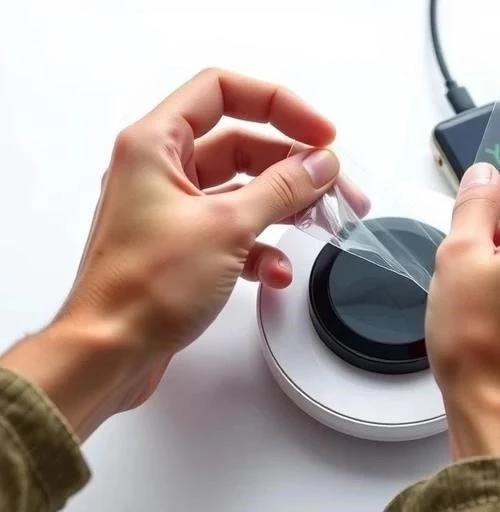
First, check what the film is attached to. A clear layer on a new charging puck may be temporary shipping packaging, but a layer on the back of the watch may be a screen protector—or part of an accessory. The distinction matters: peeling packaging is usually straightforward; scraping at the watch’s sensor area can damage it.
If the film is on the charging puck
- Unplug the charger. Disconnect its cable from the power adapter or USB port before handling it. Make sure the puck is cool and dry;
- Look for an edge or pull tab. Use your fingernail to lift a corner gently. If the film is clearly loose packaging, peel it back slowly and evenly, keeping the pull close to the puck’s surface.
- Use tape if the edge is hard to grip. Press a small piece of low-tack adhesive tape onto the film and lift gently. Do not let tape cover or pull on the cable connection.
- Check for residue. Wipe the puck with a soft, dry, lint-free cloth. If needed, lightly dampen the cloth with water, keeping moisture away from openings and the cable. Let it dry fully before reconnecting.
Do not use a knife, needle, metal tool, abrasive pad, hair dryer, or strong solvent. These can scratch the charging surface, damage the cable, or leave liquid inside the accessory. Avoid pulling hard: resistance may mean you are lifting a label, coating, or part that is not meant to be removed.
If you mean the film on the watch’s underside
Turn off the watch and remove it from the charger. Check whether the layer has a visible edge and is a separately applied protector. If so, lift only that edge with a clean fingernail or a plastic pick, then peel slowly without pressing on the sensors. Stop if it does not lift easily. The sensor window is not the charger, and scratching or prying at it may impair readings.
Some watches or accessories may have a coating or a component that looks like film. Do not try to remove anything marked as permanent, or anything with no clear edge. If the layer is scratched, trapped under the case, or impossible to identify, ask Apple Support or an authorized service provider to inspect it rather than risking damage.
After removal
Confirm that the charging puck and watch are clean and completely dry, then reconnect the charger and place the watch on it. If charging is unreliable, check alignment, the cable, and the power source; do not keep peeling or scraping. In short, remove only obvious removable packaging or a separate protector, using gentle pressure and no sharp tools.

8 Comments. Оставить новый
Separating the guidance for the charging puck from the watch’s underside makes the instructions clearer. The warning about protecting the sensors is a useful reminder that similar-looking surfaces may have different functions.
The distinction between packaging on the charging puck and a protector on the watch itself is important. The advice to identify what the film is attached to before peeling helps prevent accidental damage.
The recommendation to use a fingernail or low-tack tape instead of a sharp tool is sensible. It gives readers practical options without risking scratches to the charging surface.
I appreciate the emphasis on unplugging the charger and letting it cool before handling it. Those small precautions make the instructions safer and easier to follow.
The article appropriately explains when to stop: if the layer resists or has no clear edge, it may not be removable packaging. That caution is especially useful for people unsure what they are looking at.
The cleaning advice is measured and practical, particularly the instruction to keep moisture away from openings and let the accessory dry before reconnecting it.
The list of tools and methods to avoid helps prevent common mistakes, such as prying with metal or applying heat. This makes the safety message more specific than a general warning.
Overall, the guidance is cautious and easy to apply. It could be even more helpful with a reminder to consult the device manufacturer if the layer’s purpose remains unclear, but the advice to stop rather than force it is sound.