
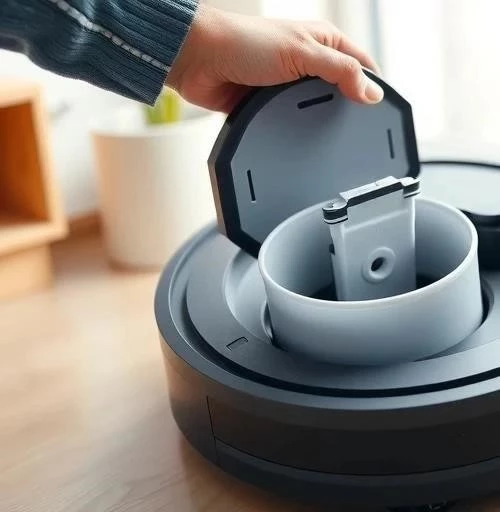
Your Xiaomi robot vacuum has finished its patrol, the floor is clean, and now the little dustbin needs attention․ The good news: on most models, opening it is a simple, tool-free job․ The small catch is that Xiaomi has made many robot vacuums, and their bins do not all release in exactly the same way․ Use the steps below as a safe guide, then check your model’s manual if a latch or layout looks different․
First, identify what you want to open
“Container” can mean several things: the removable dustbin inside the robot, a water tank, or the dust bag in an automatic-emptying dock․ These parts open differently․ This guide mainly covers the robot’s dustbin—the compartment that collects hair, crumbs, and dust․ If you have a self-emptying dock, its dust bag is usually behind a separate dock cover; do not try to pull the robot’s dustbin out of the dock․
Open the robot’s dustbin: the usual method
- Park the robot safely․ Pause its cleaning cycle and switch it off if your model has a power button․ If it is returning to its dock, wait until it has stopped․ This prevents a surprise departure while you are handling it․
- Find the top cover․ On many Xiaomi models, the dustbin sits beneath a hinged lid on the top of the robot․ Look for a small finger notch, marked release area, or seam around the cover․ Lift gently; the lid should swing open without force․
- Locate the dustbin handle or release tab․ The bin is commonly seated in a compartment under the lid․ Some versions have a fold-up handle; others use a small clip․ Lift the handle or press the release only as the design indicates, then raise the bin straight out․
- Open the bin itself․ Hold it over a rubbish container․ Look for a hinged flap, a colored latch, or a dustbin lid․ Release the latch and tip the debris out․ Keep a hand under the flap so it does not spring open abruptly․
- Close and reinstall․ Shut the bin until its latch clicks, return it to its slot in the same orientation, and press it down gently․ Close the robot’s top cover․ A properly seated bin should sit flat, with no obvious gap․
If the layout looks different
Do not assume every Xiaomi robot opens from the same place․ On some models the top lid hides the bin; on others, the dust container is accessed through a different cover or is combined with a water tank․ A 2-in-1 container may have separate chambers for dust and water, plus a filter that must stay correctly fitted․ Check the model name on the label on the robot’s underside or in the companion app, then consult the matching manual for the release point․ A gentle visual inspection is safer than testing every tab by force․
If you have a dock that empties the robot automatically, distinguish the robot’s own bin from the dock’s dust bag․ To reach the bag, open the dock’s designated cover and pull the bag by its handle, following the dock’s instructions․ Do not reach into the emptying channel while the dock is plugged in or running․
When it will not come out
- Check for a hidden latch․ A bin may feel stuck because its release tab has not been pressed fully․ Look around the edges rather than tugging the handle harder․
- Remove trapped debris․ Hair or compacted dust can wedge between the bin and its compartment․ With the robot switched off, clear visible debris using your fingers or a soft brush․
- Keep the bin level․ Pulling at an angle can catch its corners․ Lift it evenly, without twisting․
- Stop if plastic flexes․ If the lid or clip bends, pause․ The part may be a hinge, not a release, or your model may open another way․ Check the manual before trying again․
Never use a screwdriver, knife, or other tool to pry the container open․ These can break a latch, damage a seal, or puncture a water tank․ The right release should not require force․
Emptying and cleaning without a mess
Empty the dustbin over a lined rubbish bin, especially if it contains fine dust․ Tap it lightly; do not bang it against a hard surface․ Remove the filter only if your model’s instructions say it is removable․ Many filters should be brushed or replaced rather than washed․ If the manual confirms that the bin itself is washable, take out the filter and any electronic parts first, rinse only the approved component, and let it dry completely before reinstalling it․ A damp filter or bin can cause trouble for the vacuum․
Use a dry, soft brush to clear dust from the bin seat and the robot’s nearby sensors․ Avoid spraying cleaner or water into the robot․ When everything is dry, fit the filter and bin securely․ If the robot reports that the dustbin is missing, remove it and reseat it once; a click and a flush fit are useful signs that it is in place․
A quick memory trick
Pause, lift, release, empty, reseat․ That is the whole routine for most Xiaomi robot vacuums․ Open the outer lid gently, use the bin’s own handle or latch, and let the model’s shape—not force—show you the way․ If your vacuum’s design differs from these steps, its exact model manual is the final authority․
1 Comment. Оставить новый
A refreshingly careful guide: it treats the vacuum less like a stubborn appliance and more like a tiny machine with its own manners. The distinction between the robot’s dustbin, water tank, and dock bag is especially useful—and may save a few unnecessary tugs.