
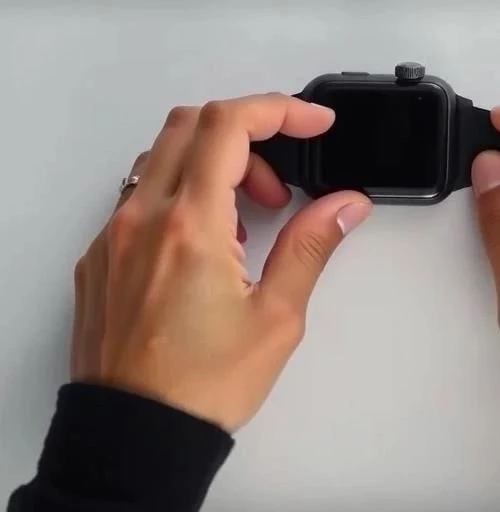
Removing a band from an Apple Watch Series 4 is straightforward when you use the release buttons and slide the band in the correct direction. You do not need a tool‚ and you should not pull the band away from the watch. The instructions below apply to the standard band slots on the 40 mm and 44 mm models.
Before you begin
- Take the watch off your wrist first. This gives you a stable grip and helps prevent accidental damage.
- Work over a soft‚ clean surface‚ such as a microfiber cloth‚ so the display and case are less likely to get scratched if the watch slips.
- If your band is a Link Bracelet‚ open it and separate it into two pieces using its quick-release button before removing it. This makes handling easier.
Remove the band
- Turn the watch over. Place it face down on the cloth. On the back of the case‚ find the small‚ oval band-release button at one end of the band slot.
- Press and hold the button. Use a fingertip to press it down and keep it pressed while you move the band. The button releases the locking mechanism inside the slot.
- Slide the band sideways. While holding the button‚ move the band left or right‚ parallel to the edge of the watch. It should glide out of its channel. Do not lift it straight up or twist it.
- Repeat for the other half. Turn the watch around if that makes the second release button easier to reach. Press and hold it‚ then slide the remaining band piece out.
If the band does not move immediately‚ check that you are pressing the release button fully. Keep the band flat and try a gentle side-to-side adjustment while sliding. Do not use a knife‚ pin‚ screwdriver‚ or other tool to pry it out; these can scratch the case or damage the release mechanism. Never force a band that feels jammed.
If the band is stuck
Remove any visible dust or lint around the slot with a soft‚ dry‚ lint-free cloth. Press the release button again and make sure the band is not under tension. If the mechanism remains stuck‚ or a button will not depress‚ stop rather than applying extra force. Contact Apple Support or an authorized service provider‚ especially if the watch has been dropped or exposed to liquid.
Reattach a band
Check that the band is facing the right way‚ then slide its connector into the matching slot until it clicks into place. The text or markings on the band may help you orient it. Do not hold the release button while inserting the band. Gently pull the band sideways afterward; it should stay securely attached. If it does not click or slides back out‚ remove it and try again‚ keeping it level and centered.
Compatibility and care
Apple Watch Series 4 bands fit the same general band system as many other Apple Watch models. Bands designed for 38 mm cases generally fit 40 mm cases‚ while those for 42 mm cases generally fit 44 mm cases. Check the band maker’s compatibility information before use‚ particularly for unusual or third-party connectors. Keep the slots clean and avoid forcing a connector that does not fit.
In short: press and hold the release button‚ slide the band sideways‚ and use gentle pressure only. With the correct motion‚ each half should come out smoothly.

2 Comments. Оставить новый
Helpful, easy-to-follow advice for removing an Apple Watch band safely. I appreciate the troubleshooting tips for a band that does not slide out right away.
The instructions are clear and practical, especially the reminders to work on a soft surface and avoid prying the band out. The step-by-step guidance should help prevent scratches or damage.