
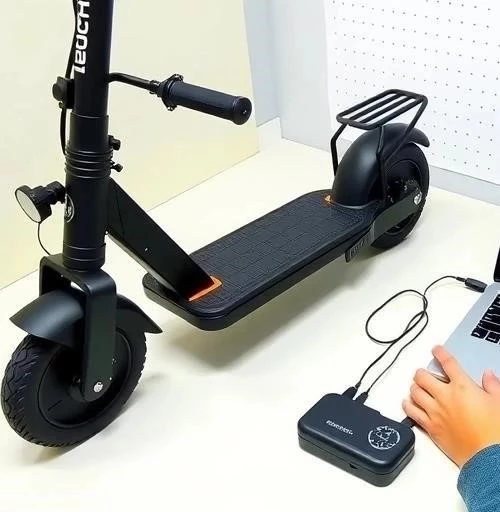
Your M365 is a small machine with a surprisingly busy inner life: its dashboard, controller, and battery-management system all exchange messages while you ride. Firmware is the set of instructions coordinating those parts. Updating it can fix bugs or improve compatibility, but the wrong file—or an interrupted update—can leave the scooter unable to start; Treat the process less like changing a phone wallpaper and more like a careful workshop appointment.
First, decide what “flashing” means
There are two very different procedures people call flashing. An official update installs software supplied through Xiaomi’s supported app. A custom firmware flash replaces or modifies that software, sometimes to alter speed, acceleration, or other limits. This guide covers the safer official route. Modified firmware can conflict with local laws, overload components, shorten battery life, disable safeguards, or make the scooter unsafe. We won’t provide instructions for bypassing speed limits or safety controls.
Before you begin: a five-minute pre-flight
- Identify the scooter. Confirm that it is actually an M365 and note whether it is an original M365 or a related model such as an M365 Pro. Similar-looking scooters can use different controllers or firmware. Check the label and the information shown in Xiaomi’s app; don’t choose a file merely because its name looks close.
- Check the current condition. The scooter should power on normally, show no unexplained error codes, and have a reasonably charged battery. Don’t start an update if the battery, dashboard, or controller is already behaving strangely.
- Prepare the phone. Install or update Xiaomi Home (also called Mi Home in some regions), sign in, and enable Bluetooth. Keep the phone close to the scooter. Charge the phone, close unnecessary apps, and avoid switching Bluetooth off during the process.
- Choose a safe place. Park on a stable surface, keep the wheel clear of obstacles, and do not ride while an update is underway. Allow enough time to finish without rushing out the door.
Official update: step by step
- Turn on the scooter and open Xiaomi Home. If it is not already paired, follow the app’s on-screen instructions to add the correct scooter model over Bluetooth. Pairing screens can vary with the app version and region.
- Open the scooter’s device page and look for a firmware or device-update notice. Read the version information and any warnings. If no update is offered, that may simply mean the scooter is already current or that no update is available for that model or region.
- If the app offers an update, confirm that you want to install it. Keep the scooter powered on, the phone nearby, and Bluetooth connected. Don’t close the app, restart the phone, power off the scooter, or walk away while the progress indicator is moving.
- Wait for the app to report that the update has completed. The scooter may restart or reconnect. Give it time, then reopen its device page and check that the connection and displayed firmware information look normal.
- With the scooter stationary, test the power button, lights, throttle response, brakes, and dashboard. Take a short, slow test ride only after everything appears normal, in a permitted area away from traffic.
What not to do
Don’t download a random “M365 firmware” file from a forum and send it to the scooter. A firmware package is not interchangeable just because two models share a brand. Controller revisions, dashboard boards, battery systems, and existing software versions matter. A mismatch can cause errors, disable communication between components, or prevent normal operation.
Be especially wary of tools or guides promising a dramatic speed increase, “one-click unlock,” or a guaranteed recovery. Third-party flashing may void warranty or support, and a scooter with changed acceleration or braking behavior can surprise its rider. Local rules may also limit motor-assisted speed. If your goal is better range, start with tire pressure, brake alignment, load, temperature, and riding style—not an unverified firmware modification.
If something goes wrong
If an official update appears stuck, don’t repeatedly tap buttons or interrupt power. Keep the scooter and phone together, wait a few minutes, and follow any recovery message shown in the app. If the app loses connection, reconnect only as directed by its instructions; Note the exact error message and firmware version. If the scooter will not power on, displays a persistent fault, or behaves abnormally, stop riding and contact Xiaomi support or a qualified electric-scooter technician. Avoid opening the battery or controller unless you are trained to work on them; lithium batteries can present serious fire and injury hazards.
The sensible finish
For most owners, “flashing” should mean installing an update the official app specifically offers for their scooter—not forcing a new personality into the controller. Confirm the model, prepare the phone and scooter, let the update finish uninterrupted, and test the result carefully. If you need a repair rather than an update, get a diagnosis before experimenting. The best firmware is not the loudest or fastest one; it is the version that lets the M365 carry you home reliably, with its safeguards still awake;
In brief: Use Xiaomi Home for supported updates, never guess at compatibility, and don’t ride during installation. For unofficial modifications or a scooter that has already been altered, consult a qualified technician and check local regulations before proceeding.


2 Comments. Оставить новый
The “five-minute pre-flight” is a terrific metaphor: it turns firmware updating from a mysterious button-press into a small act of responsibility. I especially appreciate the distinction between official updates and custom firmware; that clarity is a safety feature in its own right.
This guide treats the scooter less like a gadget and more like a tiny team of systems that need to stay in sync. The calm, practical warnings make the advice feel trustworthy—and the reminder to identify the exact model may save someone from a very expensive case of mistaken identity.