
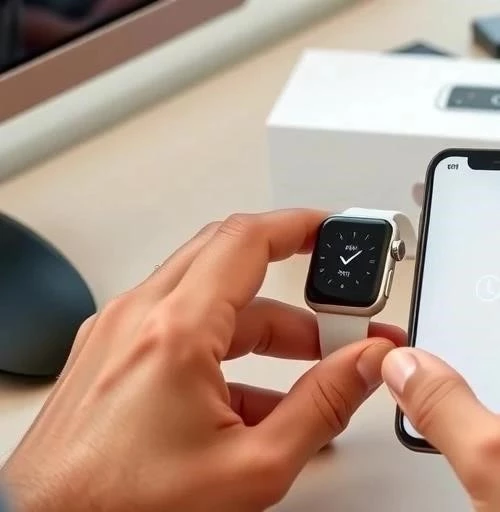
Apple Watch counterfeits can look convincing in photos, and a copied serial number may even appear to belong to a real Apple product. A careful check therefore involves more than entering a code online. Before you pay, verify the watch itself, its software, its serial number, its connection to an iPhone, and the seller’s ability to remove it from their Apple Account.
Find the serial number on the watch
On the watch, open Settings > General > About and locate the serial number. You can also find it in the paired iPhone’s Watch app: open My Watch > General > About. If the watch is not set up, some models display identifying details on the pairing screen.
Depending on the model, the serial number may also be printed inside the band slot. Remove a band and inspect the area carefully; do not force or scratch anything. The location and markings vary by generation. The original box may have a barcode label with a serial number, but packaging alone is not proof because boxes and labels can be copied or swapped.
Check the number with Apple
Type the serial number directly into Apple’s official coverage page: checkcoverage.apple.com. Check the web address before entering anything; avoid unofficial “serial checker” sites that request payment, passwords, or personal information. Apple may show the product model and service or coverage information. What appears can depend on the device and current Apple services, so do not assume the page will always show a purchase date or a complete history.
Compare the model shown by Apple with the watch in your hand. A result that identifies a different model, or a serial number Apple does not recognize, is a serious warning sign. However, a successful lookup does not prove that this particular watch is genuine. Counterfeit sellers sometimes copy a serial number from a real Apple Watch, so a valid result can belong to another device.
Compare every available identifier
- Compare the serial number in Settings or the Watch app with the number on the watch, where present, and the box label.
- Check the model name, case size, material, and finish against the model information shown on Apple’s site or in Apple’s support documentation.
- For a cellular model, check its model details and cellular capability with the carrier. An IMEI is relevant to cellular devices; many GPS-only Apple Watch models do not have one. Do not treat an IMEI as a substitute for the serial number.
A mismatch may mean the box was replaced, the watch was repaired, or the seller made an error; it is not by itself proof of a counterfeit. Ask for a clear explanation and supporting documentation. If identifiers appear altered, inconsistent, or missing where expected, walk away.
Confirm that it behaves like an Apple Watch
The strongest practical checks are performed on the actual device. Ask the seller to erase it and pair it with an iPhone using Apple’s Watch app. A genuine Apple Watch should follow Apple’s setup process and communicate with the app; a generic companion app, an Android-only setup, or a menu that merely imitates watchOS is a major red flag. Check that the interface, icons, settings, and available functions match the claimed generation. Test the screen, buttons, Digital Crown, speaker, microphone, charging, and sensors where possible.
Do not rely on appearance alone. Copies may imitate the case, packaging, startup screen, or even a real serial number. Conversely, scratches, a replaced band, or third-party packaging do not automatically make a watch fake. Focus on identity, software, pairing, and condition together.
Check Activation Lock before paying
The seller should unpair the watch from their iPhone and remove it from their Apple Account. Then begin setup yourself, if practical. If the watch asks for the previous owner’s Apple Account credentials, Activation Lock is still enabled. Do not pay on a promise that the seller will remove it later, and do not try to bypass the lock. Ask the owner to remove the device properly; otherwise, decline the purchase.
Also ask to see proof of purchase when available, and make sure the seller can answer reasonable questions about the watch’s history. A receipt can support a purchase claim but can also be forged, so treat it as one piece of evidence rather than a guarantee.
Inspect condition and buy safely
Look for cracks, dents, gaps, loose parts, corrosion, unusual heat, or signs of liquid damage. Check that the charger connects and that the battery charges normally. Review Battery Health in Settings if available, and ask about repairs or replaced parts. A genuine watch can still be faulty, locked, or unsuitable for your needs; authenticity does not guarantee good condition or remaining warranty.
For an in-person sale, meet somewhere safe and test the watch before handing over money. For an online purchase, use a payment method and marketplace with buyer protection. Be cautious of a price far below market value, pressure to pay quickly, stock photos instead of current pictures, or refusal to let you pair and inspect the device.
Quick decision checklist
- Read the serial number on the device and compare it with the available packaging.
- Check the number on Apple’s official coverage page, while remembering that a valid number can be copied.
- Confirm the displayed model matches the physical watch and its features.
- Pair through Apple’s Watch app and test basic functions.
- Make sure the seller removes Activation Lock before payment.
- Inspect condition, accessories, price, and proof of purchase.
Bottom line: no single serial-number lookup can conclusively authenticate an Apple Watch. A sensible decision combines Apple’s coverage check with matching identifiers, genuine Apple setup and pairing, an unlocked device, and a hands-on inspection. If the seller will not allow these checks, choose another watch.
6 Comments. Оставить новый
The reminder that a valid serial number can be copied is especially useful. Checking the watch itself and pairing it with an iPhone gives a much better picture than relying on a lookup alone.
This explains why the box and serial number aren’t enough to prove a watch is genuine. Comparing the model details across the device and Apple’s coverage page is a smart step.
Clear, practical advice for anyone buying a used Apple Watch. I’d also make sure the seller removes Activation Lock before handing it over.
I appreciate the warning about unofficial serial-checker websites. Going directly to Apple’s official page is safer and avoids sharing information with unknown services.
A helpful checklist, especially for people buying from a private seller. Testing the watch’s software and connection in person can reveal issues that photos won’t show.
Good advice to treat a successful serial lookup as just one part of the verification process. I’d never thought about counterfeiters copying numbers from real devices.