
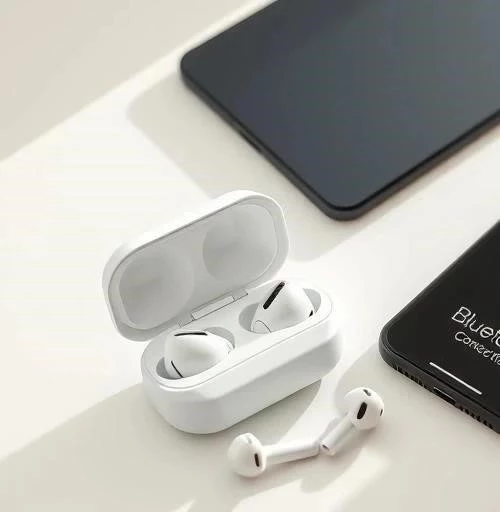
Xiaomi AirDots Pro 2, also sold in some markets as Mi True Wireless Earphones 2, are wireless earbuds with a charging case, touch controls and automatic ear detection. Getting the best from them is straightforward, but the first setup and a few small habits matter: they help prevent pairing problems, accidental pauses and poor battery life. Menu names and gestures can differ slightly by region or firmware, so check the instructions supplied with your exact version if a control behaves differently.
Charge the earbuds and case
Before pairing, place both earbuds in the case and charge the case using its USB-C port. Make sure each earbud sits properly on its charging contacts; an earbud that is not seated may remain uncharged even when the case is connected. Use a suitable USB power source and avoid forcing the cable into the port. The case indicator provides charging or pairing information, although its exact color and behavior can vary between versions. If the earbuds have been unused for a long time, give them time to charge before troubleshooting.
Pair them with a phone
- Open the case with both earbuds inside. On the first connection, the earbuds should enter pairing mode. If they do not, press and hold the case button until the indicator flashes.
- On your phone, open Settings > Bluetooth and switch Bluetooth on.
- Select “Mi True Wireless Earphones 2” or the matching AirDots Pro 2 name in the list, then confirm the connection if prompted.
- For later use, open the case near a phone they have already been paired with. Keep Bluetooth on; the earbuds should reconnect automatically.
Some Xiaomi phones show a pairing pop-up when the case is opened. Treat that as a shortcut, not a requirement: standard Bluetooth settings work on Android and iPhone. If several saved devices are nearby, disconnect the earbuds from the device you do not want to use, because they may reconnect to it first.
Wear them and use touch controls
Put the left and right earbuds in the matching ears and adjust them gently until they feel secure. Avoid pressing hard on the touch-sensitive stems. On common AirDots Pro 2 versions, double-tapping the right earbud controls music playback, while double-tapping the left can call up the phone’s voice assistant. During a call, double-tapping an earbud can answer or end it. Gesture assignments may depend on firmware and phone; test them at a low volume and consult your model’s manual if the behavior differs.
These earbuds generally do not provide a convenient dedicated touch gesture for every function, such as changing volume. Use your phone’s volume buttons or on-screen control instead. This is more reliable than repeatedly tapping and helps avoid triggering playback or the assistant by mistake.
When automatic in-ear detection is supported and enabled, removing an earbud can pause playback, and putting it back may resume it. This feature is useful, but it can be affected by fit, dirt on the sensor or software settings. If music does not pause as expected, pause it manually and check the earbud’s position rather than assuming it is faulty.
Make calls and listen comfortably
For calls, keep the phone within Bluetooth range and speak in a normal voice; the microphones are in the earbuds, so covering them with a hand can reduce clarity. In a noisy place, moving somewhere quieter usually improves the result more than changing settings. Start at a moderate listening level and increase it only as needed. Long sessions at high volume can harm hearing, and open or semi-open designs may let surrounding sound in, so they are not a substitute for hearing protection.
Disconnect, switch devices and reset
To use the earbuds with another phone, disconnect them from the current device, then select them in the new device’s Bluetooth list. If they will not connect, first charge them, toggle Bluetooth off and on, and remove the old earbud entry (“Forget” or “Unpair”) before pairing again.
If ordinary troubleshooting fails, put both earbuds in the case and use the case button to reset them. On many versions, holding it for about 10 seconds clears the pairing state; wait for the indicator to change, then pair again from Bluetooth settings. Button timing and indicator signals can vary, so follow the supplied manual if this sequence does not match your case. A reset removes the old connection and means you must set the earbuds up again.
Care and common fixes
- No sound: check the phone’s audio output, raise the volume, and confirm the earbuds are connected for media audio.
- Only one earbud works: return both to the case, ensure they charge, then reconnect. If needed, reset and pair them together.
- Charging seems unreliable: gently clean the metal contacts with a dry, soft cloth. Do not use liquid or sharp objects.
- Connection drops: keep the phone nearby, avoid obstacles, and disconnect unused Bluetooth devices during testing.
- Audio is uneven: check that the earbuds are seated correctly and clean them carefully according to the manual.
Store the earbuds in their case when not in use, keep them dry, and do not expose them to extreme heat. The simplest routine is also the most effective: charge, pair once, use the right and left gestures deliberately, and return both earbuds to the case after listening. If a problem persists after a reset, verify the exact model name and consult Xiaomi support or the product manual, since AirDots names and instructions vary by market.
9 Comments. Оставить новый
The excerpt is easy to understand, but it stops just as it begins to discuss wearing the earbuds and using touch controls. Completing that section with the exact gestures, plus any model-specific differences, would make the guide more comprehensive.
I appreciate that the article explains both the usual case-button method and the option of pairing through a phone’s Bluetooth settings. The note that Xiaomi’s pop-up is only a shortcut makes the guidance useful for people with other Android phones or an iPhone.
The troubleshooting advice about nearby saved devices is helpful. Automatic reconnection can be confusing when earbuds connect to a tablet or another phone first, so explaining how to disconnect the unwanted device addresses a common real-world problem.
The article balances straightforward instructions with useful cautions, such as not forcing the USB-C cable and checking that each earbud is properly placed. Those small details make the guidance more practical than a basic pairing checklist.
The setup instructions are clear and practical, especially the reminder to check that both earbuds are seated on their charging contacts. That detail can prevent people from mistaking a charging issue for a pairing fault.
The article appropriately avoids treating indicator colors and gestures as identical across every version. Since product names and firmware can differ by market, directing readers to the instructions for their exact model is a sensible qualification.
This is an approachable guide for someone setting up the earbuds for the first time. The ordered steps—charging, opening the case, enabling Bluetooth and selecting the device—make the process easy to follow without assuming much technical knowledge.
A useful and measured introduction to pairing these earbuds. I especially like the distinction between the model names used in different markets, since searching for only one name could otherwise make it harder to identify the correct Bluetooth listing.
The advice to let long-unused earbuds charge before troubleshooting is a useful addition. It helps distinguish a depleted battery from a Bluetooth problem and could save readers from unnecessary resets or repeated pairing attempts.