
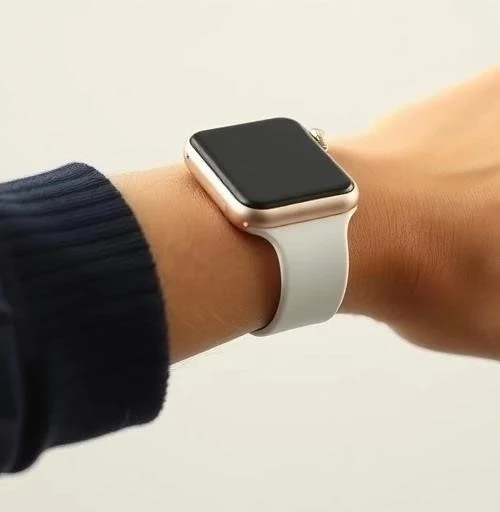
Wearing your Apple Watch correctly helps it feel comfortable, stay secure and collect more reliable health and activity readings. The basic rule is simple: place it against your skin, just above your wrist bone, and adjust the band so it is snug without squeezing. A watch that shifts around may interrupt sensor readings; one that is too tight can irritate your skin or restrict comfortable movement.
Position the watch on your wrist
Put the watch on the top or outer side of your wrist, with the display facing up. Position it just above the wrist bone, toward your elbow. This gives the sensor a flatter area of skin to contact and helps prevent the watch from pressing against the bone when you bend your hand. The case should rest evenly rather than tilt, dig into your wrist or slide toward your hand.
Choose whichever wrist feels natural. In the Watch app on your iPhone, or in the watch’s settings, set the wrist you use and the position of the Digital Crown. These options help the display and controls respond as expected. You can wear the watch on either wrist; it does not have to be on your non-dominant hand.
Adjust the band for a secure, comfortable fit
Close the band so the watch stays in place during ordinary movement, but leave enough room for comfort. You should be able to move your wrist freely, and the band should not leave a painful indentation. The back of the case needs consistent contact with your skin for features such as heart-rate sensing. If the watch slides, tighten it slightly; if your skin feels pinched, numb or irritated, loosen it or take it off.
Fit can change during the day. Heat, exercise and other conditions may make your wrist swell, while cold can make it smaller. Recheck the band if it starts to feel different. After a workout, loosen it a little if you prefer, and clean and dry both your wrist and the watch, especially if sweat or moisture has collected underneath.
Choose a band that suits the activity
- Everyday wear: Use a comfortable setting that holds the watch in place without making it feel restrictive.
- Exercise: A slightly snugger fit can help keep the sensors in contact with your skin while you move. Loosen the band again afterward if needed.
- Sleep: Keep the watch secure enough to remain in position, but not so tight that it disturbs you. Make sure the case and band are clean and dry.
- Warm weather or long wear: Check your skin from time to time and give it a break if it becomes uncomfortable.
Not every band fits every wrist or is intended for every activity. If a band has adjustment holes, try a different hole rather than pulling it uncomfortably tight. For a loop-style band, adjust the overlap so the watch cannot slip off. Follow the band maker’s care instructions, and do not assume that a band is suitable for swimming just because the watch itself has a water-resistance rating.
Attach and remove the band safely
Before putting the watch on, check that the band is securely attached. Slide each band section into its slot until it clicks into place; do not force it if it catches. Gently tug the band to confirm it is locked. To remove it, place the watch face down on a soft surface, press the band-release button on the case, and slide the band out. Never pull a band free without pressing the release.
Check comfort and sensor contact
If readings seem inconsistent, first make sure the watch is positioned above the wrist bone and the back is touching your skin. A loose fit, a case sitting on the bone, or movement during an activity can affect measurements. Tattoos, hair, cold skin and individual differences may also influence some sensor readings. A snug fit can help, but tightening the band excessively is not a solution. The watch is a wellness device, not a substitute for professional medical advice.
Take the watch off if you notice persistent redness, swelling, itching, pain or numbness. Clean the watch and your skin, let the area dry, and try a more comfortable fit. If irritation continues, stop wearing it and consult a healthcare professional. The best fit is secure enough for the watch to work as intended while remaining comfortable throughout the day.

9 Comments. Оставить новый
I like that the article covers cleaning and drying the watch after exercise as well as how to position it. Those small details matter.
This article makes the fit guidance easy to follow without overcomplicating it. The explanation of sensor contact is particularly useful.
I hadn’t considered how wrist swelling throughout the day could affect fit. The suggestions to recheck and adjust the band are useful.
A straightforward and informative read. The reminders about checking for sliding, pinching and pressure make the advice practical.
Useful guidance for everyday wear and workouts alike. I’d be interested in seeing the rest of the section on choosing a band for different activities.
This is a clear, practical guide to getting a comfortable fit. I especially appreciate the reminder to position the watch just above the wrist bone.
The comfort tips are sensible, especially the advice to loosen or remove the watch if it causes irritation or numbness.
The advice about keeping the band snug without squeezing is helpful. It explains the balance between comfort and reliable sensor contact well.
A helpful overview for new Apple Watch owners. It’s good to know that either wrist can be used and the settings can be adjusted accordingly.