
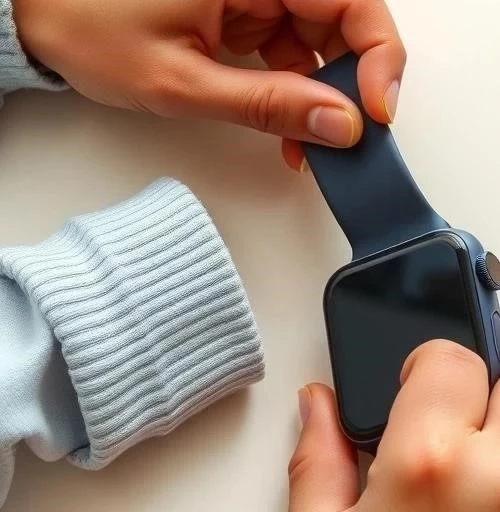
Buying an Apple Watch Series 3 can make sense only if the price is low and the watch suits your needs. It is an old model, so condition, battery life, compatibility and account security matter more than cosmetic appeal. A careful in-person test is worthwhile: a watch that looks clean may still be locked, unable to pair, or too worn to use reliably. Bring your iPhone, allow enough time for setup, and do not pay until the seller has erased the watch and you have checked it yourself.
Confirm the exact model and your iPhone’s compatibility
Series 3 came in 38 mm and 42 mm sizes, with GPS-only and GPS + Cellular versions. Ask which version is being sold and check the model information in the watch’s Settings, under General and About. Compare the model number with Apple’s official identification information if anything is unclear. A cellular model may have a red accent on the Digital Crown, but appearance alone is not proof. Do not assume that cellular service will work: the watch must be supported by your carrier, and a plan may be required.
Most importantly, check that the watch can pair with the particular iPhone and iOS version you plan to use. Series 3 is limited to older watchOS software, and compatibility may be a problem with newer iPhones or current iOS releases. Ask the seller to demonstrate pairing, or verify compatibility with Apple before travelling. If the watch cannot pair with your phone, a low price does not make it a sensible purchase.
Check Activation Lock before handing over money
This is a deal-breaker. Ask the owner to unpair the watch from their iPhone and erase it in your presence. Then begin setup using your own iPhone. If setup asks for the previous owner’s Apple Account password, Activation Lock is still enabled. The seller must remove the watch from their account; do not accept promises to do this later, screenshots, or a claim that a reset has already been completed. A locked watch may be unusable to you, even if every part works.
Wait until the watch reaches the pairing stage with your phone. A watch showing a normal clock face is not proof that it has been removed from the previous account. If the seller cannot or will not complete this check, walk away.
Inspect the case, display and controls
Examine the glass in bright light, looking for cracks, deep scratches, lifted edges, or signs that the screen is separating from the case. Check the display for dead pixels, uneven brightness, flicker, discoloration and touch areas that do not respond. Open several screens and swipe across the entire display, rather than testing only the watch face. A damaged screen can cost more to repair than an older Series 3 is worth.
Turn the Digital Crown in both directions and press it; it should move smoothly and respond consistently. Test the side button, too. Check the case for dents, corrosion, gaps and damage around the microphone, speaker and charging area. Try the speaker and microphone with a sound or voice feature if available. Cosmetic wear may be acceptable, but impact damage or a loose screen is a warning sign.
Test charging and battery condition
Bring a compatible Apple Watch charger and connect it to power. Confirm that the charging symbol appears and that the watch starts charging; a cable that merely looks right is not enough. If possible, leave it connected for several minutes and make sure the percentage rises. Also inspect the back of the watch for cracks or separation, which can indicate damage and may affect charging or sensors.
On the watch, open Settings, then Battery and Battery Health, if that option is available. Check Maximum Capacity and ask how long the watch lasts in ordinary use. A low capacity, unexpected shutdowns, rapid percentage drops, or a watch that becomes unusually hot are reasons to avoid it or negotiate a substantially lower price. Remember that the displayed health figure is not a guarantee: real-world testing matters. Replacing the battery may be uneconomical on such an old device.
Test sensors and everyday functions
Wear the watch snugly and see whether it detects your wrist and records a heart-rate reading. Test the accelerometer by moving your wrist and checking that the display responds. Try the touchscreen, notifications, alarms, and any buttons or features you expect to use. If buying the cellular version, verify that its cellular hardware is functional and ask the carrier whether it can be activated; do not rely on the seller’s description alone.
Ask whether the watch has been repaired, exposed to water, or left unused for a long time. Series 3 was designed with water resistance, but that protection can weaken with age, impacts and repairs. There is no dependable visual check that proves a used watch remains waterproof. Avoid testing it in water; water damage is not worth the risk.
Review the sale and make the decision
Ask for the original purchase proof if available, but treat it as supporting information rather than proof of condition or ownership. Compare the serial number shown in Settings with any box or paperwork, while remembering that packaging can be swapped. Agree in writing on the model, included charger, price and any return period. Prefer a seller who allows a full reset, pairing test and reasonable time to inspect the device.
Before paying, check that the watch is erased, Activation Lock is removed, your iPhone can pair with it, and charging, screen, controls and battery behavior are acceptable. A Series 3 is best viewed as a basic, budget device, not a future-proof smartwatch. If compatibility is uncertain, the battery is weak, or the seller blocks testing, choose a newer model or do not buy. Walking away is usually cheaper than inheriting someone else’s unusable watch.
5 Comments. Оставить новый
The Activation Lock warning is crucial. Having the seller erase the watch and then testing setup with your own iPhone is much safer than relying on screenshots or promises.
This is a practical checklist that appropriately looks beyond cosmetic condition. Battery life and the ability to complete setup matter far more than whether the watch looks clean.
The emphasis on compatibility is especially useful. Since the Series 3 is an older device, checking that it will pair with your specific iPhone before travelling can save both time and money.
The advice to test the watch in person is sound, particularly for an older model. Pairing it with your own phone before paying is a sensible way to confirm it will actually meet your needs.
I appreciate the distinction between GPS-only and cellular models. The reminder that cellular service depends on carrier support helps set realistic expectations before buying.