
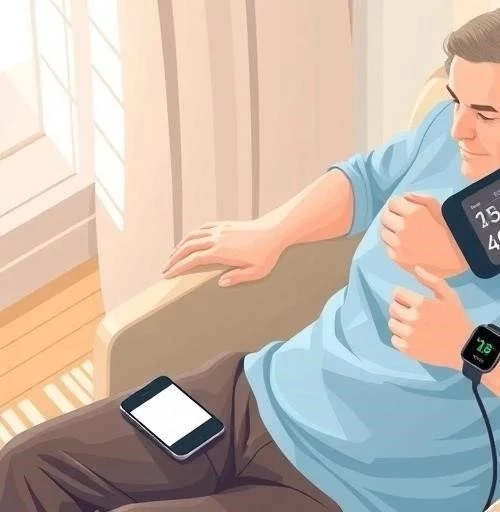
The Apple Watch Series 8 can keep an eye on your pulse‚ record an ECG‚ and notice certain changes in your heart rhythm․ But there is one important number it cannot produce on its own: your blood pressure․ There is no hidden “BP” button‚ secret wrist gesture‚ or watch face that turns the Series 8 into a blood-pressure cuff․
That distinction matters․ Blood pressure is recorded as two numbers‚ such as 120/80 mmHg‚ and a reliable reading requires a pressure sensor that squeezes an artery—usually an inflatable cuff․ The Series 8 has no inflatable cuff and does not directly measure either number․ Its heart-rate sensor‚ ECG app‚ and blood-oxygen feature are not substitutes for a blood-pressure monitor․
What your watch can—and cannot—tell you
- Heart rate: The watch can measure your pulse․ Pulse rate is not blood pressure; one can be normal while the other is high;
- ECG: The ECG app records the electrical rhythm of your heart․ It does not calculate blood pressure or rule out every heart condition․
- Blood oxygen: Where the feature is available‚ it estimates oxygen saturation‚ not pressure in your arteries․
- Health records: You may be able to store blood-pressure readings in the Health app‚ but the watch does not create those readings by itself․
Think of the Series 8 as a notebook on your wrist‚ not a miniature clinic․ It can help you keep useful information close; a proper monitor must supply the blood-pressure measurement․
How to measure pressure with an Apple Watch nearby
Use a clinically validated automatic upper-arm blood-pressure monitor with a cuff that fits․ Some monitors have their own iPhone apps and can send readings to Apple Health; others require you to enter the results yourself․ Compatibility and menus vary by brand‚ region‚ and software version‚ so check the monitor maker’s instructions․
- Prepare for a calm reading․ For about 30 minutes beforehand‚ avoid exercise‚ smoking‚ and caffeine if possible․ Empty your bladder‚ then sit quietly for five minutes․
- Set your posture․ Sit with your back supported‚ feet flat on the floor‚ and legs uncrossed․ Rest your arm on a table so the cuff is roughly level with your heart․
- Put on the cuff correctly․ Follow its instructions; place it on bare skin‚ not over clothing․ Keep still and do not talk during the measurement․
- Take and note the reading․ Many clinicians recommend two readings about one minute apart․ Record both‚ along with the time and any relevant circumstances‚ rather than choosing only the more reassuring result․
- Save it on your iPhone․ If your monitor’s app syncs with Health‚ enable the requested Health permissions․ For manual entry‚ open Health and look under Browse‚ then Heart‚ then Blood Pressure; labels can differ with iOS versions․ Enter the systolic and diastolic values exactly as shown by the monitor․
You can wear the Apple Watch while taking a cuff reading‚ but it is not doing the measuring․ Keep your arm relaxed and follow the cuff maker’s directions; if the watch or a sleeve gets in the way‚ move it or take it off․
Can an app estimate blood pressure from the watch?
Be cautious with apps that promise to turn Series 8 readings into exact blood-pressure numbers without a cuff․ The watch’s sensors were not designed to provide a direct cuffless pressure reading‚ and an app-generated estimate should not be treated as a diagnosis or as a reason to change medication․ If you are considering a special wearable or monitor that claims to estimate pressure‚ ask a healthcare professional whether it is validated and suitable for your needs․
Also‚ do not confuse an irregular-rhythm alert with a high-blood-pressure alert․ They concern different things; A normal pulse‚ a normal ECG result‚ or a lack of notifications does not prove that your blood pressure is normal․
Make the readings useful
A single measurement is a snapshot‚ not the whole story․ Keep a consistent log—ideally at the times recommended by your clinician—and bring it to appointments․ Include the date‚ time‚ both numbers‚ and notes such as stress‚ illness‚ or a missed dose․ Use a correctly sized‚ validated upper-arm cuff and compare its readings with a clinic device if your clinician suggests it․
Do not stop or adjust prescribed medicine because of a number on your watch‚ phone‚ or cuff․ Share your record with your healthcare professional‚ who can interpret the pattern alongside your health history․ If readings are repeatedly outside the range your clinician gave you‚ contact them for advice rather than trying to diagnose yourself with an app․
The bottom line
Apple Watch Series 8 cannot measure blood pressure directly․ Pair it with a suitable cuff monitor—or enter cuff readings into Apple Health—to keep a convenient record․ Let the cuff measure‚ let the watch help organize‚ and let a qualified professional help interpret the results․
If you have a very high reading‚ repeat it after sitting quietly and follow the instructions provided by your clinician or local health service․ If it comes with chest pain‚ severe shortness of breath‚ weakness‚ confusion‚ or another alarming symptom‚ seek emergency medical help immediately; do not wait for your watch to say something․
6 Comments. Оставить новый
Clear, grounded, and refreshingly free of gadget mythology. The best takeaway is simple: let the watch track what it can, and let a validated monitor handle the pressure.
I appreciate the practical clarity here: no secret setting, no clever workaround, just the honest limits of the hardware. That’s more reassuring than a flashy promise.
A useful reminder that numbers can look like cousins without being interchangeable. Pulse, oxygen, and blood pressure each tell a different chapter of the body’s story.
The “notebook on your wrist, not a miniature clinic” line makes the distinction click. A watch can keep the story of your health; it cannot invent a blood-pressure reading.
This reads like a small map through a crowded landscape of health features. Especially helpful is the reminder that storing a measurement is not the same as taking one.
The cuff comparison is the quiet hero of this explanation. It turns an invisible technical difference into something you can picture—and helps prevent a very real misunderstanding.