
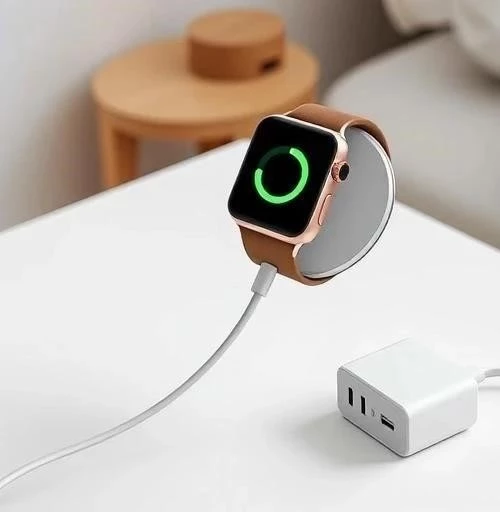
Apple Watch Series 9 charges wirelessly with the magnetic charging cable supplied with the watch or a compatible Apple Watch charger. The watch does not charge through its side button or by placing it on a standard Qi phone-charging pad. For the simplest setup, use the Apple USB-C Magnetic Fast Charging Cable and a USB-C power adapter.
Charging steps
- Connect the charging cable to a USB-C power adapter, then plug the adapter into a power outlet. A USB-C adapter rated at 5 W or more is suitable; a higher-wattage adapter can also be used.
- Place the charger on a flat surface or hold it in your hand. Bring the back of the watch close to the concave side of the charging puck. Magnets align the watch automatically.
- Check that the watch is seated flat and the charging symbol appears on its screen. If the symbol does not appear, reposition the watch and check that the cable and adapter are firmly connected.
With the optional fast-charging cable and a compatible USB-C adapter, Series 9 can charge from zero to about 80 percent in roughly 45 minutes under ideal conditions. Actual time varies with the adapter, cable, temperature, settings, and battery condition. A standard or older compatible charger may charge more slowly. Fast charging is not required; use the accessories available to you.
Useful precautions
- Remove the watch from your wrist before charging. Make sure the back of the watch and the charger are clean and dry. Wipe them with a soft, lint-free cloth if needed.
- Keep the charger and watch in a well-ventilated place, away from direct sunlight and excessive heat. Charging may pause if the watch becomes too hot; allow it to cool before trying again.
- Do not force the magnetic connection, place metal objects between the watch and puck, or use a damaged cable or adapter. Avoid cleaning the device with abrasive materials or liquids.
- If charging is intermittent, unplug the adapter, inspect the cable and outlet, then reconnect everything and realign the watch. Trying another compatible outlet or adapter can help identify the cause;
Checking battery and charging status
When the watch is charging, its display shows a charging indicator. Tap the screen or press a button to view the battery level. You can also check the Battery complication, if it is added to your watch face, or open Control Center and tap the battery percentage. A green lightning symbol indicates that the watch is receiving power.
To check the battery more closely, open Settings on the watch and tap Battery. Battery Health shows the battery’s maximum capacity and relevant service information. Charging overnight is generally convenient: Apple Watch manages charging to reduce battery wear, and Optimized Battery Charging may delay completion based on your routine. Availability and behavior can depend on settings and watchOS.
If the watch remains unresponsive after being connected to a known-working charger, leave it charging for at least 30 minutes, then check the connections again. If it still will not charge, consult Apple Support or an authorized service provider rather than opening the watch yourself.

8 Comments. Оставить новый
The guidance about checking for a charging symbol gives readers a practical way to confirm that the watch is charging.
The charging steps are clearly organized, and the explanation of magnetic alignment is useful for first-time users.
The advice to inspect the cable and outlet if charging is intermittent provides a straightforward troubleshooting starting point.
The precautions about keeping the watch and charger clean, dry, and well ventilated are relevant to everyday use.
The article distinguishes between fast charging and standard charging without suggesting that fast charging is necessary.
The article appropriately describes the 45-minute estimate as dependent on ideal conditions rather than a guaranteed charging time.
The information is presented in a practical sequence, from connecting the adapter to handling common charging issues.
It is helpful to note that a standard Qi phone-charging pad is not suitable for charging this watch.