
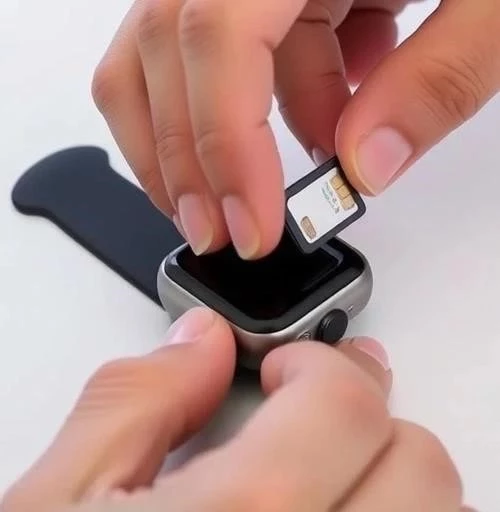
A smartwatch with a SIM card can make calls, send messages, or access mobile data without relying on a nearby phone. The exact installation method depends on the model: some watches accept a physical SIM card, while others use an eSIM that is activated digitally. Before opening the watch, check its user guide or manufacturer’s support page to confirm which type it supports and what size of SIM it requires.
Check the watch and SIM requirements
Look for the model number on the watch, its packaging, or in its settings. Confirm whether the device has a SIM tray or a removable rear cover. If the watch supports a physical SIM, the guide should specify the card format, often nano-SIM, and show the correct orientation. Do not assume that a card which fits one watch will fit another. A card that is too large may not enter the slot; forcing it can damage the contacts or tray.
Check with your mobile carrier that the SIM is active and that its plan supports the watch. Some watches require a separate data plan or a particular network type. If the watch is carrier-locked, a SIM from another provider may not work. For a child’s watch, confirm that the plan includes the functions you need and that the carrier supports the model.
Prepare the watch
- Read the manufacturer’s instructions before removing a cover or tray. Watch designs differ, and some models do not have a user-accessible SIM compartment.
- Power the watch off completely. This reduces the risk of interrupting a connection or damaging the card while inserting it.
- Work on a clean, dry, well-lit surface. Keep the SIM away from water, dust, and static-producing materials.
- If the watch has a removable strap or cover that blocks access, remove it only as described in the manual.
Do not open a sealed watch unless the manufacturer identifies the compartment as user-accessible. Opening a water-resistant case can compromise its seals and may void the warranty. Never insert tools into an opening unless the guide identifies it as the SIM tray release.
Insert a physical SIM card
Find the SIM tray or compartment. It may be on the side of the watch, beneath a small cover, or under the rear panel. If there is a tray with a pinhole, use the supplied ejector tool or the method specified in the guide. Press gently and straight into the release hole. Do not confuse it with a microphone opening; check the diagram first. Pull the tray out carefully and note its shape and orientation.
Prepare the SIM card by checking its size and locating the clipped corner. Match that corner with the outline or diagram on the tray. The metal contacts should face the direction shown in the instructions; the correct side varies by model. Lay the card flat in the tray so it does not stick up or move. If the card is part of a larger punch-out, use only the correct size and make sure its edges are smooth.
Slide the tray back into the watch in the same orientation in which it came out. It should sit flush without force. If it catches, stop, remove it, and check that the SIM is seated correctly and the tray is not reversed. Do not push a loose card into a slot unless the manufacturer specifically instructs you to do so.
For a compartment beneath a rear cover, follow the watch’s manual to open and close it. Position the card as illustrated, then replace the cover evenly. Check that any gasket or seal remains clean, undamaged, and correctly seated. Do not use the watch near water until the cover is securely closed and the manufacturer’s water-resistance instructions have been followed.
Activate an eSIM
An eSIM is built into the watch, so there is no physical card to insert. Activation usually takes place through the watch’s settings, a companion phone app, or a carrier-provided QR code or plan. Connect the watch to Wi-Fi or pair it with the phone if required, then follow the on-screen steps. Use only activation details supplied by your carrier, and do not scan a code from an untrusted source. If you are transferring a plan from another device, check with the carrier first; some eSIM profiles cannot be moved simply by copying them.
Start the watch and check the connection
Turn the watch on and allow it time to recognize the SIM and register with the mobile network. Depending on the device and carrier, you may need to enter a PIN, select network settings, or complete activation in an app. If prompted for a PIN, enter it carefully. Repeated incorrect entries can lock the SIM and require a PUK code from the carrier.
Check the signal indicator and try a basic supported function, such as placing a call or using mobile data when the watch is away from the phone and Wi-Fi. Some watches use the SIM only when Bluetooth or Wi-Fi is unavailable, so test under the conditions described in the manual. Keep in mind that network coverage, plan limits, and regional compatibility affect performance.
Troubleshooting
- No SIM detected: Power the watch off, remove the tray according to the guide, and check that the card is the correct size, undamaged, and seated in the right direction. Reinsert it gently.
- No service: Confirm that the plan is active, the watch is compatible with the carrier, and mobile coverage is available. Restart the watch and check its network settings.
- SIM PIN or activation issue: Use the correct PIN or contact the carrier for help. Avoid guessing a PIN or PUK.
- Tray will not close: Do not force it. Remove the tray and check for a misaligned card, debris, or damage. Seek service if it still does not fit.
If the watch has no physical SIM tray, do not try to pry it open: it may use an eSIM or may not support independent cellular service. When in doubt, consult the model-specific manual or contact the manufacturer or carrier. Careful identification, gentle handling, and correct activation are the safest way to connect a smartwatch to a mobile network.

7 Comments. Оставить новый
The article clearly distinguishes physical SIM cards from eSIMs and emphasizes checking the watch model before attempting installation.
The preparation advice is practical, particularly the recommendation to power off the watch and work in a clean, dry area.
The warning about sealed cases and water resistance is important because opening a watch may affect its protection or warranty.
The reminders to verify SIM size, carrier compatibility, and plan requirements make the guidance useful for avoiding common setup problems.
The article appropriately cautions readers against forcing a SIM card into a slot, which could damage the watch.
The discussion of carrier locks and watch-specific plans adds useful context beyond the physical installation process.
The guidance consistently directs readers to the manufacturer’s instructions, which is appropriate given the differences between watch models.