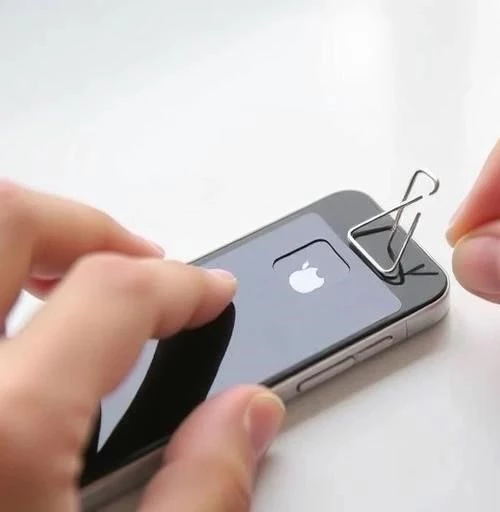
If the SIM tray on a Xiaomi phone needs to be opened but the original ejector pin is unavailable, a small straightened paper clip can usually do the job. The process is simple when the correct opening is identified and gentle pressure is used. Xiaomi models differ, however, so check the location and layout of the tray before starting. The instructions below apply to phones with a removable SIM tray; they do not apply to devices that use eSIM only.
What you can use
The safest substitute is a clean, thin paper clip with one end straightened. Choose one that is narrow enough to fit into the tray’s release opening without force. If you have access to a SIM-eject tool from another phone, that is also suitable. A tool does not have to be branded for Xiaomi, but its tip must fit the opening properly.
Avoid using a sewing needle, pin, knife, toothpick, or other sharp or fragile object. A needle can slip and injure your hand, while a wooden tip may break inside the opening. Thick wire, staples, and oversized clips can also damage the mechanism. Do not use a magnet or try to pull the tray out with adhesive.
Before opening the tray
- Turn off the phone. This is not always required, but switching it off reduces the chance of interrupting a connection or handling the card while the device is active.
- Remove the phone case. A case can cover the tray edge or make it harder to see which opening belongs to the tray.
- Find the SIM tray. On many Xiaomi and Redmi phones it is on a side edge. Look for a narrow, rectangular outline with a small round release hole beside it. The location varies by model.
- Check the opening carefully. Do not confuse the tray-release hole with a microphone opening. The release hole is positioned on or immediately beside the outlined tray. If you cannot confidently identify it, check the phone’s manual or model-specific support information before inserting anything.
Step-by-step instructions
- Hold the phone securely, with the tray edge facing you. Keep the device steady on a clean, flat surface if that makes the task easier.
- Hold the paper clip close to its tip so it does not bend easily. Align the straight end with the tray’s release hole.
- Insert the tip straight into the opening. Keep it perpendicular to the phone’s side rather than pushing at an angle.
- Apply slow, steady pressure. The release mechanism normally needs a firm push, and the tray should move outward slightly. Do not jab, twist, or force the clip.
- Once the tray protrudes, put the clip aside and pull the tray out gently with your fingers. If it does not slide freely, stop instead of levering it with a tool.
- Lift the SIM card from its recess. Note its position and the direction of the cut corner so it can be returned correctly. If the tray holds a memory card as well, keep both cards in their original places.
Putting the SIM card back
Place the card flat in the shaped recess. The cut corner should match the corresponding corner in the tray; the SIM should not need to be bent or pressed down forcefully. Check the tray for labels or diagrams, since some models support more than one card arrangement. Dual-SIM and hybrid trays can have separate positions for two SIM cards or a SIM and a microSD card. The available configuration depends on the particular model.
Slide the tray back into the phone in the same orientation in which it came out. It should enter evenly and sit flush with the frame. If it catches, stop, withdraw it, and check that the SIM is seated correctly. Pushing a misaligned tray can damage the card, tray, or internal contacts. After the tray is fully inserted, turn on the phone and check whether the SIM is detected.
If the tray does not open
- Recheck the location. Confirm that the clip is in the release hole next to the tray, not in a microphone or another opening.
- Check the tool. If the clip is too thick, bent, or blunt, do not push harder. Use a thinner, straight tool designed for ejecting SIM trays.
- Apply pressure in a straight line. Angled pressure may make the release pin slip or prevent the mechanism from moving.
- Look for a case or obstruction. Remove any case and inspect the tray edge for dirt or visible damage. Do not insert liquid or scrape inside the opening.
- Stop if the tray is stuck. Do not pry it out with a blade, tweezers, or a second tool. A jammed or bent tray may need to be checked by a repair service.
Important cautions
Use only light, controlled pressure, and keep fingers away from the tip of the clip; Avoid doing the procedure over a sink or outdoors in strong wind, where a loose SIM card could be lost. Keep the card away from dust, moisture, and static-prone surfaces, and handle it by its edges rather than touching the metal contacts.
If the phone has been dropped, exposed to liquid, or previously repaired, the tray mechanism may not work normally. Do not continue pressing if the release hole or tray looks damaged. Contact Xiaomi support or a qualified phone repair technician instead. Service is also the safer option when the correct opening is uncertain or the tray remains stuck after one careful attempt.
In most cases, a suitable paper clip is enough to open a Xiaomi SIM tray without the original key. Correctly identifying the tray hole, pressing straight and gently, and avoiding improvised sharp tools are the main ways to reduce the risk of damage.