
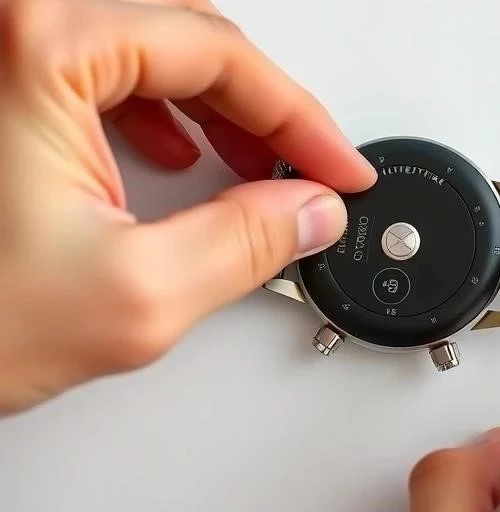
The Galaxy Watch5 Pro uses a quick-release band, so you normally do not need a special tool to take it off. The key is to release the small spring-loaded pin on the underside of the band rather than pulling the strap away from the watch. Work gently to avoid scratching the case or bending the connector.
Before you start
- Place the watch face down on a clean, soft cloth. This protects the glass and keeps the watch from sliding.
- Make sure your hands are dry and that you can see the underside of the band. A bright, even light can help you locate the release tab.
- Unfasten the buckle and loosen the band around your wrist. You do not need to remove the watch band’s buckle or undo the clasp mechanism.
Remove the original band
- Choose one side. Look at where the band meets the watch lug. On the underside of the band, near the connector, find the small sliding quick-release pin or tab.
- Move the release tab inward. Use a fingertip or fingernail to slide or press the tab toward the center of the band. This retracts one end of the spring bar from the hole in the watch lug.
- Lift the band gently. While holding the tab in its released position, angle that end of the band away from the lug. Then ease the other end out of its socket; Do not twist the band sharply or force it.
- Repeat on the other side. Turn the watch if necessary and use the same method for the second half of the band.
The Galaxy Watch5 Pro’s supplied D-Buckle Sport Band may look different from a conventional buckle strap, but the wrist-clasp adjustment is separate from the watch connection. To remove the band, operate the quick-release mechanism at the lug—not the D-buckle’s clasp or adjustment parts. If you cannot see or move a release tab, check the underside carefully before applying pressure.
If the band will not come off
First, check that you are pressing the small pin on the band itself. Pulling the strap without retracting the pin can make it feel stuck; Try holding the watch steady and moving the tab fully toward the center while lifting only the released end. If the band is dirty, wipe around the connector with a dry, soft cloth; grit can make the pin difficult to operate. Avoid knives, needles, screwdrivers, or other sharp objects, which can damage the band, lug, or finish.
If you have a replacement band with a standard spring bar rather than a quick-release slider, use a proper spring-bar tool. Carefully compress one end of the bar and guide it out of the lug. Keep a hand over the bar: spring bars can pop free and be lost. Do not lever a tool against the watch case. If a pin is bent, jammed, or broken, stop and ask a Samsung service center or a watch repair professional for help.
Attach a band again
- Confirm that the replacement band is intended for the Galaxy Watch5 Pro and is the compatible 20 mm width. The connector should sit flat between the lugs without being forced.
- Retract the quick-release pin and place one end of the spring bar into its lug hole.
- Slide the tab inward, lower the other end into line with the opposite hole, then release the tab. You should feel the pin return into place.
- Gently tug the band near the connector and check both ends. Repeat for the other side.
Before wearing the watch, make sure each band half is securely seated and the clasp is fastened properly. If either side shifts, comes loose, or does not click into position, remove it and try again rather than relying on it during exercise. Band removal does not require opening the watch or changing its settings. Handle the watch gently, and never force a connector that does not align.

8 Comments. Оставить новый
Good advice to work one side at a time and keep the release tab held while easing the band away. Clear and sensible.
A handy guide with a useful warning against pulling the strap before releasing the pin. It emphasizes protecting the watch as well as the band.
This makes the removal process sound straightforward without skipping important precautions. I would have found this helpful when changing my strap.
The step-by-step directions are easy to follow, and the advice not to force or sharply twist the band is reassuring.
I appreciate that the guide distinguishes the quick-release pin from the D-buckle clasp. That should prevent a lot of confusion.
Useful explanation for anyone removing the Galaxy Watch5 Pro band for the first time. The lighting tip is a nice practical touch.
The distinction between adjusting the wrist clasp and detaching the band is helpful. The instructions are concise and easy to understand.
Clear and practical instructions. The reminder to use a soft cloth and release the pin rather than pulling on the band is especially helpful.