
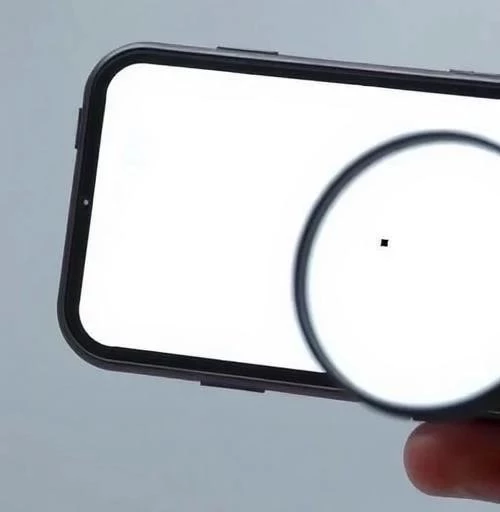
Your screen is a tiny city of lights․ A dead pixel is the one window that stays dark; a stuck pixel may glow red, green, blue, or white when its neighbors change color․ Before you blame the display—or the city—run a calm, careful inspection․
Prepare the screen
Clean the display gently with a soft microfiber cloth․ Smudges, dust, and tiny scratches can impersonate pixel defects․ Remove a screen protector only if it is clearly damaged and you can do so safely․ Turn off auto-brightness, raise brightness to a comfortable level, and inspect the phone in a dim room; Avoid maximum brightness for a long time, especially on an OLED screen․
Paint the display with solid colors
Open a full-screen color-test page or an app that shows plain backgrounds․ You can also display solid images—red, green, blue, white, and black—in the Gallery, hiding the controls if possible․ Examine each color across the whole screen, paying special attention to the edges and corners․ A pixel-sized dot that remains the same while the background changes is worth a closer look․
- Black screen: look for bright dots that refuse to go dark․
- White screen: look for black specks or colored points․
- Red, green, and blue screens: help reveal a subpixel that is stuck on one color․
Move your gaze slowly; don’t press or rub the suspected spot․ A magnifying glass can help, but keep it slightly above the glass․ A defect usually stays fixed in the same physical position, while dust on the surface may shift when you clean it․
Try Xiaomi’s built-in hardware test
Many Xiaomi, Redmi, and POCO models include a diagnostic menu called CIT․ In the Phone app, try entering *#*#6484#*#․ On some devices, ##64663##* works instead․ If a menu opens, choose a display, screen, or color test and follow the prompts․ Codes and test names vary by model and software version; a code that does nothing is not proof that your screen is faulty․
You can also look under Settings → About phone → All specs, then tap Kernel version several times․ On supported phones this opens the CIT tests․ Exit using the on-screen controls; don’t change unfamiliar engineering settings․
Rule out a false alarm
Restart the phone and repeat the color test․ Check whether the mark appears in every app and on the lock screen․ A screenshot offers another clue: view it on a different device․ If the spot appears in the screenshot, the cause may be software or image content․ If it remains on the Xiaomi screen but is absent from the screenshot, the display hardware is more likely involved․
Also distinguish a pixel defect from image retention or burn-in․ A faint icon-shaped shadow that changes or fades may be temporary retention; a fixed pinpoint dot is more consistent with a pixel problem․ LCD and OLED panels can show defects differently, so compare several solid colors rather than relying on one test․
What to do if you find one
Note the color, location, and whether the spot appears on every test screen․ Take photos with another camera, since screenshots cannot capture a physical panel flaw․ If the phone is new or under warranty, contact the seller or Xiaomi support and ask about inspection and the applicable warranty terms․ Pixel-defect policies differ by region and model․ Don’t press the pixel, heat the screen, or install “pixel fixer” apps expecting a guaranteed repair: flashing colors cannot mend a physically damaged panel․
Quick verdict: clean the glass, test full-screen colors, repeat after a restart, and use CIT if available․ One stubborn dot deserves documentation—not a finger jab․ Let the display tell its story, one color at a time․


1 Comment. Оставить новый
A clever little pixel detective kit: the color tests turn the screen into a lineup, and the CIT menu is the witness who may or may not show up. I especially appreciate the reminder not to press the glass—sometimes the best repair tool is simply patience and a steady gaze.