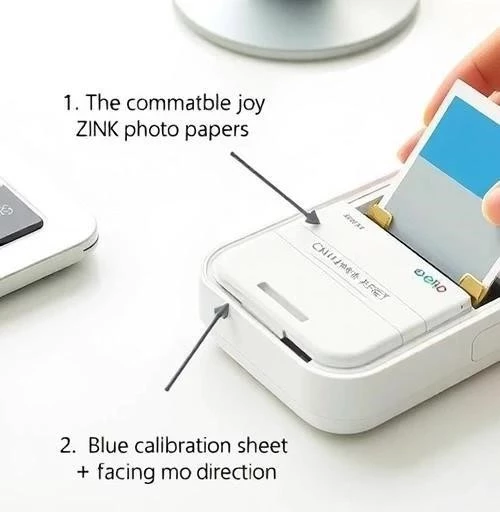
Short answer: In most cases, you cannot refill a Xiaomi mini photo printer’s “cartridge” because it does not use one. Models such as the Mi Portable Photo Printer print on special ZINK paper, which contains the colour-forming materials inside the paper itself. There is no ink tank to top up. What looks like a cartridge is usually the paper pack or its blue calibration sheet.
First, identify what your printer uses
Check the exact model name on the printer, its box, or in the companion app. If the manual specifies ZINK paper, buy compatible paper in the required size rather than ink. The printer heats selected areas of the sheet to create an image, so ordinary photo paper will not work. If your device is a different Xiaomi-branded model that uses a ribbon or cartridge, follow that model’s manual: consumables are not interchangeable.
This distinction matters. Trying to inject ink, open a sealed pack, or insert a homemade refill can damage the print mechanism and produce stains or blank images. It may also affect warranty coverage. Since ZINK paper is the intended consumable, replacing it is safer and more reliable than attempting a refill.
How to replace the paper
- Turn off the printer and open the paper compartment as shown in its manual.
- Remove any remaining sheets. Keep the new pack dry and handle it by the edges.
- Load the ZINK sheets in the direction indicated by the printer or packaging. For many packs, the blue calibration sheet goes barcode-side down, with the printable side correctly oriented. Check the icons for your model rather than guessing.
- Close the cover securely, switch on the printer, and let it feed the calibration sheet if required. Do not pull that sheet out while the printer is working.
- Print a small test image before using more paper.
If prints look poor
Faded colours, streaks, or blank prints do not usually mean the printer needs ink. Confirm that the paper is compatible, correctly oriented, and within its storage date. Keep it away from heat, moisture, and direct sunlight. Check the app for firmware updates and clean the printer only as the manual permits; never pour liquid into the feed slot or scrape the print head.
If a fresh, correctly loaded pack still produces defects, restart the printer and try another sheet. Persistent problems may indicate a paper-pack fault or a hardware issue, so contact the seller or service centre with the model number and a sample print.
Bottom line
For a Xiaomi ZINK mini printer, there is no cartridge to refill: replace the special photo paper. This costs less than risking a damaged device and preserves the print process the manufacturer designed. Before buying supplies, verify the exact printer model and paper size, because the word “mini printer” alone does not identify the consumable.