
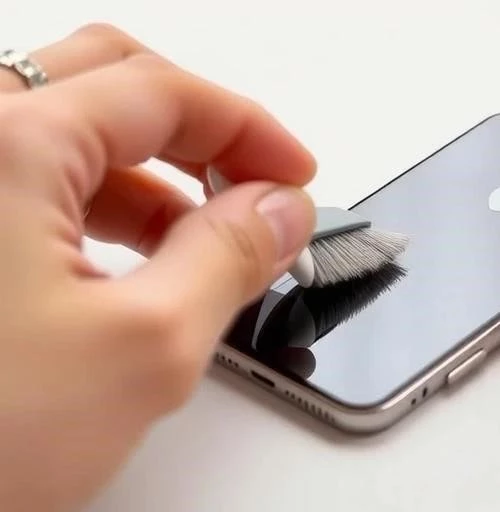
A quiet‚ muffled‚ or uneven sound from a Huawei phone can sometimes be caused by dust‚ lint‚ or dried residue covering a speaker opening․ Careful external cleaning may improve the sound when debris is the cause․ It cannot repair a damaged speaker‚ a loose internal connection‚ or a software fault‚ however․ The safest approach is to identify which speaker is affected‚ remove only accessible surface debris‚ and avoid methods that force dirt or moisture into the phone․
Huawei phones differ by model․ Some have separate openings for the earpiece and loudspeaker; others use more than one speaker for calls‚ media‚ or alerts․ The positions and shapes of the grilles also vary․ Check the user guide for the exact model if the openings are difficult to identify․ Do not assume that every small hole on the frame is a speaker: some openings may belong to a microphone or another component․
Before You Start
- Turn the phone off and disconnect its charger‚ headphones‚ and other accessories․
- Remove the case and any screen protector that overlaps a speaker opening․ Take care not to damage the phone or the protector․
- Work in a clean‚ well-lit area․ Keep liquids‚ food‚ and loose objects away from the phone․
- Use a dry‚ soft‚ clean brush‚ such as a small soft-bristled brush‚ and a clean‚ dry‚ lint-free cloth․
- Check the product documentation for model-specific cleaning and water-resistance guidance․
If the phone has recently been exposed to water‚ do not begin brushing or playing loud audio to test it․ Follow the manufacturer’s instructions for moisture exposure and allow the device to dry as directed․ Water resistance is not permanent‚ and it does not make a phone safe to clean with liquids or to submerge․
Identify Which Speaker Needs Attention
First determine whether the problem affects calls‚ media‚ or both․ If callers sound muffled only when the phone is held to the ear‚ the earpiece opening may be obstructed․ If music‚ video‚ or speakerphone audio is weak‚ check the loudspeaker opening․ A model may route sound through more than one speaker‚ so a difference in volume between modes does not by itself prove that a grille is dirty․
Before cleaning‚ check the volume level and audio settings․ Disconnect Bluetooth devices and wired accessories‚ if present‚ and confirm that sound is not being routed elsewhere․ Test more than one app or audio source at a moderate volume․ If only one app has a problem‚ its settings or the audio source may be responsible․ This simple check can prevent unnecessary handling of the speaker grille․
Safe Step-by-Step Cleaning
-
Switch off the phone
Power the device down before cleaning․ This reduces the chance of an accidental tap or call and helps prevent the speaker from playing while you work․ Do not clean a phone that is connected to power․
-
Inspect the opening
Hold the phone under good light and look at the grille from different angles․ A flashlight can help reveal visible lint or dust‚ but do not insert it or any other object into the opening․ Identify debris that is on the surface rather than trying to inspect the inside of the phone․
-
Brush gently
Hold the phone so the speaker opening faces downward․ With a clean‚ dry‚ soft-bristled brush‚ make light strokes across the grille and away from it․ Use only enough pressure to move surface dust․ Keep the brush bristles at the surface; do not push them through the holes‚ scrape the mesh‚ or scrub back and forth forcefully․
-
Wipe the surrounding surface
Use a dry‚ lint-free cloth to wipe the exterior around the speaker․ Avoid pressing the cloth into the grille․ If the case is dirty‚ clean it separately according to its own care instructions and let it dry fully before putting it back on the phone․
-
Check the result
After the phone is clean and dry‚ turn it on and test the affected audio at a moderate level․ Compare a call‚ media playback‚ and speakerphone only as needed․ If the sound remains distorted or very quiet‚ stop cleaning rather than applying more pressure or using stronger tools․
What Not to Use
Small speaker grilles protect delicate components․ A tool that seems useful for removing compacted dirt can puncture the mesh‚ deform the grille‚ or push debris into the device․ Avoid the following methods:
- Sharp objects: Do not use pins‚ needles‚ paper clips‚ toothpicks‚ tweezers‚ or knife tips․ They can damage the grille or internal parts․
- Compressed air: A forceful air jet can drive dust farther inside or harm components․ Do not blow into the opening with your mouth either; breath carries moisture․
- Liquids and cleaning sprays: Do not pour or spray water‚ alcohol‚ household cleaner‚ or disinfectant into the speaker․ Do not wet a brush or cloth for cleaning the grille․
- Adhesives and sticky putty: These can leave residue‚ pull at the mesh‚ or lodge in the opening․ Avoid tape‚ glue‚ and cleaning compounds that are pressed against the grille․
- Vacuum cleaners: Strong suction may affect small parts or pull at the grille․ Avoid putting a vacuum nozzle directly against the speaker․
- High heat: Do not use a hair dryer‚ heater‚ or direct sunlight as a cleaning or drying method․ Heat can damage the battery‚ display‚ seals‚ or other components․
- Excessive sound or vibration: Do not rely on loud tones or shaking to dislodge debris․ High volume can stress the speaker and may not remove the obstruction․
If the Speaker Is Wet
If moisture has entered or may have entered the phone‚ disconnect accessories and switch the device off if it is safe to do so․ Follow the instructions supplied for the specific model․ Do not charge the phone until the charging port and device are dry as directed‚ and do not insert cloth‚ paper‚ or tools into openings․ Avoid using rice‚ heat‚ compressed air‚ or loud audio as a drying technique․ If moisture warnings appear or the sound remains abnormal after the device has been allowed to dry according to the manufacturer’s guidance‚ contact an authorized service provider․
Water resistance‚ when a model has it‚ applies under defined conditions and can be reduced by wear‚ impact‚ repairs‚ or damage․ It should not be treated as permission to rinse a speaker grille․ If the phone was submerged‚ exposed to salt water‚ or contaminated with a sticky liquid‚ professional inspection is safer than repeated home cleaning․
After Cleaning: Check Other Possible Causes
If gentle surface cleaning does not help‚ the problem may not be dirt․ Check the following before deciding that the speaker needs repair:
- Case or accessory obstruction: Make sure the case‚ a screen protector‚ a mount‚ or a plugged-in accessory is not covering the opening․
- Volume and audio routing: Check the relevant volume control‚ Bluetooth connection‚ and sound-output selection․ Settings and menu names can differ across Huawei models and software versions․
- App or content issue: Test another app‚ recording‚ or media file․ A low-quality source or an app-specific fault can sound like a speaker problem․
- Temporary software issue: Restart the phone and install updates through the device’s normal settings when appropriate․ Back up important data before any major troubleshooting step․
- Damage or wear: A drop‚ liquid exposure‚ persistent crackling‚ or sound that cuts in and out may point to a hardware fault rather than an obstructed grille․
For call-specific problems‚ check whether the issue changes when using speakerphone or a headset․ If the other person cannot hear you‚ the microphone may be involved; cleaning the speaker will not resolve a microphone fault․ Avoid testing by inserting anything into microphone openings‚ which may be located close to speaker openings on some models․
When to Contact Huawei Support or a Repair Provider
Stop and seek professional help if the grille is bent‚ punctured‚ or visibly detached; if debris is lodged beyond the surface; or if cleaning would require opening the phone․ Internal repairs can affect seals and may require model-specific tools․ Do not remove the back cover or attempt to replace a speaker unless qualified and equipped to do so․
Arrange an inspection if sound remains muffled after careful external cleaning‚ the speaker crackles at ordinary volume‚ the phone has suffered a drop or liquid exposure‚ or audio works only intermittently․ Use Huawei support or a reputable repair provider‚ and check warranty terms before authorizing a repair․ Opening or modifying the device yourself may affect warranty coverage or water resistance․
How to Reduce Dust Build-Up
Keep the phone in a clean pocket or bag‚ away from loose lint‚ sand‚ and fine powders․ Clean the case regularly and inspect it for material that could cover the speaker openings․ When working in a dusty environment‚ use a well-fitting case designed for the specific model‚ while making sure it does not obstruct audio․ Do not cover a speaker grille with tape or a homemade filter‚ since this can reduce sound and leave residue․
A short‚ gentle brush when surface dust is visible is safer than frequent deep cleaning․ There is no need to clean the grille on a fixed schedule if it is clear and the audio works normally․ Avoid repeatedly pressing or rubbing the mesh; unnecessary contact can cause wear even when no debris is present․
Frequently Asked Questions
Can I clean a Huawei speaker with a toothbrush?
A clean‚ dry toothbrush may be too stiff‚ especially if it has been used or its bristles are worn․ A small‚ clean brush with soft bristles is preferable․ Use light strokes across the surface‚ keep the phone’s opening facing downward‚ and do not push bristles into the grille․
Can I use alcohol or a damp cotton swab?
Do not put alcohol or other liquid into the speaker opening․ A damp swab can release moisture or fibers into the grille‚ and a cotton swab may press debris inward․ For routine external cleaning‚ use a dry‚ lint-free cloth around the opening and a soft‚ dry brush over its surface․
Will a sound-cleaning tone remove dust?
Some online advice recommends playing a particular tone to clear a speaker․ It is not a substitute for careful surface cleaning and may not remove lint or compacted debris․ Avoid very loud tones and do not use audio playback to dry a phone that has been exposed to liquid․ If the sound is still poor‚ use the troubleshooting steps above or arrange an inspection․
Is it safe to use compressed air from a can?
It is better to avoid it․ The pressure may drive debris into the phone‚ damage delicate parts‚ or introduce propellant or moisture․ A soft‚ dry brush used gently on the outside is the safer home method․
What if the sound gets worse after cleaning?
Stop immediately․ Do not insert more tools or add liquid in an attempt to correct it․ Check that the case is not blocking the opening‚ then test the audio once at a moderate level; If the sound remains worse‚ or if the grille appears damaged‚ contact a repair provider․
To clean a Huawei phone speaker‚ switch off the device‚ remove any obstructing case‚ identify the correct opening‚ and gently brush visible surface dust away with a clean‚ dry‚ soft-bristled brush while holding the opening downward․ Wipe the surrounding exterior with a dry lint-free cloth․ Do not use sharp objects‚ liquids‚ compressed air‚ adhesives‚ heat‚ or force․ If careful external cleaning does not restore normal sound‚ or if the phone has been damaged or exposed to liquid‚ stop and seek model-specific support or professional service․

1 Comment. Оставить новый
The article offers practical, cautious guidance and appropriately notes that cleaning may not resolve problems caused by hardware or software faults.