
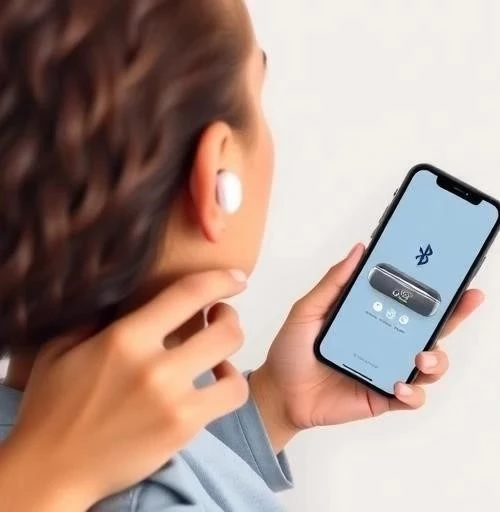
Your Xiaomi earphones may look like tiny pearls‚ buttons‚ or a familiar pair of wired buds. Whatever their shape‚ they have the same mission: turn a pocket-sized device into your personal soundstage. A little setup makes that soundstage easier to reach. Because controls differ between Redmi Buds‚ Xiaomi Buds‚ AirDots‚ and wired models‚ treat this guide as a map—and your model’s manual as the street-by-street directions.
Give them a first charge
For wireless earbuds‚ place each bud in its matching slot in the charging case. Check that the contacts meet and that any protective film has been removed from the buds; a small shipping sticker can prevent charging or pairing. Connect the case to a suitable USB-C cable‚ or use the connector specified for your model. Indicator lights vary‚ so consult the manual to learn what yours mean. Keep the case and earbuds dry while charging‚ even if the earbuds have a water-resistance rating.
Pair them with a phone
- Put both earbuds in the case and open the lid. On many models‚ this makes them discoverable the first time. If yours has a pairing button‚ use the manual’s instructions; some models require holding it until an indicator flashes.
- On your phone‚ open Settings → Bluetooth and switch Bluetooth on. Keep the earbuds and phone close together.
- Choose the Xiaomi or Redmi Buds name shown in the list‚ then approve the pairing request if prompted. When connected‚ the phone should show the earbuds as an audio device.
On some Xiaomi phones‚ a nearby-device pop-up offers faster pairing when you open the case. If it doesn’t appear‚ Bluetooth settings work just as well. On an iPhone‚ use Settings → Bluetooth and select the earbuds there. A Windows laptop or other Bluetooth device can usually connect through its own Bluetooth or “Add device” menu. If the earbuds were previously paired elsewhere‚ disconnect them from that device or put them back into pairing mode.
Make the fit feel effortless
For in-ear models‚ choose the ear-tip size that seals comfortably without pressure; Gently twist each bud into place; a good seal improves bass and helps passive noise isolation. If your model has interchangeable tips‚ try another size if the sound feels thin or a bud slips out. Avoid pushing an earbud deep into the ear canal. For wired Xiaomi earphones‚ plug the connector fully into the phone or adapter and check that the cable is not sharply bent.
Learn the touch language
Touch panels are not universal: a tap on one model may play or pause‚ while another gesture may answer a call‚ skip a track‚ change noise-control mode‚ or summon a voice assistant. Many earbuds use double taps or a press-and-hold‚ but the exact actions—and whether one or both buds respond—depend on the model. Start with a light touch on the flat outer surface‚ not a hard press into your ear. Check the quick-start card or manual before memorizing a gesture.
When supported‚ the Xiaomi Earbuds app can display battery levels‚ change touch shortcuts‚ switch listening modes‚ or install firmware updates. Download the official app from your phone’s app store‚ select your earbuds‚ and follow its on-screen instructions. Features differ by model and region. If the app cannot find your buds‚ first connect them in Bluetooth settings‚ then reopen the app and check that it has the permissions it requests.
Tune the sound to the moment
Start with the phone’s volume low‚ put the earbuds on‚ and raise it gradually. If your model offers active noise cancellation‚ transparency‚ or normal mode‚ choose the setting that suits the scene: cancellation for steady background noise‚ transparency when you need to hear the world‚ and normal mode for everyday listening. Not every Xiaomi model includes these features. Use noise cancellation responsibly near traffic‚ platforms‚ or other places where awareness matters.
If an equalizer is available in the app or your music player‚ make small adjustments rather than turning every slider to maximum. A gentle bass lift can add warmth; a modest reduction in harsh treble may make long listening more comfortable. Keep listening levels sensible and give your ears quiet breaks. Earphones are excellent companions‚ but they should not have to shout.
Calls‚ charging‚ and everyday care
For a call‚ use the earbuds’ configured call gesture or answer on your phone. Speak naturally; the microphones are usually near the outer part of each bud. Wind and crowded rooms can affect clarity‚ so move somewhere quieter if the other person struggles to hear you. To charge wireless buds‚ return them to the case and make sure they sit correctly; The case itself needs periodic charging too; check its indicator or the app for battery information when available.
Wipe the earbuds and charging contacts with a clean‚ dry‚ soft cloth. Keep moisture‚ sharp objects‚ and cleaning liquid out of the speaker mesh and case. If sound becomes quieter on one side‚ inspect the mesh for debris and clean gently—never poke it with a pin. Store the buds in their case when they are not in use; the case protects them and helps prevent them from wandering off like two very small‚ very expensive pets.
When connection or sound misbehaves
- No connection: Charge the buds‚ switch Bluetooth off and on‚ and try selecting them again. If they appear in the phone’s saved devices but will not connect‚ choose “Forget” or “Unpair‚” then pair again.
- Only one bud works: Put both buds in the case‚ check that each is charging‚ close the lid briefly‚ and reconnect. If they still act separately‚ follow the model-specific re-synchronization steps in the manual.
- Choppy audio: Keep the phone nearby‚ reduce obstacles‚ and disconnect devices you are not using. Restarting Bluetooth or the phone can help.
- Still stuck: A reset may clear pairing history‚ but its button or touch sequence varies by model. Use the official manual or app instructions rather than guessing; afterward‚ pair the earbuds again.
A final listening check
Before heading out‚ confirm that both buds are charged‚ fitted comfortably‚ and connected to the intended device. Learn just the gestures you need‚ choose a sensible volume‚ and keep the manual handy for model-specific features. Then press play. The best setup is the one that disappears into the day—leaving only the music‚ the call‚ or the quiet you chose.
1 Comment. Оставить новый
I like how this guide turns Bluetooth setup into a small expedition rather than a wrestling match with menus. The reminder about protective films is especially useful—sometimes the tiniest piece of plastic is the loudest obstacle between you and your soundtrack.