
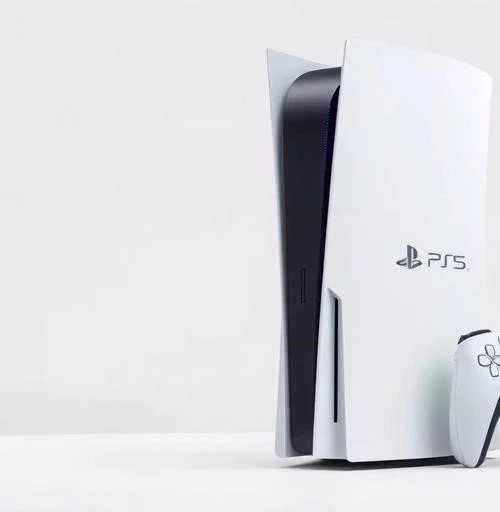
Imagine a game console with a library instead of a shelf. No plastic cases‚ no disc tray‚ no late-night hunt for the game you swore you left beside the television. That is the central idea behind the PlayStation 5 Digital Edition: a PS5 designed to play games downloaded from the internet rather than inserted from a disc.
The name can make it sound like a smaller or less powerful PlayStation. In ordinary use‚ that is not the key difference. The Digital Edition belongs to the PS5 family and offers the same kind of next-generation PlayStation experience as its matching disc-equipped counterpart. What changes is how you buy and access games: the standard Digital Edition has no built-in optical disc drive.
The short answer
PS5 Digital Edition is a PlayStation 5 console for digital games. You purchase games through the PlayStation Store‚ download them to the console‚ and launch them from your library. Depending on your console model and region‚ certain versions may support a separately sold‚ compatible disc drive. Check the exact model before buying one: accessory compatibility is not universal across every PS5 generation.
What “Digital Edition” actually means
A disc-equipped PS5 can play supported physical game discs as well as games bought online. The standard PS5 Digital Edition removes the disc drive. That small-looking hardware difference changes the console’s relationship with games in a big way: your purchases live in your PlayStation account‚ and the console retrieves the game files over a network connection.
Think of it as choosing between a bookcase and an e-reader. Both can take you into the story; one gives you physical editions to lend‚ collect‚ or resell‚ while the other keeps your collection in a digital library. The analogy is not perfect—games can be enormous files‚ and downloads need storage and bandwidth—but it captures the main trade-off.
- Games: Buy and download them from the PlayStation Store. Redeem digital codes only where they are supported and valid for your account’s region.
- Game discs: The standard Digital Edition cannot read them. A disc copy of a PS5 or compatible PS4 game will not work simply because the game is also available online.
- Movies and music on discs: Without a drive‚ the console cannot play Blu-ray or DVD discs.
- Account library: Digital purchases are associated with your PlayStation account‚ subject to Sony’s terms‚ availability‚ and account access.
- Internet: You need a connection to buy and download digital games. Many downloaded games can be played offline‚ but online features‚ licences‚ updates‚ and individual games may require a connection.
Is it less powerful than a regular PS5?
Usually‚ “Digital Edition” describes the presence or absence of a disc drive—not a different tier of gaming performance. Compare like with like: the Digital and disc versions from the same PS5 generation are intended to deliver the same core games and broadly comparable play experience. The drive is not a secret performance turbocharger; it is a way to read physical media.
There are‚ however‚ different PS5 revisions and product configurations. Storage capacity‚ exterior design‚ included accessories‚ and disc-drive arrangements can vary by model‚ market‚ and release period. A newer Digital Edition may not be identical in every detail to an older one. When comparing listings‚ look up the precise model number and official specifications rather than assuming that every product carrying “PS5 Digital Edition” is the same box with a different price tag.
What happens to game ownership?
With a digital purchase‚ you generally access the game through the PlayStation account that bought it. You can download it again later while the game remains available to your account and to the service. This is convenient: there is no disc to misplace‚ scratch‚ or swap. But it is different from owning a physical copy you can hand to a friend or sell.
Digital purchases are not normally transferable to another account‚ and their use depends on account security and Sony’s digital-store policies. Set up two-step verification‚ keep your sign-in details safe‚ and make sure the account’s country or region matches the store you intend to use. Store catalogues‚ prices‚ payment methods‚ and voucher availability can vary by region.
Advantages: why choose the disc-free route?
- A cleaner setup. The console has no built-in disc slot‚ and your games are launched from the home screen. For a minimalist entertainment centre‚ fewer objects can mean less clutter.
- Instant browsing. You can explore the PlayStation Store‚ compare editions‚ and start a download without visiting a shop or waiting for a delivery.
- Your library travels with your account. If you sign in on a compatible PlayStation console‚ your account and eligible purchases can be available there too‚ subject to settings and licence rules.
- No disc swapping. Keep several installed games ready and move between them from the interface. You do not have to get up to change a physical copy.
- Digital deals and subscriptions. Store promotions and PlayStation Plus may offer ways to access games digitally. The catalogue and benefits can change‚ and subscription access is not the same as permanently buying every included game.
Trade-offs: what you give up
The lack of a disc drive is not merely a cosmetic detail. It changes what you can buy and how you can share it. A disc-free console cannot take advantage of a used-game bargain at a local shop‚ borrow a friend’s physical copy‚ or sell a completed disc to recover some of its cost. You also cannot use it as a Blu-ray or DVD player unless you add a compatible drive where the specific model supports one.
Digital buying also makes storage and internet access part of the experience. Modern games can occupy a great deal of SSD space‚ and updates may add more. You may need to remove games you are not currently playing‚ expand storage using supported hardware‚ or wait for a large download. A fast home connection helps‚ but it does not make every download instantaneous.
Digital Edition and PlayStation Plus: are they the same thing?
No. PS5 Digital Edition is hardware. PlayStation Plus is a paid subscription service with benefits that can include online multiplayer for many paid games‚ cloud features‚ and access to a changing selection of games‚ depending on the plan and region. Buying the console does not automatically mean you have a subscription‚ and subscribing does not mean you own every game in a catalogue permanently.
Before subscribing‚ read the current plan details in your country. Games can leave a catalogue; access may depend on an active membership; and free-to-play games often have different online-play rules from paid titles. Treat a catalogue like a lending library‚ not a promise that every game will remain on your personal shelf forever.
Can it play PS4 games?
The PS5 family supports a large selection of PS4 games‚ but the way you access them matters. A digital PS4 game associated with your account may be downloadable on a compatible PS5. A physical PS4 game requires a disc drive to read it‚ so it cannot be used on a standard‚ drive-free Digital Edition. Some newer PS5 Digital Edition configurations may accept a separately purchased compatible drive; confirm that support for your exact model before relying on it.
Compatibility is not a guarantee that every older game or accessory works perfectly. Check the game’s store page or PlayStation’s current support information for details‚ especially if a particular title‚ peripheral‚ or older controller is important to you.
Storage: the invisible shelf
A digital library still occupies real space—just not on a physical shelf. Games are installed on the console’s internal storage‚ and the amount available to you is less than the advertised total because system software also uses space. Capacity differs between PS5 versions‚ so check the specification of the exact console you are considering.
When storage fills up‚ you can uninstall games and download them again later‚ provided they remain available to your account and you have a suitable connection. Supported M.2 SSD expansion can add room for PS5 games when installed to the console’s requirements. External USB storage can be useful for storing or playing compatible PS4 games‚ but PS5 games generally need to be played from internal or supported M.2 storage. Review Sony’s current hardware guidance before buying an expansion drive: speed‚ size‚ and installation requirements matter.
How to decide: a quick buyer’s test
Ask yourself these questions before choosing:
- Do you already own a collection of PS5 or PS4 discs?
- Do you often buy second-hand games‚ borrow games‚ or resell them?
- Would you like the console to play Blu-ray or DVD movies?
- Is your internet connection reliable enough for downloads and updates?
- Are you comfortable keeping your games tied to a PlayStation account?
- Does the Digital Edition save enough money‚ in your local market‚ to justify giving up disc flexibility?
If your existing collection is digital‚ your internet is dependable‚ and you rarely use discs‚ the Digital Edition can be a neat‚ straightforward choice. If you prize used games‚ physical collections‚ or the option to lend and resell‚ a disc-equipped model may be worth the extra cost. Compare the total price‚ not just the console: a cheaper digital machine can become less of a bargain if you regularly miss physical-game discounts.
Buying checklist
- Confirm the model. Read the full product name‚ model number‚ storage details‚ and included accessories.
- Check the drive situation. Is a drive built in‚ absent‚ or available as a separate compatible accessory for this particular revision?
- Compare local prices. Digital-store prices and physical retail discounts can differ substantially.
- Plan your downloads. Consider your internet speed‚ data limits‚ and the space available for games;
- Check the region. Console bundles‚ vouchers‚ payment options‚ and store content may vary between countries.
- Buy from a trustworthy seller. Confirm the warranty‚ return policy‚ and whether the console is new‚ used‚ or refurbished.
Common misunderstandings
“Digital means weaker.”
Not as a general rule. The defining difference is the disc drive. Compare exact generations and models for any changes in storage or design.
“If I can see a game online‚ I can play it offline forever.”
Not necessarily. Downloads‚ licence checks‚ updates‚ online modes‚ and publisher requirements differ. Many games offer offline play after installation‚ but check the specific title rather than assuming.
“A disc-free PS5 cannot ever use discs.”
That is true of a standard model without a drive‚ but certain PS5 revisions may support a separately sold drive. Compatibility depends on the exact model and accessory; do not purchase one based on the name alone.
“PlayStation Plus means I own its games.”
Subscription-catalogue access is conditional and can change. It is distinct from a purchase added to your account library.
The verdict
The Sony PlayStation 5 Digital Edition is a PS5 that asks you to leave the disc case behind. Its appeal is simplicity: browse‚ buy‚ download‚ play. Its compromise is flexibility: physical games‚ lending‚ resale‚ and disc movies are unavailable unless your particular console supports an optional drive and you add one.
Choose it if you want a digital-first console and understand the role of your account‚ internet connection‚ and storage. Choose a disc-equipped PS5 if physical media is part of how you play. Neither choice is automatically the “real” or “better” PlayStation. The right one is the console that fits the library you already have—and the one you want to build next.
Further information
For current console specifications‚ compatible accessories‚ game compatibility‚ and subscription terms‚ consult the official PlayStation website for your region and the exact product listing. Sony’s product pages and PlayStation support pages are more reliable than assuming that a model‚ feature‚ price‚ or catalogue is identical everywhere.

5 Comments. Оставить новый
The bookcase-versus-e-reader comparison makes the buying choice feel less like a spec-sheet puzzle and more like a question of how you want your collection to live.
The model-compatibility warning is the sort of practical detail that can save a buyer from an expensive accessory-shaped surprise.
Clear, calm, and refreshingly free of console-war fireworks: this gives readers a sensible way to decide whether physical discs still belong in their gaming life.
I like that the article treats storage and bandwidth as part of the real-world trade-off. A game library may be weightless, but downloading it certainly isn’t.
A useful reminder that “Digital Edition” describes the door games enter through, not a smaller imagination inside the console.