
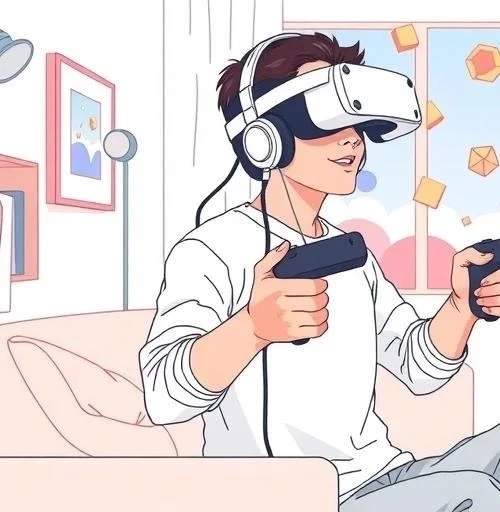
Imagine a game that does not sit politely on a television across the room. Instead, the room seems to fall away, and a new world gathers around you: a cockpit, a haunted corridor, a mountain ridge beneath a vast sky. You turn your head, and the view turns with it. That is the central idea behind PlayStation VR, Sony’s family of virtual-reality gaming headsets for PlayStation consoles.
PlayStation VR is usually shortened to PS VR or PSVR. It is not a console by itself and, unlike a standalone VR headset, it relies on a compatible PlayStation system to run games; The headset provides the view and tracks your movements; the console supplies the computing power, while controllers let you interact with the virtual scene. Put simply: the PlayStation builds the world, and the headset gives you a place inside it.
From watching a game to inhabiting it
On a regular screen, you look at a character moving through a three-dimensional environment. In VR, the screen is worn on your head, close to your eyes. Each eye receives an image from a slightly different angle, creating a sense of depth; The headset also responds as you look up, down, or around. A virtual doorway above you stays above you; a distant object appears to have a place in space rather than merely on a flat panel.
This change sounds simple, but it alters the grammar of play. A racing game can make you feel seated behind a dashboard. A puzzle may invite you to lean closer and inspect a mechanism. In a rhythm game, glowing shapes can sweep toward you from every direction. Even a quiet landscape can feel surprisingly expansive when you can turn around and see it continue behind you.
VR does not magically make every game better. It makes certain kinds of presence possible, and developers build experiences around that feeling. Some titles are complete adventures; others are short experiments, social spaces, exercise games, or special VR modes within a larger game. The experience can be thrilling, funny, peaceful, or gloriously strange—sometimes all within the same evening.
Two generations, two different systems
The name covers more than one headset generation, so it is important to check which PlayStation and which model a game requires.
- PlayStation VR (PS VR1) launched for PlayStation 4. Its library includes games designed for the original headset, and some titles can be played on PlayStation 5 when the appropriate compatibility requirements are met. The original headset uses an external PlayStation Camera for tracking. Depending on the game, players may use a DualShock 4 controller or PlayStation Move motion controllers.
- PlayStation VR2 (PS VR2) is designed for PlayStation 5. It has a newer headset design, inside-out tracking using cameras built into the headset, and dedicated PlayStation VR2 Sense controllers. These controllers can register movement and include features such as adaptive triggers and haptic feedback in supported games;
These generations should not be treated as interchangeable. PS VR2 is not simply an upgraded viewer for every original PS VR game, and PS VR1 accessories do not automatically form a PS VR2 setup. Game compatibility depends on the particular title and platform. Before buying a headset, a used game, or an accessory, check the official product information for the exact model.
What the equipment does
A VR setup is a small team of parts, each with a different job. The headset contains the displays and lenses you look through, along with sensors used to follow head movement. A cable connects it to the console, so it is not a wireless, self-contained computer. The console renders the game and sends its images and sound to the headset. The controllers provide buttons, sticks, and—in games designed for them—motion-based interaction.
Tracking is what helps the virtual view remain steady as you move. The original PS VR uses a camera-based setup, so positioning the camera and keeping its view clear matter. PS VR2 tracks the headset with cameras mounted on the device, reducing the need for a separate tracking camera; Both systems still need enough room for safe movement, and neither can see obstacles that are hidden from the player by the headset.
PS VR2 also adds features intended to make supported games feel more immediate. Eye tracking can detect where a player is looking, and headset feedback can create a subtle physical sensation. Not every game uses every feature, and the effect varies from title to title. They are tools for developers, not a guarantee that every virtual world will feel identical to real life.
How a first session usually works
- Check compatibility. Confirm that the headset, console, game, and controllers belong to the same supported setup. For the original PS VR on PS5, an appropriate camera adapter may be required; check current PlayStation guidance for the details.
- Prepare the space. Move fragile objects, pets, and trip hazards out of the play area. Use the play-area instructions for your model, and leave enough room to stand or turn if the game asks you to.
- Fit the headset carefully. Adjust it until the picture looks clear and the headband feels secure without pressing uncomfortably. Glasses wearers should follow the headset’s fitting guidance and avoid letting lenses rub together.
- Set up the controllers and tracking. Charge or connect the required equipment, follow the on-screen prompts, and make sure the camera or headset has an unobstructed view where needed.
- Start gently. Try a comfortable game or short experience first. Pause when you want to, and take the headset off if you feel unwell.
The setup is not a ritual that must be performed perfectly. It is more like tuning a small instrument: a camera shifted a little, a headset adjusted, or a play area cleared can make the whole experience smoother. Clean lenses only with suitable materials and follow the manufacturer’s care instructions; scratched optics can turn a crisp virtual horizon into a permanent blur.
The library: many kinds of “being there”
PlayStation VR games range from action adventures and horror to racing, puzzles, music, and exploration. Some ask you to move your hands as if they were your own. Others keep the player seated and use a controller. Some place you inside a fully designed VR world; others offer a separate VR mode that changes how a familiar game is viewed. The headset is a format, not a genre, so browsing by mood and comfort level is often more useful than searching for “the best VR game.”
Think of the library as a collection of rooms rather than one enormous amusement park. One room may be a cockpit where distant lights drift past the glass. Another may be a workshop in which the answer to a puzzle is hiding in plain sight, just off to one side. A third may be a calm place to explore at your own speed. Each game sets its own rules for movement, interaction, and comfort, so read its description before jumping in.
Comfort, motion, and safety
Virtual reality can cause eye strain, headache, dizziness, nausea, or disorientation for some people. Sensitivity varies, and a game that feels comfortable to one player may not feel comfortable to another. Smooth movement—where the virtual camera glides continuously—can be more demanding than teleport-style movement or a stationary experience. If you are new to VR, short sessions and regular breaks are sensible. Stop if you feel discomfort rather than trying to “push through” it.
Keep the real room in mind even when the virtual one is more exciting. A headset limits what you can see around you, and turning or swinging a controller can bring you close to a wall, table, or another person. Follow the play-space boundary, secure cables so they do not become trip hazards, and avoid playing near stairs or breakable objects. Children should use the equipment only in line with PlayStation’s age guidance and with appropriate adult supervision.
Is PlayStation VR the same as a television’s 3D mode?
No. A 3D television presents an image on a screen in front of you. VR places a display close to your eyes and changes the view as you move your head. That head-tracked perspective is a major part of the feeling of presence. It is also why VR needs careful fitting, tracking, and play-space awareness: the screen moves with you, but the furniture does not.
Is it worth trying?
PlayStation VR may appeal to you if you enjoy immersive games, want to explore experiences designed around motion and perspective, or are curious about the feeling of looking around inside a digital world. It may be less suitable if you prefer a completely cable-free setup, do not have room for safe movement, or know that head-mounted displays make you uncomfortable; A brief demonstration, where available, can be more informative than a dozen dramatic trailers.
When comparing options, consider the entire setup rather than the headset price alone: console compatibility, required accessories, controllers, available games, storage, and the space you can safely use. If buying second-hand, verify that essential cables and parts are included and that the lenses and headband are in good condition. The exact package and game requirements can differ, so check current official PlayStation information before making a purchase.
The short answer
PlayStation VR is a virtual-reality gaming system that connects a headset to a compatible PlayStation console, letting players look around and interact with specially designed digital environments. The original PS VR belongs to the PS4 generation, while PS VR2 is built for PS5 and uses newer tracking and controllers. Each offers its own compatible experiences and setup.
Its real trick is not simply putting a screen on your face. It is persuading your senses that the game has a direction, a distance, and a world just beyond your reach. You can turn toward a sound, lean toward a clue, or glance up at a sky that seems to go on forever. For a moment, the television is no longer a window. It is the doorway—and you are standing on the other side.


7 Comments. Оставить новый
A welcoming introduction for curious newcomers: vivid enough to spark imagination, grounded enough to set expectations. It leaves me wanting to know which games make the strongest use of that feeling of being somewhere else.
The line about the console building the world while the headset gives you a place inside it is wonderfully crisp. It turns a technical setup into a miniature piece of storytelling.
The examples—dashboard, puzzle mechanism, sweeping rhythm shapes—make the technology easy to picture without burying the reader in specifications. I could almost hear the virtual world switching on.
This explanation avoids treating VR as a magic portal that improves everything. That balance is refreshing: the article celebrates presence, but leaves room for the idea that the right experience matters more than the novelty.
I like the distinction between watching a character and inhabiting a space. It gives the article a strong center of gravity—and makes even the humble act of turning your head sound like a tiny revolution.
There is a subtle cleverness in describing VR as a change in the “grammar of play.” That phrase captures how the player’s body becomes part of the controls, not just a pair of hands holding them.
The image of a room falling away is a lovely doorway into the subject. This piece makes VR feel less like a gadget and more like a new stage for play, while still explaining the practical pieces clearly.