
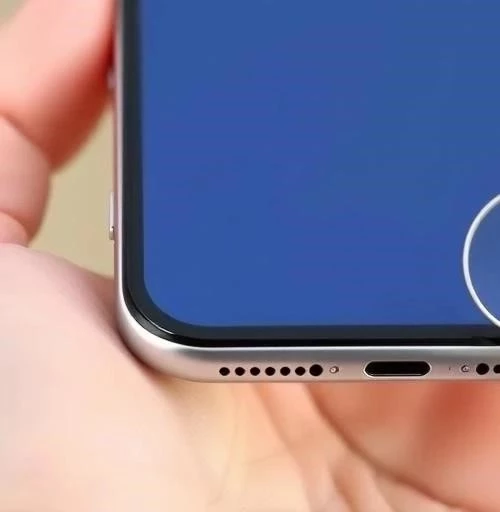
Your Xiaomi is playing a song, but sound seems to come from just one end. Before declaring the other speaker dead, pause the music: your phone may be doing exactly what it was designed to do. A smartphone’s two visible openings do not always mean it has two speakers. The mystery is part hardware, part software, and occasionally a tiny bit of dust.
First clue: two grilles do not always mean two speakers
Many Xiaomi and Redmi phones use stereo sound from two different places: the main loudspeaker at the bottom and the earpiece at the top. The bottom unit usually does most of the heavy lifting. The top one is smaller and may sound quieter, especially when a video has strong bass or you are holding the phone in a noisy room. On some models, one of the openings near the charging port is a microphone, not a speaker. It listens; it does not sing.
Designs vary by model, so check the specifications or manual for your exact phone before judging it. Symmetrical holes can be a visual choice, while their jobs are not symmetrical at all. In stereo mode, the phone may also balance sound differently depending on orientation, content, or the app. A quiet upper speaker during a bass-heavy track is not automatically a fault.
Run a quick sound investigation
- Test more than one source. Play a downloaded video, a ringtone, and a song in another app. If the sound fails only in one app, check that app’s volume, audio settings, and permissions before blaming the phone.
- Check the volume balance. Open Accessibility settings and look for audio balance or left/right channel controls. Make sure the slider is centred and mono audio is configured as you intend. Menu names differ across MIUI and HyperOS versions.
- Disconnect Bluetooth. Your phone may be sending sound to earbuds, a car, a speaker, or a device you forgot was paired. Turn Bluetooth off briefly, then test again.
- Restart and retest. A temporary software hiccup can interrupt audio routing. Restart the phone, then try a call on speakerphone and a media clip.
- Use a built-in hardware test if available. Xiaomi’s diagnostic menus and service tools vary by model and software version. Follow the instructions for your device; do not change unfamiliar engineering settings just to experiment.
When dust, water, or a case gets involved
Pocket lint can muffle a speaker until it sounds as though it has retired. A thick case, screen protector, or misaligned accessory may cover an opening. Remove the case and inspect the grilles under good light. If there is visible dust, use a clean, soft, dry brush and gentle strokes. Keep pins, needles, liquids, and high-pressure air away: a speaker mesh is not a tiny cave that needs excavation.
If the phone was recently wet, sound may be temporarily muffled. Power it down if appropriate, dry the exterior, and let it rest in a dry, ventilated place. Do not heat it with a hair dryer or put it in rice. Water resistance is not a promise that every seal stays perfect forever, and charging or probing a wet device can make matters worse.
Software trouble or hardware failure?
If one channel stopped after an update, install any available official system update and test again. You can also check sound effects, game mode, equalizer settings, and any recently installed audio app. If the issue appears in every app and during calls, reset relevant audio settings if your phone offers that option. Back up important data before attempting a broader reset; a factory reset should be a last software test, not the opening move.
Hardware becomes more likely when the sound disappeared after a drop, liquid exposure, repair, or long period of crackling. A speaker can fail, its connector can loosen, or the mesh can become blocked internally. Distortion, buzzing, intermittent sound, or a channel that stays silent across all tests are useful clues. A technician can inspect the unit without risking damage to the phone.
The sensible verdict
One audible speaker on a Xiaomi can be perfectly normal: the phone may have one main loudspeaker and a quieter earpiece, or an opening you mistook for a speaker may actually be a microphone. First identify the model’s layout, then test several apps, settings, and audio routes. Clean only gently and keep liquids and sharp tools away. If the design promises stereo and one side remains silent after these checks, arrange a professional inspection.
In short: do not count holes; identify what each hole does. Your phone may not be broken—it may simply be letting one speaker take the solo.



6 Comments. Оставить новый
A useful reminder that phone grilles can be tiny impostors. I especially like the advice to check the exact model before diagnosing a speaker by eye.
A refreshing guide that doesn’t assume every Xiaomi is built the same way. The reminder to check audio balance is a small detail with real troubleshooting value.
Practical advice with just enough personality to make it stick. Before reaching for a repair shop, I’ll be checking the app, Bluetooth, and balance settings.
Good troubleshooting starts with curiosity, not a repair bill. Testing different apps and checking Bluetooth are simple steps that can solve a surprisingly mysterious audio problem.
This turns a lopsided sound into a neat little investigation. The distinction between a quieter earpiece and a faulty speaker is especially helpful.
The “it listens; it does not sing” line gives this troubleshooting guide a memorable spark. Clear, practical, and reassuring for anyone ready to declare their phone broken.