
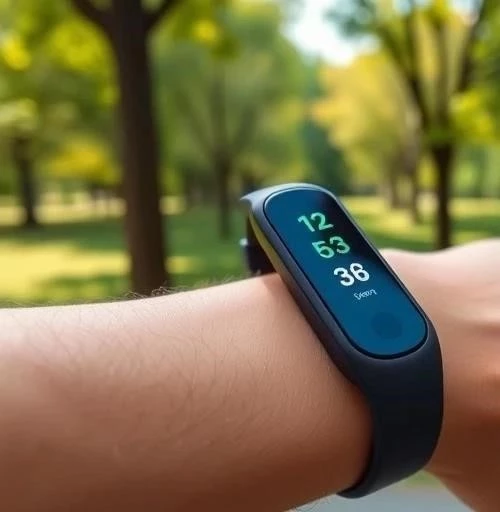
The Xiaomi Mi Band 4 is a lightweight fitness tracker designed to put everyday health and activity information on your wrist․ It can count steps, estimate calories burned, record workouts, monitor your heart rate, track sleep, and display alerts from a paired phone․ Its color touchscreen also makes it useful for quick tasks such as checking the weather, setting a timer, or controlling music․ It is not a smartwatch in the full sense, however: it depends on a phone for many connected features and does not run a broad collection of independent apps․
Released in 2019, the Band 4 is now an older model, but its basic functions remain easy to understand․ What you can use today may depend on your phone, region, firmware, and the companion app available to you․ This guide explains what the tracker does, what it does not do, and what to consider before relying on its measurements․
Screen and everyday operation
The Band 4 has a 0․95-inch color AMOLED touchscreen with a resolution of 240 by 120 pixels․ Compared with earlier Mi Band generations that used monochrome displays, its color screen makes menus, activity information, and watch faces more legible and visually appealing․ You wake the display by raising your wrist or touching the screen, depending on the settings, and navigate by swiping and tapping․ A touch-sensitive button below the display provides a quick way to return to the previous screen or home display․
You can choose from different watch faces, including designs that emphasize the time, date, step count, or other information․ The selection and availability of faces can vary with the app and firmware․ The screen is small, so it is best for brief glances rather than reading long messages or browsing detailed menus․ Brightness can be adjusted, although visibility in strong sunlight is not equivalent to that of a modern smartphone display․
Activity and fitness tracking
At its simplest, the Mi Band 4 counts steps throughout the day․ It also estimates distance and calories, and presents daily activity totals in its menus or companion app․ These figures can help you notice patterns—for example, whether you move more on some days than others—but they are estimates rather than precise measurements․ Step counts may be affected by arm movement, how the band is worn, and the type of activity being performed․
The tracker can record several workout types: outdoor running, treadmill running, walking, cycling, exercise, and swimming in a pool․ Before starting, select the activity on the band and let it collect the session information․ Afterward, the companion app can show a summary and, for supported activities, a record of changes over time․ The available workout details depend on the activity and settings․
The Band 4 does not have built-in GPS․ For an outdoor run or ride, it can use the GPS location provided by a connected phone when the phone is carried and the relevant permissions and connection are enabled․ Without that phone connection, it can still record activity using its own motion sensors, but the route and location-based distance information will be limited or unavailable․ This is an important distinction if you want to leave your phone at home and still receive a mapped route․
Swimming features
Pool swimming is one of the tracker’s more distinctive workout modes․ The band is rated for water resistance up to 5 ATM under specified test conditions, and its swim mode can record information such as duration, pool lengths, estimated distance, pace, and stroke-related data․ Some summaries may include a SWOLF score, a combined indicator based on strokes and time․ Results depend on correctly setting the pool length and on how well the device recognizes your movements․
Water resistance is not a guarantee that every water activity is safe․ The rating is based on controlled conditions; it does not mean the tracker is suitable for scuba diving, high-speed water sports, or every exposure to hot water․ Follow Xiaomi’s care guidance, rinse and dry the band after swimming, and do not operate the touchscreen underwater unless the device’s instructions allow it․ A secure fit also matters, since a loose tracker may record less reliably․
Heart rate and sleep monitoring
An optical sensor on the underside of the capsule measures heart rate by shining light against the skin and detecting changes in blood flow․ You can check a reading manually or configure periodic measurement through the app․ More frequent readings can give a fuller picture of trends, but they also use more battery․ Depending on settings and software, the tracker can provide heart-rate information during workouts and may offer alerts when a measured rate crosses a chosen threshold․
The Mi Band 4 can estimate sleep periods, including approximate sleep duration and stages such as light and deep sleep․ The app displays these records so that you can compare nights and look for broad patterns․ Sleep stages inferred from a wrist device are not clinical measurements: the tracker does not directly measure brain activity, and its estimates can be wrong, especially if the band is loose or you remain still while awake․
Neither heart-rate readings nor sleep summaries should be treated as a diagnosis or as a substitute for medical equipment․ Motion, fit, skin contact, temperature, and individual physiology can affect sensor results․ Use the information as a general wellness reference, and speak with a qualified health professional if you have a medical concern․
Phone notifications and music control
When paired with a compatible phone over Bluetooth, the Band 4 can show notifications from selected apps․ It can display incoming-call information, texts, and other short alerts, depending on the phone’s operating system, app permissions, and notification settings; Vibration lets you notice an alert without taking the phone out of your pocket․ You can generally dismiss or silence an incoming call from the band, but you cannot have a normal voice conversation on it: the tracker has no microphone or speaker for calls․
Notifications are best for quick previews․ The small screen is not suited to long messages, and notification features do not turn the band into a two-way messaging device․ It cannot independently send texts, browse the web, or install a full range of phone apps․ If alerts fail to arrive, check Bluetooth, notification access, background app permissions, and battery-saving settings on the phone․ Exact menus differ between Android and iOS and between software versions․
The band can also act as a basic remote control for music playing on a connected phone․ Depending on the player and setup, you can pause or resume playback, skip tracks, and adjust volume․ The music continues to come from the phone or its connected headphones; the Mi Band 4 does not store and play a music library by itself․ This makes the feature handy for a run or commute when the phone is nearby, but it does not replace a standalone music player․
Useful small tools
In addition to fitness functions, the Mi Band 4 includes several simple utilities․ Depending on the paired app and firmware, these can include alarms, a stopwatch, a countdown timer, a weather display, and a “find phone” function that makes a connected phone ring or vibrate․ Some versions also offer reminders to move after a period of inactivity․ The tracker can show the date and time and can be used to check basic information without unlocking the phone․
These tools are intentionally simple․ An alarm or timer is convenient for a quick task, but the band is not a full personal assistant․ Weather information normally needs a phone connection and location or weather data configured through the app․ The phone-finding function also depends on the phone being within Bluetooth range and connected; it cannot locate a lost phone across town․
Battery, charging, and connection
Xiaomi advertised battery life of up to 20 days for the Mi Band 4․ That figure is a best-case estimate, not a promise for every owner․ Actual endurance varies with heart-rate frequency, screen brightness, notifications, workout use, and other settings․ Continuous or frequent measurements and a busy notification stream can shorten the time between charges․ The 135 mAh battery is rechargeable, and the tracker uses a dedicated charging cradle․ The capsule must be removed from the wristband and placed in the cradle; it does not charge wirelessly from a standard phone charger․
The Mi Band 4 uses Bluetooth Low Energy to communicate with a phone․ Initial setup requires pairing and a compatible companion application․ The original Mi Fit app has since been renamed Zepp Life in many markets, but availability and support can change over time․ Check the current app listing and phone compatibility before buying a used device․ A tracker that was previously linked to another account may need to be unpaired or reset before a new owner can set it up․
Models, NFC, and payments
There are versions of the Mi Band 4 with and without NFC․ NFC availability does not mean that every Mi Band 4 can make contactless payments․ Payment support depends on the exact hardware variant, country, bank, payment service, and software configuration․ Some NFC functions were designed for particular markets and services, and a version sold in one region may not support the payment system used in another․ Confirm the model number and local compatibility rather than assuming that the word “NFC” guarantees usable payments․
What the Mi Band 4 cannot do
- It cannot track a route by itself․ There is no built-in GPS, so phone-assisted location is needed for mapped outdoor workouts․
- It cannot make standalone calls․ It has no cellular connection, microphone, or speaker for phone conversations․
- It is not an independent music player․ Music controls operate playback on a connected phone; the band does not function as a storage device for songs․
- It does not offer a general app store․ Its features are the functions provided by its firmware and companion app, rather than a smartwatch-style ecosystem․
- It is not a medical monitor․ Heart-rate and sleep data are wellness estimates, not a diagnosis or emergency warning system․
- It cannot guarantee every notification or payment feature․ Phone settings, region, hardware version, and service support all matter․
Is the Xiaomi Mi Band 4 still useful?
The Mi Band 4 can still be useful if you want an inexpensive, lightweight device for step counting, basic workout records, wrist notifications, and simple daily tools․ Its color screen and pool-swimming mode were notable features for a budget tracker, and its battery can last substantially longer than that of many full-featured smartwatches when configured conservatively․ It is particularly suitable for someone who wants a quick glance at activity and alerts rather than a miniature phone on the wrist․
Its age is also important․ A newer tracker may offer improved sensors, a brighter or larger display, more workout options, better app support, or built-in GPS․ Before purchasing a second-hand Band 4, check battery condition, charging accessories, account pairing, compatibility with your phone, and whether the functions you need work in your region․ A worn battery or an unsupported app can matter more than the original advertised specifications․
Frequently asked questions
Can the Mi Band 4 answer calls?
It can show an incoming-call alert and may let you reject or silence the call․ It cannot answer it as a hands-free conversation because it has no microphone or speaker․ You need the phone or another audio device to speak and listen․
Can I swim with it?
The device has a 5 ATM water-resistance rating and includes a pool-swimming mode․ Follow the manufacturer’s guidance, set the pool length correctly, and remember that water resistance does not make it suitable for every depth, temperature, or water sport․
Does it work without a phone?
It can show the time and perform some locally available tracking and tools without a nearby phone․ However, setup, syncing, phone notifications, weather updates, phone-assisted GPS, and some settings depend on a compatible paired phone․ It is not a fully independent smartwatch․
How accurate are its health and activity readings?
They are useful for approximate everyday trends, not guaranteed exact values․ Wear the band snugly, keep its sensor clean, and interpret changes in context․ For medical decisions, use appropriate clinical equipment and professional advice․
Bottom line
The Xiaomi Mi Band 4 can count steps, estimate activity, track several workouts, monitor heart rate and sleep, record pool swims, show phone notifications, control phone music, and provide basic tools such as alarms and timers․ It combines those features with a color AMOLED screen, a light design, and potentially long battery life․ Its main limitations are just as clear: no built-in GPS, no standalone calls or music, restricted app capability, and measurements that are not medical-grade․ Think of it as a practical fitness band for everyday tracking—not as a full smartwatch or health instrument․

8 Comments. Оставить новый
A helpful introduction for someone who has never used a Mi Band. The explanations of the display and navigation are straightforward and easy to follow.
The article avoids presenting step counts and heart-rate readings as perfect measurements, which is important. I would be interested in seeing more detail about tracking accuracy.
This gives a useful snapshot of what the Band 4 can do for everyday activity tracking, while making clear that it is an older model.
A concise and sensible guide. The note that many connected functions depend on a paired phone is a good point for prospective buyers to keep in mind.
The distinction between a fitness tracker and a full smartwatch is useful. It sets realistic expectations for anyone considering this older device.
This is a clear, balanced overview of the Mi Band 4. I especially appreciate the reminder that its features and app support may vary depending on the phone and region.
The explanation of watch faces, brightness, and sunlight visibility adds helpful everyday context. It makes the device sound practical without overstating its capabilities.
I like that the article explains both the practical features and the limitations of the small screen. The advice about checking current app compatibility is particularly relevant.