
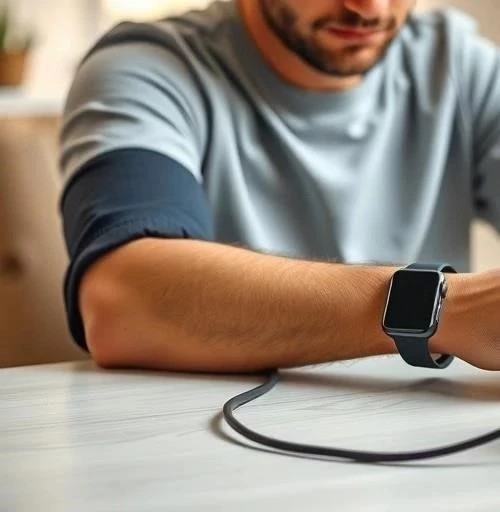
The short answer: An Apple Watch cannot take a blood-pressure reading on its own. It has no inflatable cuff, and its optical sensors do not measure the force of blood against artery walls. The watch can help you notice certain health patterns and keep a record, but for actual blood-pressure numbers you need a separate, validated monitor.
That distinction matters. A watch face may show a heart rate of 72 beats per minute; it cannot turn that number into “120 over 80.” Heart rate and blood pressure are different measurements, and there is no dependable formula or watch-only app that converts one into the other. If an app promises precise systolic and diastolic readings using only your wrist, treat the claim cautiously.
What the watch may tell you instead
On supported models and software, Apple Watch may offer hypertension notifications. This feature looks for patterns that could be associated with chronic high blood pressure over time. It does not take a cuff-style measurement, display your systolic and diastolic values, or diagnose hypertension. Availability depends on the watch, software, location, and eligibility requirements; check the Health app and Apple’s current support information for details.
Think of a notification as a smoke alarm, not a thermometer: it can be a reason to check, but it is not the measurement itself. If you receive one, arrange proper readings with a blood-pressure monitor and discuss the results with a healthcare professional. No notification does not prove that your blood pressure is normal, and a notification alone does not establish a diagnosis.
How to get a real reading
Use a clinically validated automatic upper-arm cuff that fits your arm. Many Bluetooth monitors can send readings to an iPhone app or Apple Health, though compatibility varies. A regular monitor works too: you can record its result manually. The Apple Watch can be your reminder and logbook; the cuff does the measuring.
- Prepare. For 30 minutes beforehand, avoid exercise, smoking, and caffeine. Empty your bladder if needed. Sit quietly for five minutes before measuring.
- Settle into position. Sit with your back supported, feet flat on the floor, legs uncrossed. Put the cuff on bare skin, following its instructions. Rest your arm on a table so the cuff is roughly level with your heart. Don’t talk or use your phone during the reading.
- Take two readings. Follow the monitor’s instructions, then wait about one minute and measure again. Write down both results, along with the date and time. A clinician may recommend a particular schedule; follow that advice.
- Save the numbers. In the iPhone Health app, look under Browse → Heart → Blood Pressure and choose the option to add a reading. Menu names can vary by iOS version. If your monitor’s app supports Health sharing, connect it in the app or Health settings and confirm that readings are syncing.
Make the Watch useful without asking it to be a cuff
Set a repeating reminder to take readings at the times your clinician recommends. Keep the watch snug enough for normal tracking, but don’t tighten it painfully or try to wrap it around the upper arm. You can use your iPhone or Watch to review reminders and trends, while the cuff provides the blood-pressure values. Consistent conditions make a home log more useful than a scatter of readings taken after rushing upstairs or during a stressful call.
For a clearer record, note anything that may affect a result: a missed dose, illness, unusual stress, or a reading taken at a different time than usual. Don’t change medication based on a single measurement or an app message. Share repeated readings with your clinician, who can interpret them in context and advise what to do next.
Common traps to avoid
- Confusing pulse with pressure: a heart-rate number is not a blood-pressure reading.
- Trusting watch-only “calibration” as a permanent substitute: a cuff may be used in some device setups, but calibration does not make the Watch itself a standard cuff monitor.
- Measuring over clothing or with the wrong cuff size: either can make results less reliable.
- Reacting to one number: rest and repeat an unexpected reading, then follow medical guidance rather than self-diagnosing.
When to seek help
Blood-pressure thresholds and next steps depend on your health and local medical guidance. If readings are repeatedly high, contact a healthcare professional and bring your log. If a very high reading occurs with chest pain, shortness of breath, weakness, confusion, vision changes, or another severe symptom, seek emergency care. Do not wait for your Watch to confirm what you feel.
Bottom line: Apple Watch is a helpful companion for reminders, health records, and—in eligible cases—pattern-based notifications. It does not directly measure blood pressure. For trustworthy numbers, use a validated cuff, measure carefully, and let a clinician help interpret the results.


6 Comments. Оставить новый
The “smoke alarm, not a thermometer” comparison makes the distinction memorable without making the technology sound useless. A clear, reassuring guide for anyone tempted to trust a watch-only blood-pressure app.
This article does a good job puncturing a seductive bit of tech mythology without scolding the reader. I especially liked the distinction between a pattern-based notification and an actual cuff reading.
Clear, careful, and useful: it explains what the watch can do, what it cannot do, and what to do next. The practical steps help turn a vague health worry into a sensible plan.
A refreshingly grounded health-tech explainer. The advice to check current eligibility and compatibility details is a small but important touch, since features and devices can change faster than a wristband.
The watch-as-reminder-and-logbook idea is a useful reframing: it gives the device a role without asking it to be a doctor. Sensible, approachable guidance, especially the reminder that no notification is not proof of normal blood pressure.
I appreciate how this separates heart rate from blood pressure—two numbers people often bundle together as if one could magically explain the other. The practical advice about using a validated cuff gives the article a solid landing.