
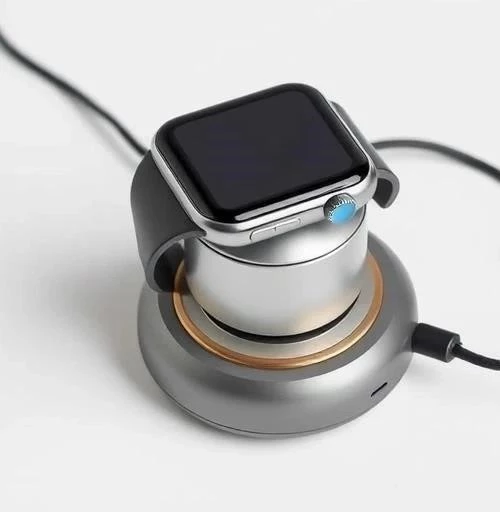
Short answer: An Apple Watch Series 3 cannot be charged without a compatible magnetic charging puck or cable. It does not charge on an ordinary Qi wireless pad, from the back of an iPhone, or through its band. If the original charger is missing, the safe solution is to borrow or obtain a replacement Apple Watch charger.
What the watch needs
The Series 3 has a charging surface on its back that connects magnetically to the round charging module made for Apple Watch. The cable’s other end connects to a suitable USB power source. Depending on the cable, that source may be a USB-A or USB-C power adapter, a computer port, or a power bank. The power source alone is not enough: the magnetic watch-charging module is essential.
A standard wireless charging pad designed for phones uses a different charging system and will not charge the Series 3. The same is true of most multi-device pads unless they have a clearly identified Apple Watch charging puck. Placing the watch on a phone or another watch’s charger is not a dependable substitute.
Practical options when the charger is unavailable
- Borrow a compatible Apple Watch cable; Ask a friend, family member, hotel reception, or workplace. Series 3 uses the Apple Watch magnetic charging connector; a compatible charger for another Apple Watch generation will generally work.
- Buy a replacement. Choose an Apple charger or a reputable, certified third-party product that explicitly supports Apple Watch. Check that the package includes the magnetic charging module, not merely a USB adapter or a phone-sized wireless pad.
- Use a power bank with a built-in watch puck. Confirm that it is intended for Apple Watch and is compatible with the Series 3. A regular power bank with USB ports still needs a separate watch charging cable.
- Ask an Apple service provider. If the watch will not charge even with a known-good compatible cable, an Apple Store or authorized service provider can help check the cable, power source, and watch.
How to charge it once you find a cable
- Connect the cable to a working USB power source.
- Place the back of the watch against the magnetic puck. It should attach and align naturally; do not force or twist it.
- Look for the charging symbol on the watch screen. If the battery is completely depleted, the display may take a few minutes to respond.
- Leave the watch on the puck and check that the connection remains secure. If no charging indicator appears, reposition it and try another outlet or adapter.
Avoid improvised methods
Do not try to charge the watch by connecting wires directly to its back, using exposed contacts, heating it, or placing it on an unverified magnetic or wireless device. Do not use damaged cables or adapters, and stop if the watch or charger becomes unusually hot. Improvised methods can damage the battery, cause overheating, or create an electrical hazard. The Series 3 does not have a user-accessible charging port for an ordinary USB cable.
If you have no compatible charging puck, there is no reliable cable-free workaround. Keep the watch powered off if possible and arrange access to a proper charger. If the battery is merely low, reducing use may preserve the remaining charge, but it will not recharge the device.



2 Comments. Оставить новый
The article clearly explains why an Apple Watch Series 3 requires a compatible magnetic charging puck and distinguishes it from ordinary wireless phone chargers.
The suggested options for finding a replacement charger are practical. The final section appears cut off, which leaves the article incomplete.