
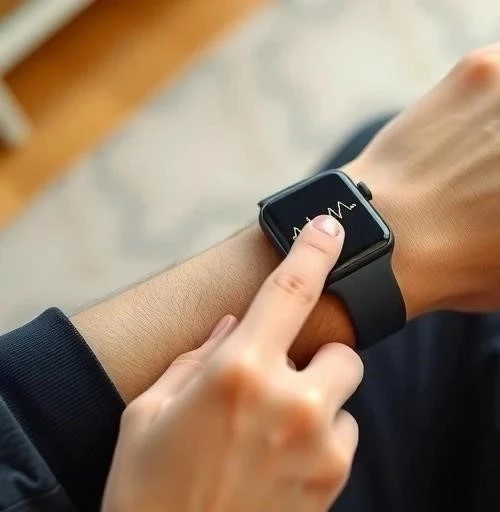
Your Apple Watch Series 5 can turn a fingertip and a quiet half-minute into a small window on your heart’s rhythm. The ECG app records an electrocardiogram; it does not make a diagnosis or replace a clinician. To switch it on, you’ll need a compatible iPhone, the paired watch, and access to the feature in your country or region.
Before you begin
- Check the model: ECG is available on Apple Watch Series 4 and later, so Series 5 supports it.
- Check age and location: The ECG app is intended for people aged 22 and older, and availability varies by country or region.
- Update both devices: Install the latest iOS and watchOS versions offered for your iPhone and watch. Keep the watch paired and connected to the iPhone during setup.
- Finish Health setup: Make sure your basic information, including your date of birth, is correct in the Health app.
Set up the ECG app
- Open the Health app on the iPhone paired with your Apple Watch.
- Tap Browse, then choose Heart.
- Find Electrocardiograms (ECG) or Set Up ECG App, and follow the instructions on screen. You may be asked to enter or confirm your age.
- When setup is complete, look for the ECG app on your watch. If it isn’t visible, use the watch’s app list or search on the paired iPhone for ECG setup options.
Menu labels can vary slightly with software versions. If the setup option is missing, check that the watch is Series 4 or later, both devices are updated, the correct iPhone is paired, and ECG is supported in your region. Restarting both devices and opening Health again may help. If it still won’t appear, consult Apple Support rather than installing an unofficial app.
Take a reading
- Wear the watch snugly on your wrist. Sit down, rest your arms on a table or in your lap, and try to stay still.
- Open ECG on the watch.
- Rest a finger from your other hand lightly on the Digital Crown. Don’t press or turn it.
- Hold still until the 30-second recording finishes. The result appears on the watch and is saved in the Health app.
The watch uses electrical contact between your wrist and the finger on the crown to record a single-lead ECG. Dry skin, a loose fit, movement, or nearby electrical interference can affect the trace. If you see an “Inconclusive” or poor-recording result, check the fit, relax your hands, and try again. A reading is a snapshot, not a continuous heart monitor;
Understand the result—and its limits
The app may label a recording as sinus rhythm, atrial fibrillation (AFib), high or low heart rate, or inconclusive. These labels are not a diagnosis. The ECG app cannot detect a heart attack, stroke, blood clot, or many other heart conditions, and it does not identify every episode of AFib. It is not intended for people under 22 or for diagnosing AFib in someone who already has that diagnosis.
If you feel chest pain, faintness, shortness of breath, or another urgent symptom, seek emergency medical care—even if the watch reports a normal result. For a concerning reading, recurring symptoms, or questions about your heart, share the saved ECG PDF with a healthcare professional and ask for advice.
In short: set up ECG in the iPhone’s Health app, then record from the watch by resting a finger on the Digital Crown for 30 seconds. Let the watch collect the trace; let a clinician interpret what it means.



1 Comment. Оставить новый
A clear, reassuring guide that treats the ECG as a useful signal, not a crystal ball. The quiet reminders to sit still, check regional availability, and seek Apple Support instead of dubious downloads make this practical advice feel grounded and trustworthy.