
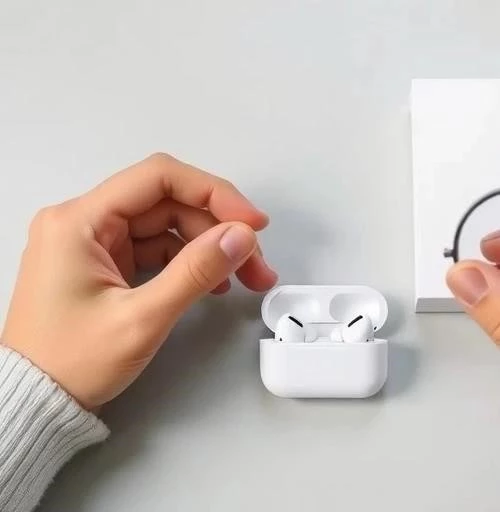
Redmi AirDots 2 are often sold through online marketplaces and independent shops, where counterfeit or incorrectly described products may appear. Packaging, a QR code, a serial number, build quality and normal operation can all offer useful clues, but no single feature proves authenticity on its own. Packaging can be copied, and genuine products may have small differences between production batches or regional versions. Use several checks together and buy from a seller who can provide a receipt and accept returns.
Check the seller and listing
Before opening the box, review the seller’s identity, ratings, return policy and product description. Be cautious if the price is far below the usual local price, the listing uses vague wording such as “same quality,” or the seller cannot explain the source of the stock. Confirm that the listing identifies the product as Redmi AirDots 2 and does not substitute another model, such as AirDots S or a different generation. A marketplace badge or a polished listing is not, by itself, proof that the item is genuine.
Inspect the box and labels
Look for clean printing, legible text, consistent colours and a securely applied product label. Compare the model name and product information with reliable images or documentation for the same regional version. Poor print quality, spelling mistakes, blurry logos, damaged seals or labels placed over other labels can be warning signs. However, packaging may differ by market, language and production run, so a minor layout difference alone does not establish that a product is counterfeit.
Check whether the box has a QR code, security code or serial number. Scan the code with the phone’s camera, but inspect the destination before opening it: it should lead to an official Xiaomi or Xiaomi-affiliated verification page, not an unrelated website. If the code opens a suspicious address, requests unnecessary personal information, or directs you to install an unknown application, do not proceed. A copied QR code can be printed on counterfeit packaging, so a successful scan is only one part of the assessment.
Use the official authenticity check where available
If the package provides a verification code or serial number, use Xiaomi’s official product-authentication service for your country or region. You can reach the service through a verified Xiaomi website rather than relying only on a link printed on the box. Enter the requested code exactly as shown and follow the site’s instructions. Some verification systems may ask for a security code from a scratch-off area; do not confuse that code with a QR code or ordinary barcode.
A result indicating that a code is valid is useful, but it is not conclusive. Counterfeit sellers may copy a valid code, and a code may have been checked before. If the service reports that the code is invalid, has already been queried unusually often, or does not match the model, keep a screenshot and contact Xiaomi support or the seller. Verification pages and procedures can change, and may not support every regional batch. Do not treat an IMEI as a normal identifier for these Bluetooth earphones: they generally do not have a mobile-network IMEI. Use the serial or security code requested by the official service.
Examine the earbuds and charging case
Take the earbuds and case out and inspect them in good light. On a genuine, well-made unit, the case should close properly, the lid should not feel excessively loose, and the earbuds should sit securely in their charging positions. Look for uneven seams, rough edges, excess glue, mismatched plastic, poorly aligned parts or lettering that is faint or irregular. Check that the charging contacts are clean and positioned consistently. Obvious gaps or a poorly fitted charging port may indicate a copy, though wear or damage can also affect a genuine product.
Compare the shape, controls, indicator lights, port and printed markings with reliable photographs or product documentation for Redmi AirDots 2 specifically. Do not rely on comparisons with a different AirDots model: similar products can have different details. Assess the overall finish rather than expecting one exact shade or a particular packaging insert. Small cosmetic differences can result from regional packaging or production changes, while multiple clear defects together justify further checks.
Test charging, pairing and sound
Charge the case and earbuds using the instructions supplied with the product. Confirm that the earbuds make contact with the charging pins and that the case’s indicator behaves consistently with the manual. Then pair them through the phone’s Bluetooth settings. Check that both earbuds connect and play audio, that the controls respond, and that the connection remains stable at a normal distance. Listen for severe distortion, unusually weak output or a major difference between the left and right sides.
These tests help identify faults, but they do not authenticate the product: counterfeit earbuds can also pair and play music. Likewise, a Bluetooth name such as “Redmi AirDots 2” can be copied and should not be considered proof. If the product claims to support a feature that is absent from the official specifications, or behaves very differently from the manual, verify the exact model and ask the seller for clarification.
Interpret certification marks carefully
An EAC mark on packaging indicates that the product is labelled for conformity with applicable requirements in the Eurasian Economic Union. It can be a useful detail to check when relevant to the market, but a printed mark is not an authentication certificate and can be imitated. Its presence does not prove that the earbuds are genuine; its absence may also reflect a different region or packaging version. Consider it together with the serial check, packaging, construction and seller documentation.
What to do if you remain unsure
- Keep the box, labels, receipt and order page until the product is verified.
- Photograph the serial or security label and any visible defects before contacting the seller.
- Ask Xiaomi support to confirm which verification method applies to that model and region.
- Use the marketplace’s return or dispute process if the code fails, details do not match, or the seller cannot resolve concerns.
- Do not publish a complete security code or serial number publicly, and do not share payment or account details with an unofficial verification site.
The most reliable approach is to combine a trustworthy purchase source, a careful inspection of the box and device, and a check through an official authentication service when one is available. QR codes, serial numbers, EAC marks, Bluetooth names and working audio are clues rather than stand-alone guarantees. If several details conflict, pause use, document the issue and request verification or a refund from the seller.

7 Comments. Оставить новый
This is a helpful checklist for evaluating a product listing and its packaging. The advice to use reliable references for the relevant regional version is particularly pertinent.
The article is organized around clear checks that readers can apply before and after purchase. Comparing several details together is a sensible approach.
The discussion of packaging appropriately notes that regional and production differences can occur. This helps avoid treating every minor variation as evidence of a counterfeit.
The advice to inspect QR-code destinations before opening them is a useful security precaution. The article also appropriately cautions readers against installing unknown applications.
The article gives a practical overview of how to assess whether Redmi AirDots 2 may be genuine. Its reminder to consider several clues rather than relying on one feature is useful.
The seller-checking section highlights relevant points, including the return policy, product description and unusually low prices. These checks can help buyers make a more informed purchase.
The guidance is measured and avoids presenting packaging or a marketplace badge as conclusive proof. Including the seller’s receipt and return options adds practical context.